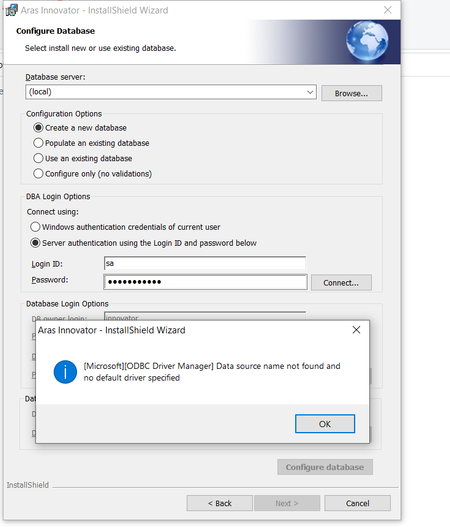
Installation issue : ODBC Driver 18 SSL Provider error
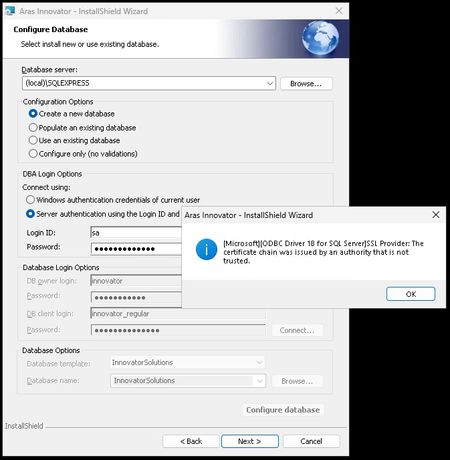
Hello 😊 I'm trying to install Aras Innovation (all in one server for testing purpose) and I'm stuck on this nice message while trying to connect to the DB : Just to inform that my system is under : Windows Server 2025 Datacenter Azure Edition (10.0) IIS server version 10 (10.0.26100.32860) .NET 6.0.36 installed Microsoft SQL Server Express 2025 (17.0.1000) ☝️ And I've already pushed ODBC17/18 but without success regarding the install. Thank you for your precious "lights" 💡 Regards, G.393Views0likes11CommentsNoob question...
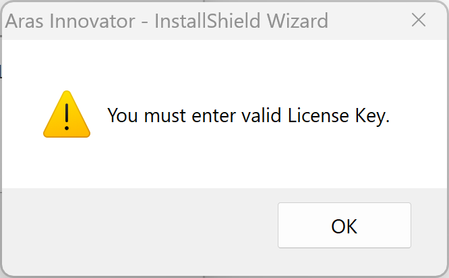
Hello, 😑 I'm probably very stupid, but I'm trying to find the install file for "Aras Innovator Community Edition" but I can't find it ! I've followed the URL received into the Welcome email I've already received my License key using my MAC address I've been to "https://aras.com/en/download" as well as "https://www.aras.com/en/support/download-innovator" received into the "welcome email" But still can't find any "download" link for the product Thank you for your help... 😅Solved137Views0likes2Comments
HTTP Error 502.5 - ANCM Out-Of-Process Startup Failure
I install ARAS in win10, iis 10 and .net 9 SDK, with Hosting Bundle also, but it display a error like this: I have no idea how to deal with it, where is the system event log? how to Enable logging message? HTTP Error 502.5 - ANCM Out-Of-Process Startup Failure Common solutions to this issue: The application process failed to start The application process started but then stopped The application process started but failed to listen on the configured port Troubleshooting steps: Check the system event log for error messages Enable logging the application process' stdout messages Attach a debugger to the application process and inspectSolved525Views0likes3Comments
MPP 2025 Release (14.0.3) Corrupt Archive
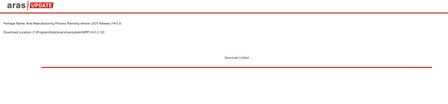
Hello, When attempting to download Manufacturing Process Planning version 2025 Release (14.0.3) via Aras Update, the "Download is failed." Aras Update logs: [embed:dc8ab71f-3b98-42d9-b0f6-e21e02a0f8e2:a821e795-7faf-4c9d-bb35-be36ae44a7df:type=text&text=2025-09-02%2009%3A54%3A55%2C868%20%5BERROR%5D%20%2811%29%20-%20System.IO.InvalidDataException%3A%20A%20local%20file%20header%20is%20corrupt.%0D%0A%20%20%20at%20System.IO.Compression.ZipArchiveEntry.ThrowIfNotOpenable%28Boolean%20needToUncompress%2C%20Boolean%20needToLoadIntoMemory%29%0D%0A%20%20%20at%20System.IO.Compression.ZipArchiveEntry.OpenInReadMode%28Boolean%20checkOpenable%29%0D%0A%20%20%20at%20System.IO.Compression.ZipFileExtensions.ExtractToFile%28ZipArchiveEntry%20source%2C%20String%20destinationFileName%2C%20Boolean%20overwrite%29%0D%0A%20%20%20at%20System.IO.Compression.ZipFileExtensions.ExtractToDirectory%28ZipArchive%20source%2C%20String%20destinationDirectoryName%29%0D%0A%20%20%20at%20System.IO.Compression.ZipFile.ExtractToDirectory%28String%20sourceArchiveFileName%2C%20String%20destinationDirectoryName%2C%20Encoding%20entryNameEncoding%29%0D%0A%20%20%20at%20Aras.Tools.ArasUpdateCore.Implementations.FileManager.DecompressZip%28String%20packagePath%2C%20String%20zipPath%2C%20String%20extractPath%2C%20Boolean%20isDeleteAfterDecompress%29%0D%0A%20%20%20at%20Aras.Tools.ArasUpdateCore.Implementations.Archiver.DecompressZip%28String%20packagePath%2C%20String%20zipPath%2C%20Boolean%20isDeleteAfterDecompress%29%0D%0A%20%20%20at%20Aras.Tools.ArasUpdateCore.Implementations.Commands.DecompressZipCommand.Execute%28CancellationToken%20cancellationToken%29%0D%0A%20%20%20at%20Aras.Tools.ArasUpdateCore.Implementations.Commands.CompositeCommands.DownloadCommand.Execute%28CancellationToken%20cancellationToken%29] Opened C:\ProgramData\Aras\ArasUpdate\MPP and attempted to manually extract 14.03.130, and extract fails: Tested the archive for 14.03.130 with 7-Zip, and it is reported as not an archive: Additionally, this issue was replicated on several systems, and I attempted to run Aras Update as Administrator. Are there any other options for getting the archive? I am not a subscriber, so I do not have FTP access.Solved194Views0likes3CommentsARAS 31 soap-env:server authentication failed for admin authentication failed for admin
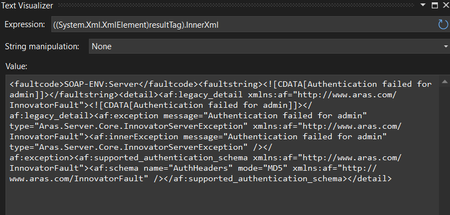
Hai, We have upgraded to ARAS 31 from 12. The migration is in progress. While login from application Its working fine. But while login from web API we are getting an error "soap-env:server authentication failed for admin authentication failed for admin" We have tried to give the password in MD5 hash format for username admin. But the error not yet solved. can anyone help us on this? Thanks in advance, Salini296Views0likes6Comments
Aras installation: connection to SQL server failed.
Hello, I am facing this error while installing Aras. I tried with windows authentication also, but it shows the same error. The error is: [Microsoft] [ODBC Driver Manager] Data source name not found, and no default driver specified. I don't have any old Aras instance installed right now and don't have Innovator solutions database to use existing database option. Restarting the PC also did not solve this issue. Does anyone have any idea how to solve this? Thanks, Rucha B376Views0likes6Comments
Error 1720 just when installation is about to complete
Hi, I am Nikhil. While installing Aras innovator 11 server, I am facing a problem just at the end when I am about to finish the installation. I am getting Error 1720 which says "There is a problem with this windows installer package......". I have checked on the internet and I am using the latest windows installer version V5.0. I am meeting all other requirements for the server as mentioned in installation manual. I would be grateful if I can get a solution to this. I have tried twice and failed at the same point. Regards Nikhil7.8KViews0likes4Comments