Installation issue : ODBC Driver 18 SSL Provider error
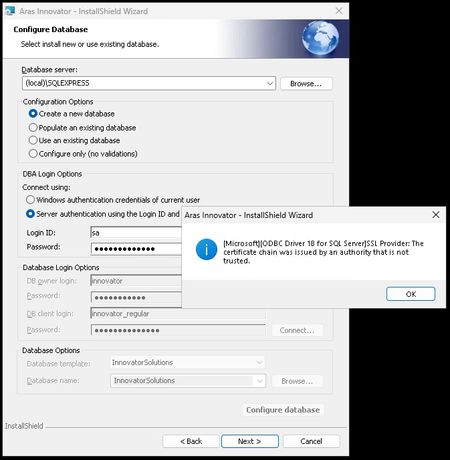
Hello 😊 I'm trying to install Aras Innovation (all in one server for testing purpose) and I'm stuck on this nice message while trying to connect to the DB : Just to inform that my system is under : Windows Server 2025 Datacenter Azure Edition (10.0) IIS server version 10 (10.0.26100.32860) .NET 6.0.36 installed Microsoft SQL Server Express 2025 (17.0.1000) ☝️ And I've already pushed ODBC17/18 but without success regarding the install. Thank you for your precious "lights" 💡 Regards, G.393Views0likes11CommentsNoob question...
Hello, 😑 I'm probably very stupid, but I'm trying to find the install file for "Aras Innovator Community Edition" but I can't find it ! I've followed the URL received into the Welcome email I've already received my License key using my MAC address I've been to "https://aras.com/en/download" as well as "https://www.aras.com/en/support/download-innovator" received into the "welcome email" But still can't find any "download" link for the product Thank you for your help... 😅Solved137Views0likes2Comments
Install more than 1 scheduler on a server
I'm setting up multiple Aras Innovator environments on my server. When it comes to installing the scheduler, I'm stuck as there are no instructions on how to install more than 1 InnovatorService on a server. When you try and setup a second one by running the install script, it says there is already an InnovatorService existing and I don't see a way to specify a different service name for a different environment. How can this be done? Can I use the standard windows "sc create" to create the service myself and not use the install tool given by Aras?162Views0likes3Comments
ARAS31 import.mf deployment issue
Hai, We recently upgraded our environment from Aras Innovator 11 to Aras Innovator 31, and we are running into several issues while deploying our solution packages. I wanted to share the details here to see if anyone has faced similar challenges or has suggestions. In Aras 11, we used an import.mf file with the following structure, and everything deployed without issues: <imports> <package name="DatabaseIdentifier" path="com\aras\innovator\DatabaseIdentifier" /> <package name="com.aras.innovator.solution.PLM" path="PLM\Import" /> <package name="com.aras.innovator.solution.Project" path="Project\Import"> <dependson name="com.aras.innovator.solution.PLM" /> </package> <package name="com.aras.innovator.core" path=".\" /> <package name="com.aras.innovator.cui_default" path=".\" /> <package name="Custom_Pkg1" path="CustomPkg1\Import" /> <package name="Custom_Pkg2" path="CustomPkg2\Import" /> </imports> After upgrading to Aras 31, we tried using the same .mf configuration, but we are encountering multiple deployment errors. Issues Observed 1. Null Reference Error Object reference not set to an instance of an object. 2. Method Not Found Error It points to this AML:→ Error: “No items of type Method found.” <Item type='ItemType' id='8052A558B9084D41B9F11805E464F443' action='edit'> <Relationships> <Item type="Server Event" action="add"> <related_id keyed_name="FileOnGet" type="Method"> <Item type="Method" action="get" select="id"> <name>FileOnGet</name> </Item> </related_id> </Item> </Relationships> </Item> Import package 'com.aras.innovator.core' failed with message: No items of type Method not found. 3. Timeout Error During Import The package was then marked as a failed release (seen for custom_Pkg). faultcode: 999 faultstring: System.Net.WebException: The operation has timed out 1. In Aras 31, are we required to use manifest.json instead of the old import.mf format for custom packages? 2. If yes, where exactly should the manifest.json file be placed, and what structure should it follow? 3. How should we handle customizations or extensions to system-level packages like com.aras.innovator.core and com.aras.innovator.cui_default that previously existed in Aras 11? 4. Has anyone encountered the faultcode 999 / timeout issue during import — and how did we resolve it? Thanks in Advance SaliniSolved340Views0likes9Comments
On the Aras Innovator login screen, the database drop-down list does not show any entries.
After installing Aras Innovator, I attempted to log in, but the database drop-down list is empty. I expected the database created during the Aras Innovator installation to appear in the list. Could you please tell me why the database drop-down list is empty? The versions are as follows: Aras Innovator: 14.35 SQL Server: 2022 Express Microsoft .NET: 8.0.16 I followed the installation procedure from the link below: https://aras.com/ja-jp/blog/aras-innovator-install69Views0likes1CommentHTTP Error 500.19 - Internal Server Error
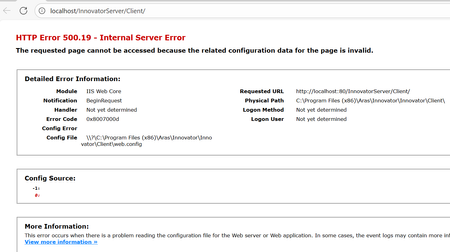
This error hits while installing the ARAS innovator, if User done install the .Net Hosting bundle. The solution was to download and install the MS .Net 8.0 Hosting bundle from below link. HTTP Error 500.19 after installing Innovator 2025 - Solved - Getting Started - Aras Community - Aras Community146Views0likes0Comments