Reference an Engineering Parts xClass xProperty as Engineering Master Data
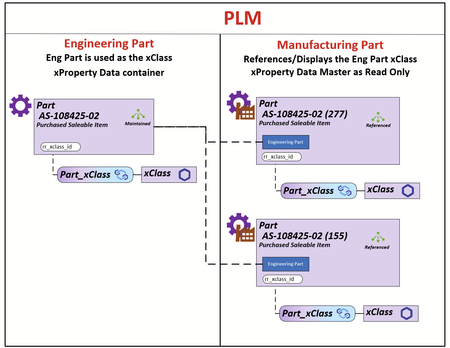
My client uses the Part Itemtype in 2 contexts Engineering and Manufacturing. The requirement is that all xClass-xProperty data is populated and maintained on the Engineering Part and the xClass-xProperty data on the Manufacturing Part is rendered using the Engineering Parts Id. The Engineering Part that will be used for the reference will be the Latest Released Generation. The illustration demonstrates the relationship between the Engineer Part and its Manufacturing Parts. What I do know is that all the xProperty Data is store in the table set [xp.XpropertyValues#] as shown below. All xProperties can be acquired using the ID of the Engineering Part (I have a SQL query that can do this for reporting for a BOM structure). I have modeled the js/ts methods but I can't figure out how to apply them in this use case. What I can't figure out is: 1) What are the options for rendering the xClass-xProperty container on the Part Manufacturing Form 2) How to populate that container using the ID from the latest Released Engineering Part Any help/ideas would be greatly appreciated. Thanks Scott38Views0likes0Comments
xClassification Insufficient permissions
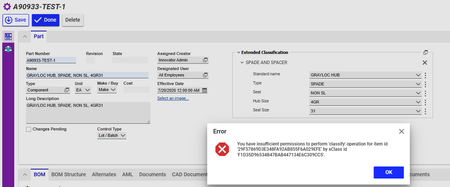
I have created xClasssifications with set of xProperties and linked them to Part ItemType. When I tried to added xClassifications it give's an error as below " You have insufficient permissions to perform 'classify' operation for item id '29F57869D3E348FA92AB855F6A029EFE' by xClass id 'F1D35D96534B47BAB447134E6C309CC5'. "80Views0likes1Comment
Displaying In-Line Units for xClass xProperties
Migrating from another system, they have a lot of properties that also include units. Like this: How can I modify the Extended Classification display to show units in line like this? My plan so far is to build out ItemTypes for each type of measurement (Length, Temperature, etc) similar to the default 'Measurement Units', including a conversion value to whatever base unit is decided. (Anyone know why there is a 'viewer' on this itemtype?) So then I could build xProperties linked to the ItemType for that type of unit, and add it to the xClass which would put the UoM as another line in the xProperties So the question is how would I modify the xClass Display so that I could pair up the two properties and get an in-line display of the units? (and do it for some properties, not others, and for many properties within an xClass)165Views0likes1Comment
How to use explicit xProperties in ItemType?
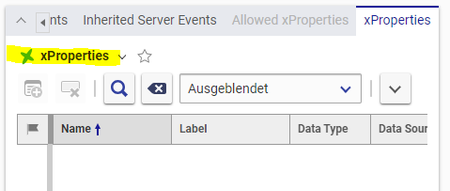
Hi community, is any familiar with using explicit xProperties in ItemTypes? Inside of a ItemType there is a relationships "xProperties". When can add custom xProperties there. These new properties will be automatically linked in the grid so user can enable/disable them by themselves. This is works very well and would be exactly the behavior I am looking for my current use case. But I struggle to "use" these direct xProperties. I cannot add the fields to a Form. I right now have no idea how users can add values to these new properties. Does any knows how to use these properties? Best regards and thanks for any hint! Angela207Views0likes3Comments
Lessons Learned from importing data for Parts with xClassification data and a thumbnail image
With the attached document, I just want to share my experiences and struggles with the hope that it helps someone else trying to do similar things. It follows on from my posts https://community.aras.com/f/getting-started/35943/script-for-importing-items-with-xproperties-from-excel-using-batch-loader https://community.aras.com/f/getting-started/35979/how-to-import-thumbnail-images-for-parts-using-batch-loader I eventually worked out for myself how to import thumbnails, but - unless I've missed a trick somewhere - it isn't as straightforward as one would hope. Should you be able to provide feedback / improvements / information about useful reference documents or if you have any questions I'd be happy to hear from you! Tim --------- This is just a record of my experience (as a non-programmer) trying to work out how to import the data for a demo system just using AML and Batch Loader. A lot of it was picking clues out from various sources plus a lot of educated guesses. The documentation is insufficient. What I did find was as below: A nice introduction, but just an introduction by Christopher Gillis on the Aras Forum The Programmer’s Guide in the Innovator Documentation. This includes a three-page reference, which feels a bit short. The documentation for Batch Loader includes some examples at the end I would love to see further documentation and references, in particular: The full extent of what AML can and can’t do. Specifically: Can it include logic such as IF statements that depend on the content of the file being imported (i.e. an SQL where condition doesn’t help here) Can one concatenate input data. See below where this would have been useful for loading the thumbnail images. Can one import files (e.g. image files) along with the data by using pointers to the file locations with the import sheet? A full description of the error messages returned within Batch Loader. These are mostly very obscure and singularly unhelpful. Software used Excel for Data Lookup for GUIDs to enable importing of Thumbnails Generating AML for Batch Loader Batch Loader. I assume that the reader has a basic understanding of using this program. If not MS SQL Studio. Other options also available. Used to get a list of files in the vault along with their GUID ... Please see attached file for the rest of the document: [View:/cfs-file/__key/communityserver-discussions-components-files/6/Lessons-Learned_2C00_-xClass-import-with-thumbnail-images_2C00_-forum.pdf:40:40]3.6KViews2likes1CommentScript for importing items with xProperties from Excel using Batch Loader
I just went through this process as part of learning Aras. Importing items from Excel using the Batch Loader is pretty straightforward if you only have simple properties that all belong directly to the Item Type. See documentation for the Batch Loader. Note that you should save the Excel file as a tab-delimited .txt file. It gets more difficult, however, when you need to import properties over relationships. In this case Costs over the Part Goal relationship and xProperties over Part_xClass. I found no documentation to help me with this, so the script below is the result of a lot of trial and error. Comments and improvements welcome" It is my first import script! Copy the text below into Notepad++ for better readability. A big difficulty was working out how to explicitly identify the xClass. I used the xClass Property "name". This used just the simple name of the "Leaf" xClass in the xClass tree. Hope it saves someone a bit of time :) (Extract to show the highlights...) <Item type='Part' action='add'> <!--Use Action='edit' when updating items--> <!--@10, etc. denotes the column in the data file and is independent of the header row contents--> <item_number>@2</item_number> <name>@4</name> <classification>@5</classification> <Relationships> <!--Part Goal is the relationship item that links to item type Goal--> <Item type="Part Goal" action="add"> <goal>@7</goal> <!--e.g. Cost--> <actual_value>@8</actual_value> <!--Further fields available, see Loader docs--> </Item> <!--Part_xClass is the relationship item from part to xClass--> <!--Note that "name" (lower case) is the easiest of several field options for identifying xClass--> <!--Format is, e.g. "Fuel Tanks" (name of leaf, spaces OK)--> <Item type="Part_xClass" action="add"> <related_id> <Item type="xClass" action="get" select="id"> <name>@10</name> </Item> </related_id> </Item> </Relationships> <!--The properties below can only be loaded once the xClass relationship has been established as above--> <xp-mass_full set="value">@14</xp-mass_full> </Item>3.7KViews1like1Comment