Auto vote workflow task when timeout
Hello, I’ve created a very simple workflow with three statuses: Submit, Approval and Released In the Approval status, there are eight review and approval assignments, and I need any that haven’t been completed within five days to be automatically voted as ‘Approve’. I’ve been looking into this, but the only information I’ve found is very old and refers to a VB method. Is there an easier way, or would I need to create a method in On Escalate? Thanks123Views0likes1Comment
Log how many times an item has been opened
Hello, we are looking into measuring how much items/modules are beeing used by our users. I think if you add a client method to a item, that should be no problem with an OnShowItem event and then increase a number on a table somewhere. But is there are global approach that we don't have to insert such a method in each item we want to track? Any ideas are welcome, thanks in advance.254Views0likes7Comments
How to get comment value during Item promotion via Lifecycle
Hi Community, I have a short question regarding the 'Get Comment' feature that we can use in LIfeCycles. When we choose "Get Comment = 1" for a LifeCycle Transition, the end user will be asked with a dialog to add some notes why the lifecycle was changed. Is it possible to get this comment value from Pre or Post or may be some other way? Thanks a alot.150Views0likes5Comments
Refreshing xClass Field on Form in Field Event OnChange
So I wrote a client side method so when you change the Classification of a part, it selects a matching xClassification. This part is working, except the UI isn't updating with the selection of the xClass, so its prompting me to enter the required properties for my xClass, but I can't see them. How do I get the xClass field on my form to update so that it displays my new selection? Several examples used aras.uiReShowItemEx() but that pulls from the database, but the xClass selection has not be saved to the Part yet... so its blank. It looks like form.populate() is the right idea because its not pulling from memory but everything I try returns form as null...Solved302Views0likes4CommentsCan Assembly has different version of BOM?
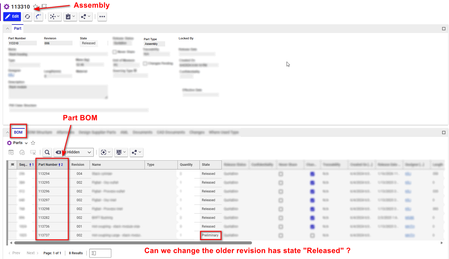
Hi, We have following scenario, I have one Part assembly, and has 8 Part BOM as shown below. Can we change the Part BOM to older revision that has state "Released". Note: Here Part assembly is in "Released" state and locked for updating. We can promote assembly to "Manual Change" state but related Part BOM got unlocked and got synced to their latest revision, which we do not want. Is there any way were we can change the few property of the Part assembly without unlocking the Part BOM? (We do not want to sync the revision of PART BOM if it has higher revisions.) Thanks in Advance !!192Views0likes2Comments
How can I trigger the classification to update and change forms from a different property?
Hi Aras Community, I have a use case where my classification is technically controlling two things. What type of workflow they are on and what kind of form they see with the ability to switch the different kinds of forms. I'm trying to prevent mistakes from happening by providing 2 drop downs one that shows the workflow type and another that offers the form options. On selecting the form options, I need to update the classification and have the form change to the proper form. My current code updates the classification but does not execute whatever code causes the form to change on the classification update the way it does if you type it in or use the classification dialog box. Below is the code I'm starting with I don't know if there may be an API I can call that does this change or if there is a way to refresh the iframe that I'm not aware of. Any help is greatly appreciated. var inn = top.aras.newIOMInnovator(); var formtype = document.all("form_type").value; var worktype = document.all("workflow_purpose").value; var classification = ""; switch(worktype){ case "New Work": if(formtype = "form1"){ classification = "form1/Create New"; }else{ classification = formtype+"/"+worktype; } break; case "Other Work": if(formtype = "form2"){ classification = "form2/Other Work"; }else{ classification = formtype+"/"+worktype; } break; } window.handleItemChange("classification",classification); window.handleItemChange("form_type", formtype); return this;Solved424Views0likes2Comments
Getting Item id from custom context method on Tree Grid View
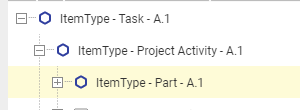
Hi, I have two new ItemTypes that i use to add project activities and tasks to the Part ItemType like this: I have created a new query definition and tree grid view to display the structure on a new tab on the Part: I have also created a custom context menu item with corresponsing method that is intended to set the Done property on the selected task. The issue i am struggeling with is that i cant get the Item id of the selected row. var taskItem = aras.newIOMItem('Task', 'edit'); var tgvContext = inArgs.contextParams.tgvContext; var tgvGrid = tgvContext.grid; var tgvGridData = tgvContext.getGridData() var dataObject = tgvGridData.focus[0].row.cells[0].data; aras.AlertError("Result: " + dataObject); as shown from the output i get "INVALID_ID_VALUE" Hope somebody can assist here.1.3KViews0likes5CommentsPass a property into a window.open() command
This seems simple, but I'm struggling with it. I've got a button added to a toolbar that I want to open an external URL with. The URL is saved as a property against the item. Have tied a method to the button and it's a Client-side javascript. Problem I'm getting is that the command window.open doesn't recognize the variable or const. I've tried various forms of this including nesting the getProperty into the window.open, but nothing seems to work. I have some HTML that works on the form, but I'd really like this as a button in the toolbar instead. Here's the working code in the HTML form: <a id="newlink2" href="#" onclick="return showURL2();" target="_blank" style="color: #3668B1;text-decoration: underline">Open 3D Model</a> <script> function showURL2() { debugger; var description2 = document.thisItem.getProperty("_forgemodelurl"); if (description2) { document.getElementById("newlink2").href = description2; } else { top.aras.AlertError("Please Enter the Forge 3D Link with value."); return false; } }; </script>Solved2.9KViews0likes3CommentsInnovator is not defined Client Side Error
I've got a very simple method that creates a new PR from a button on a TGV. This worked perfectly in V12, but is not working in our V15 instance. Any help would be greatly appreciated! The error message is: The method 'create_PR_from_tgv' failed. Innovator is not defined Client Side Error The code is below: var inn = new Innovator(); var pr = inn.newItem("PR","add"); pr.setProperty("parent", thisItem.getID()); top.aras.uiShowItemEx(pr.node, "tab view", true, true);4.3KViews0likes8Comments
Using a method to update a team, doesn't seem to iterate beyond the first
Hi Community. I am setting up a method to assign a user to multiple teams based on a form. The issue I am having is that it seems to only apply the user to the first team I select (using a multi-value list). Essentially, I am defining on the form - The user identity to add The name of the team to add them to Their team role and regions they are responsible for Code is below: Innovator inn = this.getInnovator(); //Get the form used to make the GPR change selections Item qryGprItem = this.newItem(this.getAttribute("type"), "a_GetControlledItem"); qryGprItem.setID(this.getID()); Item gprItem = qryGprItem.apply(); string[] prodCats = gprItem.getProperty("a_add_to_prodcat").Split(','); string regions = gprItem.getProperty("a_add_to_region"); string gprAction = gprItem.getProperty("a_add_or_remove"); foreach (string prodCatValue in prodCats) { string prodCat = prodCatValue; Item qryTeamItem = inn.newItem("Team", "get"); qryTeamItem.setProperty("name", prodCat); Item teamItem = qryTeamItem.apply(); if (gprAction == "Add") { Item teamMember = inn.newItem("Team Identity", "add"); teamMember.setPropertyItem("source_id", teamItem); teamMember.setPropertyItem("related_id", gprItem.getPropertyItem("a_user_to_modify")); teamMember.setProperty("a_team_region", regions); teamMember.setPropertyItem("team_role", gprItem.getPropertyItem("a_gpr_role")); return teamMember.apply(); } if (gprAction == "Remove") { } } return this;Solved2.4KViews0likes2Comments