Install more than 1 scheduler on a server
I'm setting up multiple Aras Innovator environments on my server. When it comes to installing the scheduler, I'm stuck as there are no instructions on how to install more than 1 InnovatorService on a server. When you try and setup a second one by running the install script, it says there is already an InnovatorService existing and I don't see a way to specify a different service name for a different environment. How can this be done? Can I use the standard windows "sc create" to create the service myself and not use the install tool given by Aras?173Views0likes3Comments
On the Aras Innovator login screen, the database drop-down list does not show any entries.
After installing Aras Innovator, I attempted to log in, but the database drop-down list is empty. I expected the database created during the Aras Innovator installation to appear in the list. Could you please tell me why the database drop-down list is empty? The versions are as follows: Aras Innovator: 14.35 SQL Server: 2022 Express Microsoft .NET: 8.0.16 I followed the installation procedure from the link below: https://aras.com/ja-jp/blog/aras-innovator-install74Views0likes1Comment
Installing Aras Innovator and SQL?
I have a question about installing Aras Innovator and setting up the environment. When I checked the installation guide, there was no mention of SQL Server during installation. Please tell me what I should do before installation and what I should do after installation. I believe that Aras Innovator indirectly manipulates SQL. There was a mention of SQL during installation in the Japanese blog. Reference URL aras.com/.../install-2023-releaseSolved242Views0likes5Comments
first Aras 2023 installation
the error message "unable to start WAS and W3SVC services" is displayed. If I comment <!-- <system.web> --> <!-- <authentication mode="Windows" /> --> <!-- </system.web> --> in applicationHost.config, the services start but I get the message "HTTP error 500.9" when I connect to the server localhost/.../Server.38Views0likes1Comment
R26 Core Hosting Version
There have been several updates of the Core Hosting since 6.06. R26's Platform Specifications (D-008121 Mod on 1/4/2023), document is for 6.06. Anybody have issues with later Core version? Release dates 6.0.7 – July 12, 2022 6.08 – August 9, 2022 6.0.9 – September 13, 2022 6.0.10 – October 11, 2022 6.0.11 – November 8, 2022 6.0.12 – December 13, 2022 6.0.13 – January 10, 2023 6.0.14 – February 14, 2023 6.0.15 – March 14, 2023 6.0.16 – April 11, 2023185Views0likes1Comment
Unable to access ARAS PLM(HTTP Error 500.19 - Internal Server Error)
Hi, I have installed ARAS PLM and while tring to access it. I am experiencing following issue. Please help in resolving this issue The requested page cannot be accessed because the related configuration data for the page is invalid. Detailed Error Information: Module IIS Web Core Notification BeginRequest Handler Not yet determined Error Code 0x80070021 Config Error This configuration section cannot be used at this path. This happens when the section is locked at a parent level. Locking is either by default (overrideModeDefault="Deny"), or set explicitly by a location tag with overrideMode="Deny" or the legacy allowOverride="false". Config File \\?\C:\Program Files (x86)\Aras\Innovator\Innovator\web.config Requested URL localhost:80/InnovatorServer Physical Path C:\Program Files (x86)\Aras\Innovator\Innovator Logon Method Not yet determined Logon User Not yet determined Config Source: 3: <system.webServer> 4: <handlers accessPolicy="Read, Script" /> 5: <directoryBrowse enabled="false" /> More Information: This error occurs when there is a problem reading the configuration file for the Web server or Web application. In some cases, the event logs may contain more information about what caused this error. Regards, Adarsh19KViews0likes9Comments
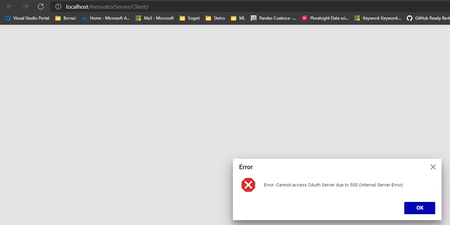
Version 12 SP9 - Cannot access O Auth server 500 error
I installed ARAS 12 SP9 with dependencies of right version installed prior to it. Installation was successful. Post installation, I logged into ARAS webclient using edge & chrome and faced the error shown below These are the list of dependencies installed Why does it fail to load login screen?4.8KViews0likes5Comments
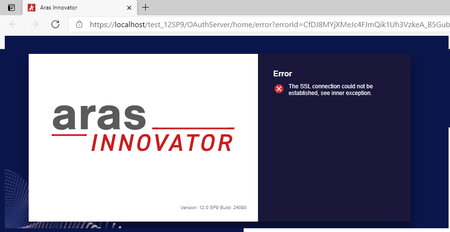
V12 Enabling HTTPS on Local machine
Hi, This subject has been discussed here : https://community.aras.com/b/english/posts/setting-up-https-on-a-development-machine But it looks not exaclty the same use case as I have. I simply want to make my Aras Innovator V12SP9 working with HTTPS on my local machine (localhost). So I use the IIS integrated certificate for localhost ("IIS Express Development Certificate"). But I get the following error and even after deeper researches I did not found how to solve it: Obviouslt I've checked many time the installation and IIS configuration and everything is normally OK. (actually It works fine with a V11SP15 except that I had to use TLS 1.1 instead of TLS 1.2) Thank you in advance for yuour help1.6KViews0likes0Comments