Reference an Engineering Parts xClass xProperty as Engineering Master Data
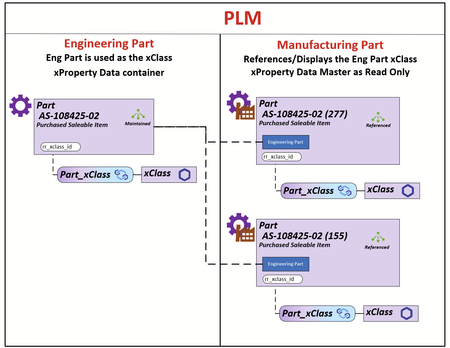
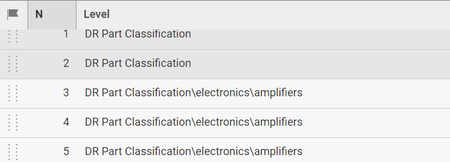
My client uses the Part Itemtype in 2 contexts Engineering and Manufacturing. The requirement is that all xClass-xProperty data is populated and maintained on the Engineering Part and the xClass-xProperty data on the Manufacturing Part is rendered using the Engineering Parts Id. The Engineering Part that will be used for the reference will be the Latest Released Generation. The illustration demonstrates the relationship between the Engineer Part and its Manufacturing Parts. What I do know is that all the xProperty Data is store in the table set [xp.XpropertyValues#] as shown below. All xProperties can be acquired using the ID of the Engineering Part (I have a SQL query that can do this for reporting for a BOM structure). I have modeled the js/ts methods but I can't figure out how to apply them in this use case. What I can't figure out is: 1) What are the options for rendering the xClass-xProperty container on the Part Manufacturing Form 2) How to populate that container using the ID from the latest Released Engineering Part Any help/ideas would be greatly appreciated. Thanks Scott38Views0likes0Comments
xClassification Insufficient permissions
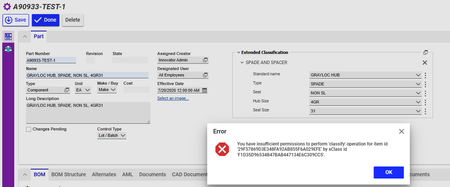
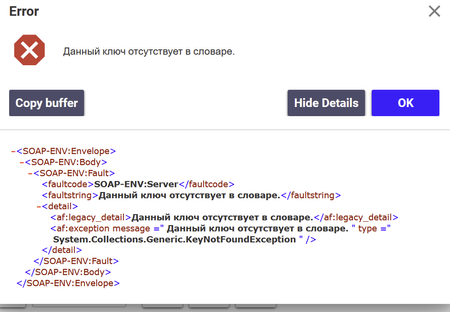
I have created xClasssifications with set of xProperties and linked them to Part ItemType. When I tried to added xClassifications it give's an error as below " You have insufficient permissions to perform 'classify' operation for item id '29F57869D3E348FA92AB855F6A029EFE' by xClass id 'F1D35D96534B47BAB447134E6C309CC5'. "80Views0likes1Comment
Refreshing xClass Field on Form in Field Event OnChange
So I wrote a client side method so when you change the Classification of a part, it selects a matching xClassification. This part is working, except the UI isn't updating with the selection of the xClass, so its prompting me to enter the required properties for my xClass, but I can't see them. How do I get the xClass field on my form to update so that it displays my new selection? Several examples used aras.uiReShowItemEx() but that pulls from the database, but the xClass selection has not be saved to the Part yet... so its blank. It looks like form.populate() is the right idea because its not pulling from memory but everything I try returns form as null...Solved289Views0likes4Commentsxclassification dialog from custom method
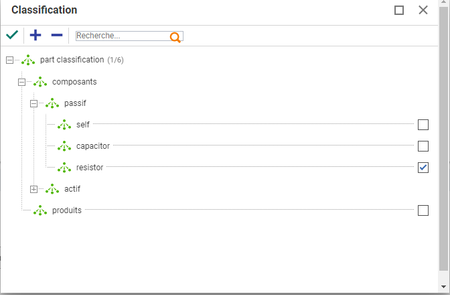
hello i'm begining a project, the idea is to have a an action launch a dialog to select a xclass. I would like to launch the same dialog as the one that pops up when adding a part xclass and x property(see below): after the user selected a class i want to retrieve the name of the class he chose. The following step is to have a second dialog (depending on the classification chosen) this second dialogs might be hard coded or dynamically buit i'm still unsure and they are going to look like the form used to fill the xproperty after you choose your part class but slightly different: i want to add a column of check boxes for future business logic. i've tried to search for the xclass tree selection dialog but couldn't find it i've tried to display some that i could find in the code tree but without sucess, i used the dialog api, here is my code: var param = { aras: top.aras, type: "HTMLEditorDialog", sHtml:"here i've tried to put just the name and the full path but it didn't seem to work as even when i changed form i was always getting same form opening ", dialogWidth: 1000, dialogHeight: 500, }; // This will be called after the dialog is closed function callback(res) { if (res) { alert(res + " loves learning about new opening HTML pages as dialogs!"); } }; // Open the dialog var topWnd = top.aras.getMostTopWindowWithAras(); var wnd = topWnd ? topWnd : window; wnd.ArasModules.Dialog.show('iframe', param).promise.then(callback); any help is welcome thanks lucas1.6KViews0likes1CommentDisplaying In-Line Units for xClass xProperties
Migrating from another system, they have a lot of properties that also include units. Like this: How can I modify the Extended Classification display to show units in line like this? My plan so far is to build out ItemTypes for each type of measurement (Length, Temperature, etc) similar to the default 'Measurement Units', including a conversion value to whatever base unit is decided. (Anyone know why there is a 'viewer' on this itemtype?) So then I could build xProperties linked to the ItemType for that type of unit, and add it to the xClass which would put the UoM as another line in the xProperties So the question is how would I modify the xClass Display so that I could pair up the two properties and get an in-line display of the units? (and do it for some properties, not others, and for many properties within an xClass)165Views0likes1Comment
Load xClass and xProperties, and link xProperties to multiple xClasses from AML
We want to load 1k+ xclasses to Aras, we are talking about 4k+ xproperties here. When we are running AML for creating relations xClass_xProperty_Flatten and xClass_xPropertyDefinition to link them to class tree, it fails with error : <faultstring><![CDATA["xClass_xProperty_Flatten" can be added or deleted or updated only in XTree context]]></faultstring> <detail> <af:legacy_detail><![CDATA["xClass_xProperty_Flatten" can be added or deleted or updated only in XTree context]]></af:legacy_detail> <af:exception message=""xClass_xProperty_Flatten" can be added or deleted or updated only in XTree context" type="System.ArgumentException" /> </detail> I can load property definitions, but not classes, but can’t map the properties to classes. How can we mass create and reuse these xProperty definitions in more than one class from AML, by creating relations correctly?2.5KViews1like2CommentsxClass Implementation Considerations for Performance
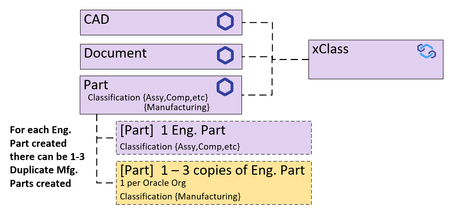
Community, My current client wants to use xClass Properties on Itemtypes: Document, CAD, and Part. Current Configuration The Document and CAD Itemtypes will use xClass in a straight forward way therefore predictable data generation. The question is Part. The Part Itemtype is being used for Engineering Parts (Classification: Assy, Comp, Material, Software, etc.) and Manufacturing Part (Classification: Manufacturing). So for every Eng. Part there can be 1 to 3 duplicate Mfg. Parts created with the same xClass data. Currently the client has 240 xClass Properties defined and this is just the start. I can predict that the property count will be close to 500 + when Part, CAD, Document are fully defined. Current: Each xclass Property requires 4 columns and each Itemtype assigned to an xClassTree (Part, CAD, Document) their item_id, and their Itemtype_id are added to each of the xp.XPROPERTYVALUE tables. This results in five xp.XCLASSPROPERTYVALUES tables generated: xp.XCLASSPROPERTYVALUES; xp.XCLASSPROPERTYVALUES1; xp.XCLASSPROPERTYVALUES2; xp.XCLASSPROPERTYVALUES3; xp.XCLASSPROPERTYVALUES4; xp.XCLASSPROPERTYVALUES5... Each of these tables has 100 property values stored in the 100 Columns and managed by 300 columns. Currently only 1, of many Division, is using the Parts Classified as Manufacturing. Goals The client wants to use the xClass Data to do: 1) eBOM validations so performance in gathering xClassPropertyValues is key. 2) Product development regulatory definition and tracking. Questions 1) Are there any configuration issues that should be considered? 2) Are there xClassProperty implementation considerations that you suggest? 3) Are there performance issues that should be considered? Thanks for your time and insight. Scott101Views0likes1Comment
Adding an xClass-specific image to a form
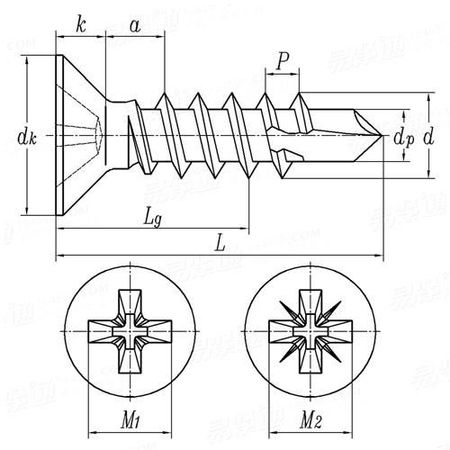
With standard classification, it is pretty straightforward to add an image to a form that is only seen when viewing an item of that specific class. But how to achieve this with xClassifications? I noticed that there is not even an image property type for xProperties. Use case: We have a xClassification "Countersunk screws". For these, we need to define certain measurements according to DIN standards. To make it clearer what the measurements mean, it would be very useful to also provide a diagram, e.g. as below. Any idea how to achieve this with xClassifications? Thank you!4.9KViews0likes3Comments