Programmatically add Item types to Poly type
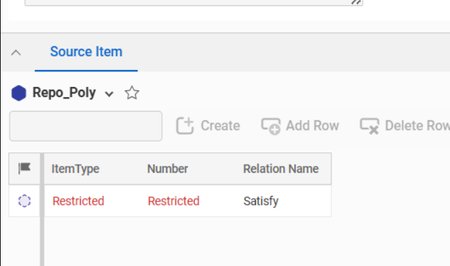
Hello Experts We use a Poly Item type (call it Repo_Poly) to manage relation and some metadata between and a single source Itemtype to multiple Itemtypes in Aras We wrote a "Action" for Admins to add the Itemtypes to our "Repo_Poly" type to help with usability as we do other things in the background after adding the new type. Our Server method does the following Add a Morphae relation between the Poly type and selected Itemtype Add custom actions on selected Itemtype The thing to note is, this seems to add the Itemtype to Poly type but it does not seem to update the "List" which is used to managed Poly type. But when we create the relations which exists between our source type and poly type(Repo_Poly), the items under the relationship table are being shown as Restricted The DB entries seems to be identical for types added manually or programmatically As a test we set World permission on all the types involved but we still see the same error. We are unable to figure out what is missing, we are also unable to trigger the "beforesave" and "after save" events on the Poly type. We also tried adding the selected Item type to this "List" used by the Poly type but there was no change. Any suggestions will be highly appreciated177Views0likes11Comments
Logging & Progressbars Inside Innovator
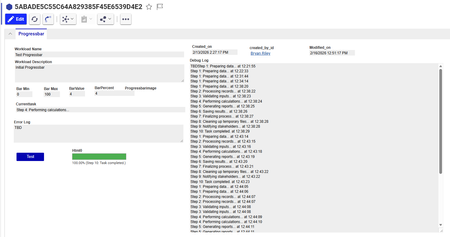
In Aras, we have a lot of different automations running at any given time, and there is no clean way (I know of) to see them all in one place. Further, I don't have access to the server, so I can't access the log files you might typically see so I'm looking for a way to write those directly into Aras. So I set out to address these issues, by creating an ItemType called Progressbar with fields for tracking progress and on the form I created a html object and a button to trigger a 'ProgressBarClient' Method, which repeatedly calls a 'ProgressBarServer' Method multiple times. This gets me an interface to see the status of the processing... So before I spend too much time on this, I thought I'd see if the community has any ideas on better ways to approach this or ideas for improvement. Some thoughts: Using the button on the item probably wasn't the best move, it stops processing if you close the item. It also gave me a lot of headaches getting the typing right I should probably set it up so the C# method doesn't require a return to update the progress I was hoping for a live progressbar in the search grid... but using the html on the form isn't going to work because its not a property // Javascript Client Method: ProgressBarClient console.group("---Action Trigger---"); // ProgressBar ItemType Values // barmin - int - minimum value of progressbar // barmax - int - maximum value of progressbar // barvalue - int - current value of progressbar // barpercent - decimal - % complete, barvalue / barmax // currenttask - string - text description of current action // debuglog - Text - log of all activity // errorlog - Text - log of error messages console.log("Name: ProgressBar Prototype"); console.log("Description: This will call a server side method and update a progressbar"); console.log(""); console.log("Setting up progressbar..."); // --- Instantiate Innovator object at the beginning --- var inn; try { inn = new Innovator(); console.log("Innovator object instantiated successfully."); } catch (e) { console.error("CRITICAL ERROR: Failed to instantiate Innovator. The global 'Innovator' might not be a constructor or is not available. Error: " + e.message); alert("An internal error occurred. Please contact support. (Innovator instantiation failed)"); console.groupEnd(); return; } // Basic check to ensure 'inn' is a valid object after instantiation if (!inn || typeof inn.getItemById !== 'function') { console.error("CRITICAL ERROR: The 'inn' object does not have the expected Aras API methods (e.g., getItemById) even after instantiation."); alert("An internal error occurred. Please contact support. (Invalid Innovator object)"); console.groupEnd(); return; } console.log("Innovator object retrieved and validated."); // Get the current Aras Item object (assuming parent.item is available and is an XML DOM node) var currentArasItemXml = parent.item; if (!currentArasItemXml) { console.error("CRITICAL ERROR: Aras Item XML object (parent.item) could not be retrieved."); alert("An internal error occurred. Please contact support. (Aras Item XML not found)"); console.groupEnd(); return; } console.log("Current Aras Item XML object retrieved."); var itemId = currentArasItemXml.getAttribute('id'); console.log("item ID:" + itemId); var itemTypeName = currentArasItemXml.getAttribute('type'); console.log("item Type:" + itemTypeName); if (!itemId || !itemTypeName) { console.error("CRITICAL ERROR: Item ID or ItemType name not found from parent.item."); alert("An internal error occurred. Please contact support. (Item ID/Type missing)"); console.groupEnd(); return; } var currentArasItem = inn.getItemById(itemTypeName, itemId); if (currentArasItem.isError()) { console.error("CRITICAL ERROR: Failed to fetch full Aras Item object: " + currentArasItem.getErrorString()); alert("An internal error occurred. Please contact support. (Failed to fetch item)"); console.groupEnd(); return; } console.log("Full Aras Item object fetched."); // Find the form field control for our property var propName = "html0"; // This is correct based on your HTML inspection var fieldContainerEl; // This will be the <div> with name="html0" var targetHtmlEl; // This will be the inner <div class="sys_f_value"> // --- MODIFIED: Robust way to find the field element without aras.uiFindField --- console.log("Attempting to find field for property: " + propName + " directly in the DOM..."); // Try to find the element in the current document (most likely the iframe document) fieldContainerEl = document.getElementsByName(propName)[0]; // If not found, try to find it in the top document (less likely for form fields, but a fallback) if (!fieldContainerEl) { try { fieldContainerEl = top.document.getElementsByName(propName)[0]; } catch (e) { console.warn("Could not access top.document directly to find field. Error: " + e.message); } } if (!fieldContainerEl) { console.error("CRITICAL ERROR: Progress bar field '" + propName + "' not found on form. Please ensure the field's HTML 'name' attribute is '" + propName + "' and the form is loaded."); alert("Progress bar field '" + propName + "' not found on form. Please ensure the field's HTML 'name' attribute is '" + propName + "' and the form is loaded."); console.groupEnd(); return; } console.log("Progress bar field container element found. Name attribute used: " + fieldContainerEl.name); // Find the inner div with class "sys_f_value" to inject the HTML targetHtmlEl = fieldContainerEl.querySelector('.sys_f_value'); if (!targetHtmlEl) { console.error("CRITICAL ERROR: Could not find the inner '.sys_f_value' div within the '" + propName + "' field container."); alert("An internal error occurred. Please contact support. (Target HTML element for injection not found)"); console.groupEnd(); return; } console.log("Target HTML element for injection found."); // --- END MODIFIED SECTION --- // Create basic progress bar HTML function renderBar(percent, currentTask) { percent = Math.max(0, Math.min(100, percent)); return '' + '<div style="border:1px solid #999;width:100%;height:18px;background:#f5f5f5;">' + ' <div style="height:100%;width:' + percent + '%;background:#4caf50;transition:width 0.2s;"></div>' + '</div>' + '<div style="font-size:10px;margin-top:2px;">' + percent.toFixed(2) + '% ' + (currentTask ? '(' + currentTask + ')' : '') + '</div>'; } // Helper to set the field value + UI function setProgress(barvalue, barmax, currenttask) { var percent = (barmax > 0) ? (barvalue / barmax) * 100 : 0; var renderedHtml = renderBar(percent, currenttask); // Update rendered field in current UI targetHtmlEl.innerHTML = renderedHtml; } // Initialize at 0% setProgress(0, 100, "Initializing..."); console.log("Progress bar initialized to 0%."); // --- START: Replaced simulated work with Server Method call --- // Variables to maintain state across server calls var progressItemId = null; // Stores the ID of the Progressbar item created/updated by the server var currentStep = 0; // Stores the current step to send to the server // Function to call the server method and update progress function callServerMethodForProgress(initialCall) { console.log("Calling the server-side method 'ProgressBarServer'..."); var serverMethod = inn.newItem("Method", "ProgressBarServer"); serverMethod.setProperty("itemId", itemId); // Pass the ID of the item that triggered this client method serverMethod.setProperty("itemTypeName", itemTypeName); // Pass the ItemType name serverMethod.setProperty("initialCall", initialCall ? "true" : "false"); serverMethod.setProperty("progressItemId", progressItemId || ""); // Pass the ID of the Progressbar item serverMethod.setProperty("currentStep", currentStep.toString()); // Pass the current step var result = serverMethod.apply(); if (result.isError()) { var errorMsg = result.getErrorString(); console.error("Server method 'ProgressBarServer' error: " + errorMsg); alert("Server method error: " + errorMsg); setProgress(0, 100, "Error: " + errorMsg); // Show error in progress bar console.groupEnd(); return; // Stop progress } // Parse the response from the server method var progressItem = result.getItemByIndex(0); if (!progressItem || progressItem.isError()) { console.error("Server method 'ProgressBarServer' returned an invalid or empty item."); alert("Server method returned invalid data."); setProgress(0, 100, "Error: Invalid server response"); console.groupEnd(); return; } // Extract properties from the server's response progressItemId = progressItem.getProperty("id", progressItemId); // Update progressItemId if it's the first call var barmin = parseInt(progressItem.getProperty("barmin", "0")); var barmax = parseInt(progressItem.getProperty("barmax", "100")); var barvalue = parseInt(progressItem.getProperty("barvalue", "0")); var barpercent = parseFloat(progressItem.getProperty("barpercent", "0")); var currenttask = progressItem.getProperty("currenttask", "Processing..."); var debuglog = progressItem.getProperty("debuglog", ""); var errorlog = progressItem.getProperty("errorlog", ""); var isComplete = progressItem.getProperty("is_complete", "false") === "true"; currentStep = parseInt(progressItem.getProperty("next_step", (currentStep + 1).toString())); // Get next step from server console.log("Server response - Value: " + barvalue + ", Max: " + barmax + ", Task: " + currenttask + ", Complete: " + isComplete + ", Progress Item ID: " + progressItemId); if (debuglog) console.log("Server Debug Log:\n" + debuglog); if (errorlog) console.error("Server Error Log:\n" + errorlog); // Update the client-side progress bar setProgress(barvalue, barmax, currenttask); // Persist the progress to the Progressbar ItemType (if it's the item being edited) // This assumes the form you are on *is* the Progressbar ItemType form. // If this client method is on a *different* ItemType's form, you would need to // load the Progressbar item by its ID and update its properties. if (itemTypeName === "Progressbar" && itemId === progressItemId) { currentArasItem.setProperty("barmin", barmin.toString()); currentArasItem.setProperty("barmax", barmax.toString()); currentArasItem.setProperty("barvalue", barvalue.toString()); currentArasItem.setProperty("barpercent", barpercent.toFixed(2)); currentArasItem.setProperty("currenttask", currenttask); currentArasItem.setProperty("debuglog", debuglog); currentArasItem.setProperty("errorlog", errorlog); // Note: This only updates the client-side item object. // To save to the database, the user would need to click 'Save' on the form, // or you would need to explicitly call currentArasItem.apply("update") here, // which might be too frequent and cause performance issues. // The server method already saves the Progressbar item. } else { // If the client method is on a different ItemType, we need to explicitly update the Progressbar item // This is an example of how to update the Progressbar item from a different context var updateProgressItem = inn.newItem("Progressbar", "edit"); updateProgressItem.setID(progressItemId); updateProgressItem.setProperty("barmin", barmin.toString()); updateProgressItem.setProperty("barmax", barmax.toString()); updateProgressItem.setProperty("barvalue", barvalue.toString()); updateProgressItem.setProperty("barpercent", barpercent.toFixed(2)); updateProgressItem.setProperty("currenttask", currenttask); updateProgressItem.setProperty("debuglog", debuglog); updateProgressItem.setProperty("errorlog", errorlog); // updateProgressItem.apply("update"); // Uncomment if you want to save from client, but server already does this. } if (!isComplete) { // If not complete, call the server method again after a short delay setTimeout(function () { callServerMethodForProgress(false); }, 500); // Adjust delay as needed } else { inn.showStatusMessage("Processing completed.", "info"); console.log("Processing completed."); console.groupEnd(); } } // Start the process by making the initial call to the server method callServerMethodForProgress(true); // --- END: Replaced simulated work --- console.log("Notify user of completion (handled by showStatusMessage)"); // C# Server Method: ProgressBarServer Innovator innovator = this.getInnovator(); // Get parameters from the client string progressItemId = this.getProperty("itemId"); string currentStepStr = this.getProperty("currentStep", "0"); int currentStep = int.Parse(currentStepStr); Item progressBarItem; int barmin = 0; int barmax = 10; // Define total steps for the simulated task // --- Step 1: Load the existing Progressbar Item --- if (string.IsNullOrEmpty(progressItemId)) { return innovator.newError("Error: 'progressItemId' is required but was not provided. The Progressbar item must exist."); } // Load the item first to get its current state progressBarItem = innovator.newItem("Progressbar", "get"); progressBarItem.setID(progressItemId); progressBarItem = progressBarItem.apply(); if (progressBarItem.isError()) { return innovator.newError("Failed to load Progressbar item (ID: " + progressItemId + "): " + progressBarItem.getErrorString()); } // Ensure barmax is consistent if it was set on creation barmax = int.Parse(progressBarItem.getProperty("barmax", barmax.ToString())); // --- Step 2: Attempt to lock the item for update --- // Use the loaded item to attempt the lock. // This is important: applying 'lock' on the loaded item ensures we're working with the same item instance. Item lockResult = progressBarItem.apply("lock"); if (lockResult.isError()) { string errorString = lockResult.getErrorString(); // Check for the specific Aras error message indicating it's already locked by *this* user. // The exact message for "already locked by current user" can vary slightly. // We'll use a broader check for "locked" and then check the user. if (errorString.Contains("Item is already locked") || errorString.Contains("Aras.Server.Core.ItemIsAlreadyLockedException")) { // Now, check *who* locked it. // Get the locked_by property from the item (if it exists and is populated) string lockedById = progressBarItem.getProperty("locked_by_id", ""); string currentUserId = innovator.getUserID(); if (lockedById == currentUserId) { // Item is already locked by the current user. This is expected in polling. // Proceed with the update. No error needed. System.Diagnostics.Trace.WriteLine("DEBUG: Progressbar item (ID: " + progressItemId + ") already locked by current user. Proceeding."); } else if (!string.IsNullOrEmpty(lockedById)) { // Item is locked by another user. This is a genuine conflict. Item lockedByUser = innovator.getItemById("User", lockedById); string lockedByUserName = lockedByUser.getProperty("keyed_name", "Unknown User"); return innovator.newError("Failed to lock Progressbar item (ID: " + progressItemId + "): Item is already locked by another user: " + lockedByUserName + "."); } else { // Item is locked, but locked_by_id is not set or couldn't be determined. // This might indicate a stale lock or an unexpected state. return innovator.newError("Failed to lock Progressbar item (ID: " + progressItemId + "): Item is already locked, but the locker could not be identified. Error: " + errorString); } } else { // Some other locking error occurred. return innovator.newError("Failed to lock Progressbar item (ID: " + progressItemId + "): " + errorString); } } // If lockResult is not an error, or if it was already locked by current user, // the progressBarItem is now locked by this session and ready for update. // --- Step 3: Simulate work and update progress --- string currentTaskDescription = ""; bool isComplete = false; // Simulate different steps switch (currentStep) { case 0: currentTaskDescription = "Step 1: Preparing data..."; System.Threading.Thread.Sleep(500); // Simulate work break; case 1: currentTaskDescription = "Step 2: Processing records..."; System.Threading.Thread.Sleep(700); // Simulate work break; case 2: currentTaskDescription = "Step 3: Validating inputs..."; System.Threading.Thread.Sleep(400); // Simulate work break; case 3: currentTaskDescription = "Step 4: Performing calculations..."; System.Threading.Thread.Sleep(800); // Simulate work break; case 4: currentTaskDescription = "Step 5: Generating reports..."; System.Threading.Thread.Sleep(600); // Simulate work break; case 5: currentTaskDescription = "Step 6: Saving results..."; System.Threading.Thread.Sleep(500); // Simulate work break; case 6: currentTaskDescription = "Step 7: Finalizing process..."; System.Threading.Thread.Sleep(300); // Simulate work break; case 7: currentTaskDescription = "Step 8: Cleaning up temporary files..."; System.Threading.Thread.Sleep(200); // Simulate work break; case 8: currentTaskDescription = "Step 9: Notifying stakeholders..."; System.Threading.Thread.Sleep(100); // Simulate work break; case 9: currentTaskDescription = "Step 10: Task completed."; isComplete = true; break; default: currentTaskDescription = "Unknown step or task completed."; isComplete = true; break; } // Update properties on the progressBarItem object int barvalue = currentStep + 1; // Increment value for the next step if (isComplete) barvalue = barmax; // Ensure it reaches max when complete double barpercent = (double)barvalue / barmax * 100; progressBarItem.setProperty("barvalue", barvalue.ToString()); progressBarItem.setProperty("barpercent", barpercent.ToString("F2")); // Format to 2 decimal places progressBarItem.setProperty("currenttask", currentTaskDescription); progressBarItem.setProperty("debuglog", progressBarItem.getProperty("debuglog", "") + currentTaskDescription + " at " + DateTime.Now.ToString("HH:mm:ss") + "\n"); // --- Step 4: Persist the updated Progressbar item --- // At this point, progressBarItem *must* be locked by this session. Item updateResult = progressBarItem.apply("update"); if (updateResult.isError()) { // If update fails here, it's a critical error. // This could still be a locking issue if the lock was somehow lost or not acquired correctly. return innovator.newError("Failed to update Progressbar item (ID: " + progressItemId + "): " + updateResult.getErrorString()); } // --- Step 5: Prepare the response for the client --- Item resultItem = innovator.newItem("Progressbar", "get"); // Return the updated Progressbar item resultItem.setProperty("id", progressItemId); // Ensure the ID is returned resultItem.setProperty("barmin", progressBarItem.getProperty("barmin")); resultItem.setProperty("barmax", progressBarItem.getProperty("barmax")); resultItem.setProperty("barvalue", progressBarItem.getProperty("barvalue")); resultItem.setProperty("barpercent", progressBarItem.getProperty("barpercent")); resultItem.setProperty("currenttask", progressBarItem.getProperty("currenttask")); resultItem.setProperty("debuglog", progressBarItem.getProperty("debuglog")); resultItem.setProperty("errorlog", progressBarItem.getProperty("errorlog")); resultItem.setProperty("is_complete", isComplete ? "true" : "false"); resultItem.setProperty("next_step", (currentStep + 1).ToString()); // Tell client the next step to send // --- Step 6: Unlock the item if the task is complete --- Item unlockResult = progressBarItem.apply("unlock"); // Unlock the item that was locked if (unlockResult.isError()) { // Log the unlock error, but don't fail the entire method as the task is complete. System.Diagnostics.Trace.WriteLine("ERROR: Failed to unlock Progressbar item (ID: " + progressItemId + "): " + unlockResult.getErrorString()); } return resultItem;321Views0likes4Comments
Create log file with CCO.Logger
Hello, I want to start using the CCO.Logger for creating log files and I didn't find any information about this. The only thing I found is a topic that the appsettings needs to be configured. I'm assuming that over there I can manage the writing level and also where the log file will be created. Currently my appsettings is looking like this: { "LoggerConfiguration": { "MinimumLevel": "Fatal", "WriteTo": [ { "Name": "Console" }, { "Name": "File" }, { "Name": "EventLog" } ] } } Is someone can point me to relevant documentation, or give me some examples, I will appreciate it. Thanks in advanceSolved378Views0likes6Comments
'The given key '()' was not present in the dictionary.' Error
Wanted to provide a solution to an old post on here. In our situation, when this item presented, it was a missing item from one of the float codes, specifically for updates. This is a C#, server-side method. Under the 'new Dictionary' item list, we added the missing item by its item type name and the name in which we would like to describe it--there should be others listed as well to model from. Your switch(thisType) list should be consistent with the new Dictionary list below it as well. After saving this method, your item should be able to save and float that information. If it does not, inspect other dictionary code lines in your float methods.176Views1like0Comments
Need server method to hide property of an Item for specific identity
As the tilte says. We want the "Classification" property of ItemType "Document" to be hidden for a user if they are part of a specific identity. I also want the value of "Classification" to set as "General" for these users when they search of Documents. I have achieved this. However, now we do not want the users of this identity to be able to see the "Classification" column in the search grid. How do I accomplish this. I apply the code below to "onBeforeGet". Mentioned below is my method: Innovator inn = this.getInnovator(); //Get ID of the logged in user Item alias = inn.newItem("Alias","get"); alias.setProperty("source_id",inn.getUserID()); alias.setAttribute("select","related_id"); alias = alias.apply(); string relatedId = alias.getProperty("related_id"); int count = alias.getItemCount(); string target = "DBA5D86402BF43D5976854B8B48FCDD1"; if(relatedId == target){ this.setProperty("classification", "General"); this.createRelationship("Property", "edit"); this.setProperty("id", "DE3C90BC7B434151A6F3C9D97A5B2B69"); // Property ID this.setProperty("is_hidden", "1"); // Hide the property this.setProperty("is_hidden2", "1"); // Hide the secondary property } return this;108Views0likes1CommentWhat is the correct syntax of writing "where" statement in AML with C#
I need to write just write one line of AML wrapped in C# and store the ID of the item in a variable code: Innovator inn = this.getInnovator(); string amlString= @"<AML><Item type='Document' action='get' where='item_number='MADL002828'' select='Document.id'/></AML>"; Item results = inn.applyAML(amlString); return results; Everything works except for the "where" clause in it. Just can' figure out the what kind of quotation marks does this require. Thanks!295Views0likes1Comment
Is there an easy way to run code after a change/creation transaction finished?
Hello, I need to send a created/ changed item to another service. I have some code that just needs the ID of an Item, it then retrieves it from the database and sends it to the other service. The problem I am facing is that, I can't find a way to run said code after the item is saved to the database. If I try to run my code in the onAfterUpdate Event it fails because it tries to retrive the item with the new ID before the transaction finsihed. So basically what I am looking for is something like an onAfterTransaction Event. Would appreciate any ideas on how to approach this problem. Thanks!78Views0likes3Comments
Server Method working when given a GUID, but not when using this
Hello, When I run this server method from the method itself and use a GUID to get the Item I want to update the method works fine, but when I change it from a GUID to = this; and run it from the Item Type on the server events "OnBeforeUpdate" it crashes the whole server and the server has to be restarted. // Item KSAAsses = inn.getItemById("smc_KSA_Assessment","2956D6CFB25949D39985FF112F2395FA"); Item KSAAsses = this; Has anyone ever ran into something similar? I can post more code if needed. Thank you for your help!Solved124Views0likes3CommentsHow to stop\pause life cycle promotion to edit a part?
I need to edit some Part properties such as State, Release Date, Revs, etc. But everytime a Part is edited a new version is created where the Rev increments. I do not want this to happen. I want to edit the part and have it not create a new version.Solved87Views0likes2CommentsGet item using multiple Where conditions and edit the item
I am trying to edit the State of a Part with a specific generation, "1". The output of the following is just "<Result/>" [embed:dc8ab71f-3b98-42d9-b0f6-e21e02a0f8e2:9a6a26a7-70fb-4a82-93de-26eefb432e27:type=text&text=Innovator%20innovator%20%3D%20this.getInnovator%28%29%3B%0Astring%20configId%20%3D%20this.getProperty%28%22config_id%22%29%3B%0AItem%20itm%20%3D%20this.newItem%28%22Part%22%2C%20%22edit%22%29%3B%0Aitm.setAttribute%28%22where%22%2C%22part.item_number%3D%2711-1-1D123%27%20AND%20part.generation%3D%271%27%22%29%3B%0Aitm.setProperty%28%22state%22%2C%22Released%22%29%3B%0Areturn%20itm.apply%28%29%3B] However, if I use "setProperty" with "get" in separate lines I get the correct output. However, I can't use "setProperty" to filter with "edit" because it sets a new value for the property. Below is the code: [embed:dc8ab71f-3b98-42d9-b0f6-e21e02a0f8e2:161b262a-2907-49f7-8c2f-47f2f3418f14:type=text&text=Innovator%20innovator%20%3D%20this.getInnovator%28%29%3B%0Astring%20configId%20%3D%20this.getProperty%28%22config_id%22%29%3B%0AItem%20itm%20%3D%20this.newItem%28%22Part%22%2C%20%22get%22%29%3B%0Aitm.setAttribute%28%22select%22%2C%20%22id%2Cgeneration%2Cmajor_rev%2Cstate%2Citem_number%22%29%3B%0Aitm.setProperty%28%22generation%22%2C%20%221%22%29%3B%0Aitm.setProperty%28%22item_number%22%2C%20%2211-1-1D123%22%29%3B%0Areturn%20itm.apply%28%29%3B]166Views0likes3Comments