Reference an Engineering Parts xClass xProperty as Engineering Master Data
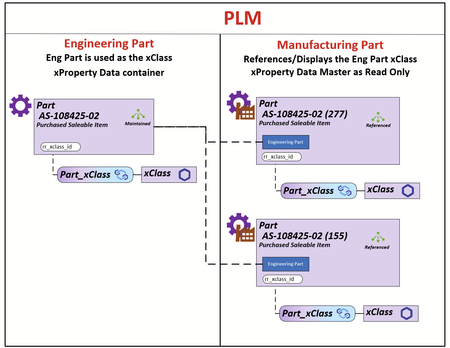
My client uses the Part Itemtype in 2 contexts Engineering and Manufacturing. The requirement is that all xClass-xProperty data is populated and maintained on the Engineering Part and the xClass-xProperty data on the Manufacturing Part is rendered using the Engineering Parts Id. The Engineering Part that will be used for the reference will be the Latest Released Generation. The illustration demonstrates the relationship between the Engineer Part and its Manufacturing Parts. What I do know is that all the xProperty Data is store in the table set [xp.XpropertyValues#] as shown below. All xProperties can be acquired using the ID of the Engineering Part (I have a SQL query that can do this for reporting for a BOM structure). I have modeled the js/ts methods but I can't figure out how to apply them in this use case. What I can't figure out is: 1) What are the options for rendering the xClass-xProperty container on the Part Manufacturing Form 2) How to populate that container using the ID from the latest Released Engineering Part Any help/ideas would be greatly appreciated. Thanks Scott45Views0likes0Comments
Add GUID to Search Column
I have some batch data operations I'd like to do where I need to do a search, then export the Part GUID and some other data and later feed the fixed data back into the Batch Loader. Is there a way to add the GUID as a column? The id column is showing/exporting other data... I was going to write a program to do it but it seems like overkill...Solved204Views0likes2Comments
How to hide a tab of an item?
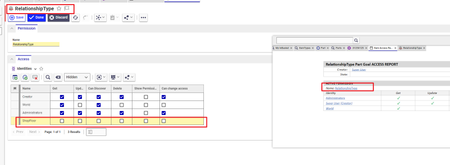
For the Item Part, for the all the part numbers, I need to hide a specific tab, lets say "Goals" for a specific identity. "Goals" is under Relationship Types in Part item. I have tried: - Right click on the Goals in Relationship Type,Permissions--> Access Report, edit Permissions named "Relationship Type". Add identity, here to Permission named "RelationshipType" and give no rights to the identity. The tab still shows.128Views0likes2Comments
How can I control behavior of BOM on revision up
Hi community, Here is an use case that User want to control Part by item that make the BOM are float or fixed when revision up. I read some solution that you can use a customized property and replace the action when creating a new revision. But I need more explain on doing this. Thanks to read this.36Views0likes0Comments
Feature licenses error when activate
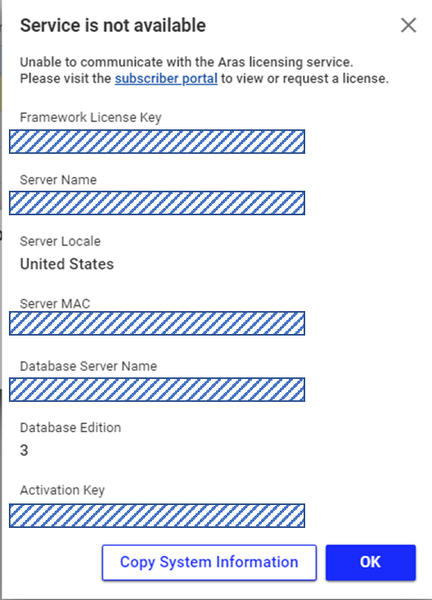
We are using a stand-alone server currently until we get ARAS fully stood up, then we will go live. We received the feature license keys and went to activate feature key but we keep receiving the pictured error below. It also pops up upon entering our database. Has anyone seen the below error before?2.2KViews0likes4CommentsHow to export a part?
It is that simple of a question. I need to export one or two parts from one environment to the other. Just the parts and nothing else. I have tried adding the part to the package definition. I chose, com.aras.innovator.solution.PLM, dependency. I don't think this is the right dependency. Which one should I choose to export just the parts? Upon importing the part, there are not errors. I don't know if any "success" message should be shown. There isn't any message when the import is done so I am assuming it was successful. However, that particular part is not in the destination environment.74Views0likes1Comment
Hide Classification Values (in the Classification Tree) based on Criteria
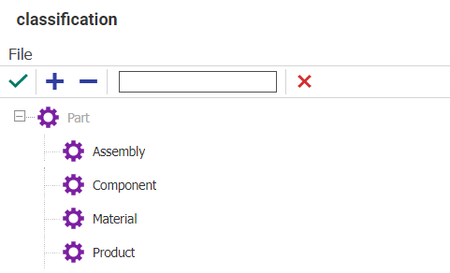
Hi All, Is there a good way to Hide some of the Classification/Type values from the select Classification Page , based on a specific criteria ? e.g. User ABC should only see Assembly and Component in the above page when creating a Part. Thanks and Regards, Shruti Suresh706Views0likes7Comments
Need to Hide few Columns in Part relationship BOM Tab
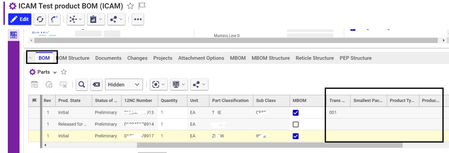
Hello Aras Experts, I have a business requirement related to the BOM (Bill of Materials) tab. In my current scenario, there is a need to hide specific columns, illustrated by the black-highlighted sections in the attached screenshot. Typically, to hide a column, one would navigate through ItemType -> Part -> Property -> and check the Hidden & Hidden2 values. However, in my case, these columns seem to be non-existent in this structure. I've also attempted to use JavaScript in the formload and formpopulated events to hide the columns, but unfortunately, this approach has not yielded the desired results. I would greatly appreciate any suggestions or guidance you can provide to address this issue. columns to hide - Transgroup, smallest pack, product type etc ( highlighted below) Regards, S. Senthurpari130Views0likes1CommentOnly alow to select Part "Assembly" instead of all Parts like "Component", "Assembly", "Material",...
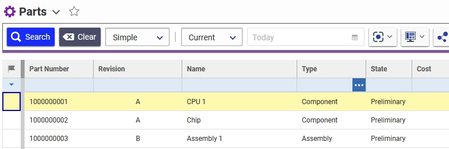
Hello everyone, i am new to Aras Innovator (I am using Version 12.0 SP9 Build: 24090). I have created several Parts (Components and Assemblys) and a new ItemType "Test". I have modified the "View" of the ItemType "Test" to select different Parts. Like this: Now i want to modify the selection so that it is only possible to select Parts with the Type "Assembly". Something like this: But the "normal" user shouldn't be allowed to select a Component and only Assemblys. Do you know how to do this? Thanks in advance. Best regards ThomasSolved1.4KViews0likes1Comment