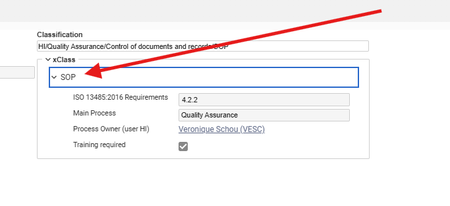
Auto expand x-properties
We used to have a small javascript deployed on the server which made sure that x-properties was auto expanded when the user opened a Document: Now we are on release 35 and it same that we have missed this part and that the functionality on x-properties in forms have changed a lot. Does anybody have implemented a solution to auto expand x-properties on R35 (or higher) ? Many thanks in advance21Views0likes0Comments
Changing File Type Column Width in Relationship Grid
Hi all, I'm trying to change the default width of the "File Type" column in all relationship grids. I was able to change "Related File" within the relationship itemType (related_id), but when I give myself editing permissions on the File item type, it loads with the new width, then immediately reverts to the previous size. Is it possible to change this column?Solved102Views0likes4Comments
How can I trigger the classification to update and change forms from a different property?
Hi Aras Community, I have a use case where my classification is technically controlling two things. What type of workflow they are on and what kind of form they see with the ability to switch the different kinds of forms. I'm trying to prevent mistakes from happening by providing 2 drop downs one that shows the workflow type and another that offers the form options. On selecting the form options, I need to update the classification and have the form change to the proper form. My current code updates the classification but does not execute whatever code causes the form to change on the classification update the way it does if you type it in or use the classification dialog box. Below is the code I'm starting with I don't know if there may be an API I can call that does this change or if there is a way to refresh the iframe that I'm not aware of. Any help is greatly appreciated. var inn = top.aras.newIOMInnovator(); var formtype = document.all("form_type").value; var worktype = document.all("workflow_purpose").value; var classification = ""; switch(worktype){ case "New Work": if(formtype = "form1"){ classification = "form1/Create New"; }else{ classification = formtype+"/"+worktype; } break; case "Other Work": if(formtype = "form2"){ classification = "form2/Other Work"; }else{ classification = formtype+"/"+worktype; } break; } window.handleItemChange("classification",classification); window.handleItemChange("form_type", formtype); return this;Solved445Views0likes2Comments
HTML Button - Script Not Working?
I'm looking to dress up a form by adding in some HTML buttons that have images (basically the ItemType image). I've got methods linked to normal buttons on the form and those are working as expected. When I do an HTML button they look like I want, but the script doesn't seem to be firing. Here's a code snippet: <script> function meeting() { // Create an Innovator object var inn = aras.newIOMInnovator(); var thisItem = parent.thisItem; var mtg = inn.newItem("Meeting", "add"); mtg.setProperty("_project", thisItem.getID()); var results = mtg.apply(); top.aras.uiShowItemEx(results.node, "tab view", true, true); </script> <button class="button-meeting" onClick="meeting()"> </button> What have I got wrong here? The script is copy/paste from the method. Thanks in advance!Solved1.4KViews0likes2Comments
onChange field value does not keep new value when item is saved
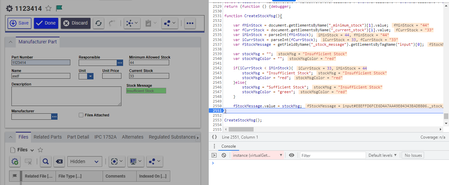
Hi everyone, I have an on change event that fires when one of my stock fields are changed, which should change the value of a stock message field. The function I have is able to change the value of the stock message field, but when I save/click done, the value is not updated in the properties. My code: var fMinStock = document.getElementsByName("_minimum_stock")[1].value; var fCurrStock = document.getElementsByName("_current_stock")[1].value; var iMinStock = parseInt(fMinStock); var iCurrStock = parseInt(fCurrStock); var fStockMessage = getFieldByName("_stock_message").getElementsByTagName("input")[0]; var stockMsg = ""; var stockMsgColor = ""; if(iCurrStock < iMinStock){ stockMsg = "Insufficient Stock"; }else{ stockMsg = "Sufficient Stock"; } fStockMessage.value = stockMsg; The onChange in action: When save or done is clicked after onChange: Any ideas on what I might be doing wrong?Solved4.5KViews0likes3CommentsClient side Form function and script not evaluating correctly.
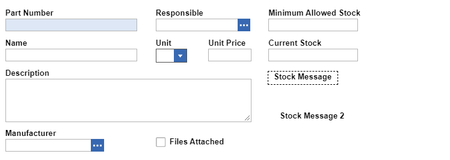
Good day all. TL;DR: I am having trouble getting an onLoad method to reliably print an evaluated value to a field. The form is as follows: Stock message contains: <span id='stock_msg'></span> I have a javascript onLoad method that compares the minimum and current stock: // Create min and current stock variables var minStock = document.thisItem.getProperty("_minimum_stock"); var currStock = document.thisItem.getProperty("_current_stock"); // Bring in HTML field span var field = document.getElementById("stock_msg"); // Create stockMsgValue variable var stockMsgValue = null; // if current stock is less than or equals to minimum stock if(currStock <= minStock) { stockMsgValue = "<p style='color: red'>Not enough Stock!</p>"; } else { stockMsgValue = "<p style='color: green'>Stock levels look good</p>"; } // Write to HTML field span field.innerHTML += stockMsgValue; I did something similar with Stock message 2, but included the javascript in the HTML field directly: <div id="Message"></div> <div id="min"></div> <div id="curr"></div> <script> var divText = document.getElementById("Message"); var divCurr = document.getElementById("curr"); var divMin = document.getElementById("min"); var currStock = document.thisItem.getProperty("_current_stock"); var minStock = document.thisItem.getProperty("_minimum_stock"); if(currStock <= minStock ) { var textVal = "<span style='color: red';>Insufficient</span>"; } else { var textVal = "<span style='color: green';>Sufficient</span>"; } divText.innerHTML += textVal; divMin.innerHTML += "Minimum stock: " +minStock; divCurr.innerHTML += "Current stock: " + currStock; </script> The problem is that it works for a little bit, and then the evaluation does not reflect the correct values. Some examples: Any ideas? ThanksSolved5.8KViews0likes8Comments
xclassification dialog from custom method
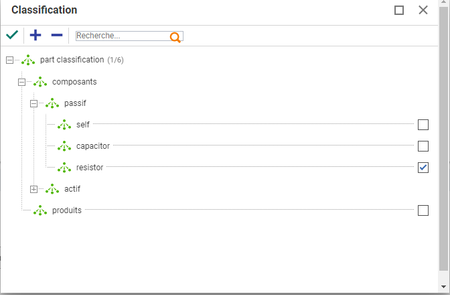
hello i'm begining a project, the idea is to have a an action launch a dialog to select a xclass. I would like to launch the same dialog as the one that pops up when adding a part xclass and x property(see below): after the user selected a class i want to retrieve the name of the class he chose. The following step is to have a second dialog (depending on the classification chosen) this second dialogs might be hard coded or dynamically buit i'm still unsure and they are going to look like the form used to fill the xproperty after you choose your part class but slightly different: i want to add a column of check boxes for future business logic. i've tried to search for the xclass tree selection dialog but couldn't find it i've tried to display some that i could find in the code tree but without sucess, i used the dialog api, here is my code: var param = { aras: top.aras, type: "HTMLEditorDialog", sHtml:"here i've tried to put just the name and the full path but it didn't seem to work as even when i changed form i was always getting same form opening ", dialogWidth: 1000, dialogHeight: 500, }; // This will be called after the dialog is closed function callback(res) { if (res) { alert(res + " loves learning about new opening HTML pages as dialogs!"); } }; // Open the dialog var topWnd = top.aras.getMostTopWindowWithAras(); var wnd = topWnd ? topWnd : window; wnd.ArasModules.Dialog.show('iframe', param).promise.then(callback); any help is welcome thanks lucas1.6KViews0likes1CommentTargeting Element on Form from Relationship Grid
Hello All, I'm making a relationship grid event that fires on a row selection. It's meant to target an HTML control on the top item form and then will fill it with a TGV. Trouble is, I'm running in circles trying to target the element on the form, which is called 'tgv'. Lots of debugger tries in the console and methods and nothing is finding it. Have tried... top.mainWindow.document.getElementsByName("tgv")[0]; top.mainWindow.document.querySelector('div[name="tgv"]'); parent.document...... Any thoughts or help?162Views0likes7Comments