Auto expand x-properties
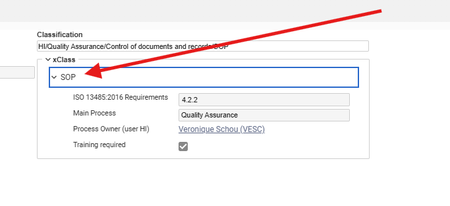
We used to have a small javascript deployed on the server which made sure that x-properties was auto expanded when the user opened a Document: Now we are on release 35 and it same that we have missed this part and that the functionality on x-properties in forms have changed a lot. Does anybody have implemented a solution to auto expand x-properties on R35 (or higher) ? Many thanks in advance21Views0likes0Comments
Changing File Type Column Width in Relationship Grid
Hi all, I'm trying to change the default width of the "File Type" column in all relationship grids. I was able to change "Related File" within the relationship itemType (related_id), but when I give myself editing permissions on the File item type, it loads with the new width, then immediately reverts to the previous size. Is it possible to change this column?Solved102Views0likes4Comments
Targeting Element on Form from Relationship Grid
Hello All, I'm making a relationship grid event that fires on a row selection. It's meant to target an HTML control on the top item form and then will fill it with a TGV. Trouble is, I'm running in circles trying to target the element on the form, which is called 'tgv'. Lots of debugger tries in the console and methods and nothing is finding it. Have tried... top.mainWindow.document.getElementsByName("tgv")[0]; top.mainWindow.document.querySelector('div[name="tgv"]'); parent.document...... Any thoughts or help?162Views0likes7CommentsSecondary Language Label on Group Box Not Displaying in Responsive Form
Hello Aras Community, I’m using Responsive Form Designer to build a custom Item Details form, and I’ve run into an issue with the Group Box control: In the form designer, I placed a Group Box and filled in the Secondary Language Label (Japanese) as shown below: However, when I view the Item Details page, the group box header does not display the Japanese label. It simply shows no header at all. If I put Japanese text into the Primary Label (English) field instead, the header appears correctly in Japanese. My questions are: Is this behavior a bug or a known limitation of Responsive Form Designer? What is the recommended way to show secondary‐language labels (e.g. Japanese) on group boxes in a responsive form? Do I need to modify an XML resource or language pack to make it work? Any guidance or best practices you can share would be greatly appreciated. Thank you!108Views0likes2CommentsValidating Input/Partially Restrict Editing of Fields
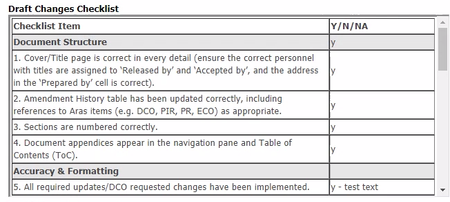
Hi all, I have a checklist (for users to fill out) in the form of a table as illustrated here: It is a HTML table housed in a Formatted Text field. I would like to prevent users from modifying the checklist items (first column of the table) or perform some sort of validation of the checklist items to ensure that they haven't be deformed. Having the items and the entries in a different field (and then disabling editing of the items field) is not an option as the list requires scrolling, and that would cause the items and entries to become misaligned. Is there a way to achieve what I'm trying to do?144Views0likes3Comments"This" String Becomes "srcElement"
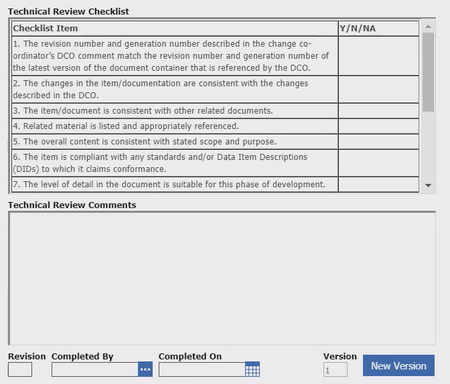
Hi all, I have created a form that looks like this: The table is pre-filled via a Form Event method. This is a checklist that the user fills out for document reviews. Clicking on the New Version button triggers a Field Event method that clears the table and fills the table with fresh (but same) checklist items. However, on clicking the button and triggering the method, all instances of the string "this" becomes "srcElement". Does anyone know why this is happening and how to prevent it? Version 11 SP9. Thanks!103Views0likes4Comments
Aras 32 and lab_styleform / custom-form-css
Hello, We are upgrading Aras from 12SP09 to Aras32 and some our forms are using https://github.com/ArasLabs/custom-form-css lab_Styleform javascript. I can see there hasn't been any updates in GitHub in 6 years. And the forms are looking a little bit funny. But the main question is that is there better way to modify the css than this custom-form-css in Aras version 32? Should we ditch the old way and start using something better now in a new version? And what that new way of doing that would be? Any hint/advice? Cheers, Jukka33Views0likes1Comment
Method for hiding button on a form
I need to hide a button on a Work Process form. Name of the button is cancel_workflow_button I can do this using the UI making another view where this button is hidden but I want to do this by writing a method. If someone can get me started on this that would be awesome. thanks!56Views0likes1Comment