Conversion Task failing due to 'License text is empty' error
Hello Team, I need help with Aras CAD to PDF conversion issue. Conversion task was working earlier, but it is now failing with the below license-related error in Conversion Task errors Event Handler: InvokeStandardConverter Event Type: OnConvert Status: Failed Event Handler Error: Aras.ConversionFramework.Exceptions.EventCallbackErrorException: See inner exception for details: ---> System.Exception ---> System.ServiceModel.FaultException: Error occurred during conversion: Exit Code:1 Command line arguments were: --sc_compute_bounding_boxes "All" --input_pdf_template_file "C:\Aras_Server\12_AutoLEAN\Hoops_Converter\Templates\Blank_Template_L.pdf" --output_pdf "C:\Aras_Server\12_AutoLEAN\ConversionServer\temp\B60C9C5C4F184FA4AB4231D949D24761\shock spring adjustment NUT.pdf" --output_png "C:\Aras_Server\12_AutoLEAN\ConversionServer\temp\B60C9C5C4F184FA4AB4231D949D24761\shock spring adjustment NUT.png" --output_png_resolution "150x150" --output_scs "C:\Aras_Server\12_AutoLEAN\ConversionServer\temp\B60C9C5C4F184FA4AB4231D949D24761\shock spring adjustment NUT.scs" --output_xml_assemblytree "C:\Aras_Server\12_AutoLEAN\ConversionServer\temp\B60C9C5C4F184FA4AB4231D949D24761\shock spring adjustment NUT.xml" --output_prc "C:\Aras_Server\12_AutoLEAN\ConversionServer\temp\B60C9C5C4F184FA4AB4231D949D24761\shock spring adjustment NUT.prc" --background_color "1.0, 1.0, 1.0" --output_logfile "C:\Aras_Server\12_AutoLEAN\ConversionServer\temp\B60C9C5C4F184FA4AB4231D949D24761\shock spring adjustment NUT" --input "C:\Aras_Server\12_AutoLEAN\ConversionServer\temp\B60C9C5C4F184FA4AB4231D949D24761\shock spring adjustment NUT.par" View the following log for details: License log 06/06/2026 09:39:14: Consume ArasCadConverter data was started. 06/06/2026 09:39:15: Server was unable to process request. ---> Aras.Server.Licensing.FeatureLicenseValidationException ---> The feature license you are attempting to use has encountered a restriction. Converter log Converter output License text is empty at System.ServiceModel.Channels.ServiceChannel.HandleReply(ProxyOperationRuntime operation, ProxyRpc& rpc) at System.ServiceModel.Channels.ServiceChannel.EndCall(String action, Object[] outs, IAsyncResult result) at System.ServiceModel.Channels.ServiceChannelProxy.TaskCreator.<>c__DisplayClass1_0.<CreateGenericTask>b__0(IAsyncResult asyncResult) --- End of stack trace from previous location --- at Aras.Server.Conversion.Activities.RunConvertOperationHandler.ExecuteConvertOperationAsync(ConversionServiceClient client, String task, ConversionOperationContext context, Uri conversionServerUrl, ProtocolInfo protocolInfo, IAuthenticator authenticator, Boolean isFirstTry) in C:\Builds\CI\40942\Innovator.git\CompilableCode\Aras.Server.Conversion\Activities\RunConvertOperation\RunConvertOperationHandler.cs:line 135 --- End of inner exception stack trace --- at Aras.ConversionFramework.Models.ConversionTask.<>c__DisplayClass40_0.<OnConvertCompleted>b__1() in C:\Builds\CI\40942\Innovator.git\CompilableCode\ConversionFramework\ConversionManager\Models\ConversionTask.cs:line 254 at Aras.ConversionFramework.Models.ConversionTaskEventHandler.Execute(ConversionTask task) in C:\Builds\CI\40942\Innovator.git\CompilableCode\ConversionFramework\ConversionManager\Models\ConversionTaskEventHandler.cs:line 166 --- End of inner exception stack trace --- at Aras.ConversionFramework.Models.ConversionTaskEventHandler.Execute(ConversionTask task) in C:\Builds\CI\40942\Innovator.git\CompilableCode\ConversionFramework\ConversionManager\Models\ConversionTaskEventHandler.cs:line 170 at Aras.ConversionFramework.Models.ConversionTask.ExecuteEventHandlers(ConversionTaskEventType eventType) in C:\Builds\CI\40942\Innovator.git\CompilableCode\ConversionFramework\ConversionManager\Models\ConversionTask.cs:line 319 This is happening during CAD to PDF conversion using the Conversion Server/HOOPS converter. Though I have already activated all required licenses, but the conversion task is still failing. Please revert me back if somebody has already faced this.149Views0likes1Comment
Mass import options
We have an old Minerva Import Tool as part of our Aras Instance. It's written as a standalone webapp, but running on the same webserver as Aras and reusing the authentication cookie - I don't know what was the benefit of doing it this way, but that's what they did. Now, this tool is getting outdated due to some changes required for an integration. We don't have the source code for the tool so we can't easily update it, it's written in VB for an ancient version of .net anyway so it wouldn't be so useful anyway. What I'm wondering is, what are you using for mass import of Parts, BOMs, and Manufacturer Parts?Solved271Views0likes4Comments
Customizing BatchLoader in ARAS 31 to Add Users with Identities
Hi everyone, I recently migrated from ARAS version 11 to version 31. In ARAS 11, we used the BatchLoader tool to import user data from an Excel file, which included both user details and their associated identities. However, after migrating to ARAS 31, I noticed that the BatchLoader no longer supports adding users and identities together in a single operation. The AML mapping now restricts us to using only one ItemType at a time, which makes it difficult to replicate our previous process. Has anyone tried customizing the BatchLoader in ARAS 31 to overcome this limitation? I’d really appreciate any guidance or suggestions on how to achieve this. Thanks in advance for your help! — Salini54Views0likes0Comments
How to batch download and upload files?
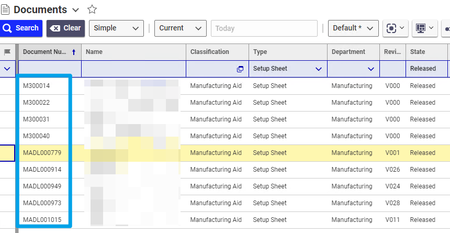
Under Documents, Type= Setup Sheet, State = Released, are documents that are in excel and they have to be converted to pdf I guess the first the step woudl be to get the meta data, Document name, ID, Related Files, and File ID. Then loop through this file to download them. But then what would the path be to download this. How do I go about this? Thanks!!Solved280Views0likes5CommentsUpload missing document relationship in Process Plan. "Add" statement doesn't work
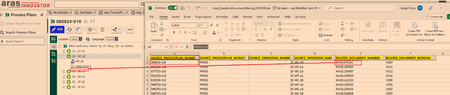
I need to upload relationship between Operation Document and the Documents. As you can see from the picture below the hierarchy of Process Plan is: Process Plan--> Operation Number (which is `sort_order`, in this case it is 20)-->Document I have an excel sheet of the missing documents that need to show under an operation (20) The document relationship cannot by uploaded just to Operation because the operation 20 will exist under other Process Plans. However, under one process plan the operation number is unique, so in this case there will be only one operation with sort_order 20. The documents already exist, I just need them to be shown here. From the AML script I have the `get` command works. The code is below. <AML> <Item type="mpp_processPlan" action="get"> <item_number>080824-S10</item_number> <Relationships> <Item type="mpp_Operation" action="get"> <sort_order>20</sort_order> <Relationships> <Item type="mpp_operationDocument" action="get"> </Item> </Relationships> </Item> </Relationships> </Item> </AML> However, in the above script in the line `<Item type="mpp_operationDocument" action="get">` when `action = Update` it won't work. Basically the following doesn't work <AML> <Item type="mpp_processPlan" action="get"> <item_number>080824-S10</item_number> <Relationships> <Item type="mpp_Operation" action="get"> <sort_order>20</sort_order> <Relationships> <Item type="mpp_operationDocument" action="Update"> <item_number>MADL074161</item_number> </Item> </Relationships> </Item> </Relationships> </Item> </AML> Result of scriopt with all `action=get` [embed:dc8ab71f-3b98-42d9-b0f6-e21e02a0f8e2:b4eb42d4-78c3-44de-b633-1a7d250b7129:type=text&text=%3CSOAP-ENV%3AEnvelope%20xmlns%3ASOAP-ENV%3D%22http%3A%2F%2Fschemas.xmlsoap.org%2Fsoap%2Fenvelope%2F%22%3E%0A%3CSOAP-ENV%3ABody%3E%0A%3CResult%3E%0A%3CItem%20type%3D%22mpp_ProcessPlan%22%20typeId%3D%224E030A4723224002B3E94F40F01AC1DE%22%20id%3D%22767F3FCDCC0F4CCF95F3CA3D9DB9D391%22%3E%0A%3Cconfig_id%20keyed_name%3D%22080824-S10%22%20type%3D%22mpp_ProcessPlan%22%3E767F3FCDCC0F4CCF95F3CA3D9DB9D391%3C%2Fconfig_id%3E%0A%3Ccreated_by_id%20keyed_name%3D%22Data%20Migration%22%20type%3D%22User%22%3E08880028FF8C43D48CB02B44EB74B127%3C%2Fcreated_by_id%3E%0A%3Ccreated_on%3E2024-02-20T11%3A49%3A02%3C%2Fcreated_on%3E%0A%3Ccurrent_state%20name%3D%22Released%22%20keyed_name%3D%22Released%22%20type%3D%22Life%20Cycle%20State%22%3E7109CDD337C84AFF87F55B21CCAC34AC%3C%2Fcurrent_state%3E%0A%3Cdescription%3E%3C%2Fdescription%3E%0A%3Cgeneration%3E1%3C%2Fgeneration%3E%0A%3Chas_change_pending%3E0%3C%2Fhas_change_pending%3E%0A%3Cid%20keyed_name%3D%22080824-S10%22%20type%3D%22mpp_ProcessPlan%22%3E767F3FCDCC0F4CCF95F3CA3D9DB9D391%3C%2Fid%3E%0A%3Cis_current%3E1%3C%2Fis_current%3E%0A%3Cis_released%3E1%3C%2Fis_released%3E%0A%3Ckeyed_name%3E080824-S10%3C%2Fkeyed_name%3E%0A%3Clocation%3E10%3C%2Flocation%3E%0A%3Cmajor_rev%3EPP000%3C%2Fmajor_rev%3E%0A%3Cmodified_on%3E2024-02-20T11%3A49%3A02%3C%2Fmodified_on%3E%0A%3Cname%3ESlitter%20Knife%20Arm%2C%20Rotary%20Tip%2C%2035%22%20Ring%2C%20C%2FR%3C%2Fname%3E%0A%3Cnew_version%3E1%3C%2Fnew_version%3E%0A%3Cnot_lockable%3E0%3C%2Fnot_lockable%3E%0A%3Cowned_by_id%20keyed_name%3D%22Mfg%20Eng%22%20type%3D%22Identity%22%3ED46B8ECBDB0C4D94BFF7A93D36FAB474%3C%2Fowned_by_id%3E%0A%3Cpermission_id%20keyed_name%3D%22Process%20Plan%20-%20Released%22%20type%3D%22Permission%22%3EE4EB045B2622409BA09AC91778FAE18C%3C%2Fpermission_id%3E%0A%3Crelease_date%3E2024-01-29T00%3A00%3A00%3C%2Frelease_date%3E%0A%3Cstate%3EReleased%3C%2Fstate%3E%0A%3Citem_number%3E080824-S10%3C%2Fitem_number%3E%0A%3Citemtype%3E4E030A4723224002B3E94F40F01AC1DE%3C%2Fitemtype%3E%0A%3CRelationships%3E%0A%3CItem%20type%3D%22mpp_Operation%22%20typeId%3D%2291B674D7C7AF47F99CA1C2FB26C38DBF%22%20id%3D%2277DD37200C7B4858833A6D6D8A48F4FA%22%3E%0A%3Cconfig_id%20keyed_name%3D%2220%22%20type%3D%22mpp_Operation%22%3E77DD37200C7B4858833A6D6D8A48F4FA%3C%2Fconfig_id%3E%0A%3Ccreated_by_id%20keyed_name%3D%22Data%20Migration%22%20type%3D%22User%22%3E08880028FF8C43D48CB02B44EB74B127%3C%2Fcreated_by_id%3E%0A%3Ccreated_on%3E2024-02-20T12%3A06%3A27%3C%2Fcreated_on%3E%0A%3Ccycle_time%3E60%3C%2Fcycle_time%3E%0A%3Cdescription%20xml%3Alang%3D%22en%22%3EMC-1B%20MC2%20CNC%20Machine%20Centre%20S10%3C%2Fdescription%3E%0A%3Cgeneration%3E1%3C%2Fgeneration%3E%0A%3Cid%20keyed_name%3D%2220%22%20type%3D%22mpp_Operation%22%3E77DD37200C7B4858833A6D6D8A48F4FA%3C%2Fid%3E%0A%3Cis_current%3E1%3C%2Fis_current%3E%0A%3Cis_released%3E0%3C%2Fis_released%3E%0A%3Ckeyed_name%3E20%3C%2Fkeyed_name%3E%0A%3Cmajor_rev%3EPP000%3C%2Fmajor_rev%3E%0A%3Cmodified_on%3E2024-02-20T12%3A06%3A27%3C%2Fmodified_on%3E%0A%3Cname%20xml%3Alang%3D%22en%22%3EMC-1B%3C%2Fname%3E%0A%3Cnew_version%3E1%3C%2Fnew_version%3E%0A%3Cnmg_erp_name%3EMC-1B%3C%2Fnmg_erp_name%3E%0A%3Cnmg_location_id%3E10%3C%2Fnmg_location_id%3E%0A%3Cnot_lockable%3E0%3C%2Fnot_lockable%3E%0A%3Cpermission_id%20keyed_name%3D%22Process%20Plan%20-%20Released%22%20type%3D%22Permission%22%3EE4EB045B2622409BA09AC91778FAE18C%3C%2Fpermission_id%3E%0A%3Csetup_time%3E0%3C%2Fsetup_time%3E%0A%3Csource_id%20keyed_name%3D%22080824-S10%22%20type%3D%22mpp_ProcessPlan%22%3E767F3FCDCC0F4CCF95F3CA3D9DB9D391%3C%2Fsource_id%3E%0A%3Cwi_details%20xml%3Alang%3D%22en%22%3E%3C%2Fwi_details%3E%0A%3Csort_order%3E20%3C%2Fsort_order%3E%0A%3CRelationships%3E%0A%3CItem%20type%3D%22mpp_OperationDocument%22%20typeId%3D%2238BA57E0616B49A58317C267E436AE4C%22%20id%3D%22106F5032EE7F4C5497717888370A3BB6%22%3E%0A%3Cconfig_id%20keyed_name%3D%22106F5032EE7F4C5497717888370A3BB6%22%20type%3D%22mpp_OperationDocument%22%3E106F5032EE7F4C5497717888370A3BB6%3C%2Fconfig_id%3E%0A%3Ccreated_by_id%20keyed_name%3D%22Data%20Migration%22%20type%3D%22User%22%3E08880028FF8C43D48CB02B44EB74B127%3C%2Fcreated_by_id%3E%0A%3Ccreated_on%3E2024-02-20T12%3A36%3A02%3C%2Fcreated_on%3E%0A%3Cgeneration%3E1%3C%2Fgeneration%3E%0A%3Cid%20keyed_name%3D%22106F5032EE7F4C5497717888370A3BB6%22%20type%3D%22mpp_OperationDocument%22%3E106F5032EE7F4C5497717888370A3BB6%3C%2Fid%3E%0A%3Cis_current%3E1%3C%2Fis_current%3E%0A%3Cis_released%3E0%3C%2Fis_released%3E%0A%3Ckeyed_name%3E106F5032EE7F4C5497717888370A3BB6%3C%2Fkeyed_name%3E%0A%3Cmajor_rev%3EA%3C%2Fmajor_rev%3E%0A%3Cmodified_on%3E2024-02-20T12%3A36%3A02%3C%2Fmodified_on%3E%0A%3Cnew_version%3E1%3C%2Fnew_version%3E%0A%3Cnot_lockable%3E0%3C%2Fnot_lockable%3E%0A%3Cpermission_id%20keyed_name%3D%22Process%20Plan%20-%20Released%22%20type%3D%22Permission%22%3EE4EB045B2622409BA09AC91778FAE18C%3C%2Fpermission_id%3E%0A%3Crelated_id%20keyed_name%3D%22MADL074152%22%20type%3D%22Document%22%3E%0A%3CItem%20type%3D%22Document%22%20typeId%3D%22B88C14B99EF449828C5D926E39EE8B89%22%20id%3D%22BD9ECB6D5C5D4AEEBC0ED65680C5505C%22%3E%0A%3Cclassification%3EManufacturing%20Aid%3C%2Fclassification%3E%0A%3Cconfig_id%20keyed_name%3D%22MADL074152%22%20type%3D%22Document%22%3EBD9ECB6D5C5D4AEEBC0ED65680C5505C%3C%2Fconfig_id%3E%0A%3Ccreated_by_id%20keyed_name%3D%22NMIS%20_MADL%22%20type%3D%22User%22%3E41E9090B65234C899CAFF690C7C0F562%3C%2Fcreated_by_id%3E%0A%3Ccreated_on%3E2024-02-19T11%3A12%3A07%3C%2Fcreated_on%3E%0A%3Ccurrent_state%20name%3D%22Released%22%20keyed_name%3D%22Released%22%20type%3D%22Life%20Cycle%20State%22%3E8EDE39438A7E4A56A1B4A9D07EF4A2FF%3C%2Fcurrent_state%3E%0A%3Cdescription%3E35%22%20SLITTER%20ARM%20C%2FR%3C%2Fdescription%3E%0A%3Ceffective_date%3E2018-11-16T14%3A35%3A00%3C%2Feffective_date%3E%0A%3Cgeneration%3E1%3C%2Fgeneration%3E%0A%3Chas_change_pending%3E0%3C%2Fhas_change_pending%3E%0A%3Chas_files%3E1%3C%2Fhas_files%3E%0A%3Cid%20keyed_name%3D%22MADL074152%22%20type%3D%22Document%22%3EBD9ECB6D5C5D4AEEBC0ED65680C5505C%3C%2Fid%3E%0A%3Cis_current%3E1%3C%2Fis_current%3E%0A%3Cis_released%3E1%3C%2Fis_released%3E%0A%3Cis_template%3E0%3C%2Fis_template%3E%0A%3Ckeyed_name%3EMADL074152%3C%2Fkeyed_name%3E%0A%3Cmajor_rev%3EV007%3C%2Fmajor_rev%3E%0A%3Cmodified_on%3E2007-07-09T08%3A17%3A00%3C%2Fmodified_on%3E%0A%3Cname%3E080824%3C%2Fname%3E%0A%3Cnew_version%3E0%3C%2Fnew_version%3E%0A%3Cnmg_department%3EManufacturing%3C%2Fnmg_department%3E%0A%3Cnmg_type%3EProgram%20%28CAD%2FCAM%29%3C%2Fnmg_type%3E%0A%3Cnot_lockable%3E0%3C%2Fnot_lockable%3E%0A%3Cowned_by_id%20keyed_name%3D%22Mfg%20Eng%22%20type%3D%22Identity%22%3ED46B8ECBDB0C4D94BFF7A93D36FAB474%3C%2Fowned_by_id%3E%0A%3Cpermission_id%20keyed_name%3D%22Released%20Document%22%20type%3D%22Permission%22%3E74C205C37E7C4D56BBBE99B52B28431E%3C%2Fpermission_id%3E%0A%3Crelease_date%3E2018-11-16T14%3A35%3A00%3C%2Frelease_date%3E%0A%3Cstate%3EReleased%3C%2Fstate%3E%0A%3Citem_number%3EMADL074152%3C%2Fitem_number%3E%0A%3Citemtype%3EB88C14B99EF449828C5D926E39EE8B89%3C%2Fitemtype%3E%0A%3C%2FItem%3E%0A%3C%2Frelated_id%3E%0A%3Csource_id%20keyed_name%3D%2220%22%20type%3D%22mpp_Operation%22%3E77DD37200C7B4858833A6D6D8A48F4FA%3C%2Fsource_id%3E%0A%3C%2FItem%3E%0A%3C%2FRelationships%3E%0A%3C%2FItem%3E%0A%3C%2FRelationships%3E%0A%3C%2FItem%3E%0A%3C%2FResult%3E%0A%3C%2FSOAP-ENV%3ABody%3E%0A%3C%2FSOAP-ENV%3AEnvelope%3E]114Views0likes4Comments
Error when try to upload a file ARAS 12
When I try to upload a file in my Item Type, I receive the error Multiple Errors: DoPhysicalFiles - SendRequestToVaultServer: invalid_client -, it was working normally, but today start to show this issue. Someone pass by this issue and can help me? Thanks a lot.375Views0likes4Comments
Loading files using BeforeAMLPackagesImport script
Hello All, I am loading some custom help pages as items in Innovator as part of an AML package. These items have pictures attached to them so I know I need to load the pictures separately through a BeforeAMLPackagesImport script (or just before the help items on the import.manifest file?) I need these items (and the files that the items rely on) to load with a new build. The question is, how would I script to load those files into the database?136Views0likes3CommentsUpload file Rest API using Logic App
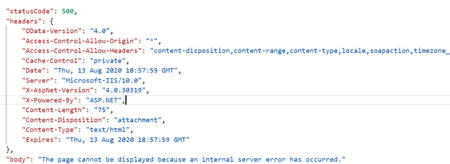
I am currently developing a sample project in Azure Logic Apps using the Aras Restful APIs. However while trying to Execute the vault.UploadFile API I am facing the 500 error message: The Rest API Call Details are as follows : { "uri": ".../vault.UploadFile?fileId=EB166A9FF4EE47C8A0DA55252CA140CA", "method": "POST", "headers": { "Authorization": "*sanitized*", "Content-Disposition": "attachment;filename*=utf-8''Hello.txt", "Content-Length": "5", "Content-Range": "bytes 0-4/5", "Content-Type": "application/octet-stream", "transactionid": "0c2c787fce70226029d752c0ba372607" }, "body": "Hello" } For now I am trying to upload a simple text file as seen above. I have verified the url as well as run the same in Postman , ARC and fiddler - and I am able to get it working in all the cases except for via Logic Apps . Please let me know if anyone knows what I am missing here . Thanks9.4KViews1like4Comments
Upload Files with AML - does it still work this way?
Hi Community, in many forum posts samples are shown how to upload files via AML. Typical one: <Item type='Document' action='add'> <item_number>uploadtest</item_number> <name>myName</name> <description>myDescription</description> <Relationships> <Item type='Document File' action='add'> <related_id> <Item type='File' action='add'> <actual_filename>c:\temp\uploadtest.txt</actual_filename> <filename>uploadtest.txt</filename> <Relationships> <Item type='Located' action='add'> <related_id>67BBB9204FE84A8981ED8313049BA06C</related_id> </Item> </Relationships> </Item> </related_id> </Item> </Relationships> </Item> I remember that I was able to use this script successfully in the past. But in Innovator 12 it doesn´t seem to work anymore. Does anyone know if we need a different approach now? Thanks and best regards! Angela1.3KViews0likes0CommentsUpload File without creating a new generation
I wish to create an Action for the Document ItemType that 1. Prompts the user to select a file, 2. Uploads the file, and 3. Does not create a new generation of the Document Item. Use Case: A Document, for example at Rev C, are reviewed via the out-of-the-box (OOTB) Document Change Object. Prior to the Release step, a PDF file is generated and submitted to the customer. The workflow is then completed, setting the state of the Document as Released. The PDF is sent to the customer for approval. And a new revision, Rev D, of the Document is started using subsequent DCO. Not a problem. The customer returns a wet-ink or digital signed PDF file of the Rev C of the Document. This version of the PDF is to be included in the the latest generation of Rev C, which most probably will have been updated by Rev D and subsequent generations. It is not appropriate to add the signed PDF to Rev D or later iteration. This process is possible using AML, by 1. Determine the ID of the latest generation of Rev C of the document. 2. Using admin, drag and drop the file into the file vault. 3. Get the ID of the file, after it has been uploaded, and 4. Using AML <AML> <Item type='Document File' action='add'> <source_id>id of the document at the correct generation</source_id> <related_id>id of the uploaded file </related_id> </Item> </AML> Can the above sequence be done using an Action, a Form with a File Item field or some other method?6.5KViews0likes6Comments