Using a method to update a team, doesn't seem to iterate beyond the first
Hi Community. I am setting up a method to assign a user to multiple teams based on a form. The issue I am having is that it seems to only apply the user to the first team I select (using a multi-value list). Essentially, I am defining on the form - The user identity to add The name of the team to add them to Their team role and regions they are responsible for Code is below: Innovator inn = this.getInnovator(); //Get the form used to make the GPR change selections Item qryGprItem = this.newItem(this.getAttribute("type"), "a_GetControlledItem"); qryGprItem.setID(this.getID()); Item gprItem = qryGprItem.apply(); string[] prodCats = gprItem.getProperty("a_add_to_prodcat").Split(','); string regions = gprItem.getProperty("a_add_to_region"); string gprAction = gprItem.getProperty("a_add_or_remove"); foreach (string prodCatValue in prodCats) { string prodCat = prodCatValue; Item qryTeamItem = inn.newItem("Team", "get"); qryTeamItem.setProperty("name", prodCat); Item teamItem = qryTeamItem.apply(); if (gprAction == "Add") { Item teamMember = inn.newItem("Team Identity", "add"); teamMember.setPropertyItem("source_id", teamItem); teamMember.setPropertyItem("related_id", gprItem.getPropertyItem("a_user_to_modify")); teamMember.setProperty("a_team_region", regions); teamMember.setPropertyItem("team_role", gprItem.getPropertyItem("a_gpr_role")); return teamMember.apply(); } if (gprAction == "Remove") { } } return this;Solved2.4KViews0likes2Comments
What is the best way to validate whether an item has a parent?
I'm trying to send an email on promotion to "Released" of Parts when a couple of criteria are met, the parts being of a certain custom classification we've added, and them not being used in another BOM anywhere (i.e. they're top-level Parts being released). What's the best way to go about checking whether the part is a top-level part (i.e. doesn't have a parent)? I've tried isRoot(), getParentItem(), and getProperty("source_id"), but I'm either misusing those or for some reason they're not working for my case. This is what I have tried so far (this method is attached as a Post method to the lifecycle transitions to Released, and it is generating the emails, it's just not limiting it to only the times when it's a top-level BOM, like I want): Innovator inn = this.getInnovator(); Item myResult; if (this.getProperty("classification", "") == "Hull Assembly" && this.isRoot() == true) { //email code } return this; //or Innovator inn = this.getInnovator(); Item myResult; if (this.getProperty("classification", "") == "Hull Assembly" && this.getParentItem() == null) { //email code } return this; //or Innovator inn = this.getInnovator(); Item myResult; if (this.getProperty("classification", "") == "Hull Assembly" && this.getProperty("source_id", "") == "") { //email code } return this;Solved2.6KViews0likes2Comments
ARAS31 import.mf deployment issue
Hai, We recently upgraded our environment from Aras Innovator 11 to Aras Innovator 31, and we are running into several issues while deploying our solution packages. I wanted to share the details here to see if anyone has faced similar challenges or has suggestions. In Aras 11, we used an import.mf file with the following structure, and everything deployed without issues: <imports> <package name="DatabaseIdentifier" path="com\aras\innovator\DatabaseIdentifier" /> <package name="com.aras.innovator.solution.PLM" path="PLM\Import" /> <package name="com.aras.innovator.solution.Project" path="Project\Import"> <dependson name="com.aras.innovator.solution.PLM" /> </package> <package name="com.aras.innovator.core" path=".\" /> <package name="com.aras.innovator.cui_default" path=".\" /> <package name="Custom_Pkg1" path="CustomPkg1\Import" /> <package name="Custom_Pkg2" path="CustomPkg2\Import" /> </imports> After upgrading to Aras 31, we tried using the same .mf configuration, but we are encountering multiple deployment errors. Issues Observed 1. Null Reference Error Object reference not set to an instance of an object. 2. Method Not Found Error It points to this AML:→ Error: “No items of type Method found.” <Item type='ItemType' id='8052A558B9084D41B9F11805E464F443' action='edit'> <Relationships> <Item type="Server Event" action="add"> <related_id keyed_name="FileOnGet" type="Method"> <Item type="Method" action="get" select="id"> <name>FileOnGet</name> </Item> </related_id> </Item> </Relationships> </Item> Import package 'com.aras.innovator.core' failed with message: No items of type Method not found. 3. Timeout Error During Import The package was then marked as a failed release (seen for custom_Pkg). faultcode: 999 faultstring: System.Net.WebException: The operation has timed out 1. In Aras 31, are we required to use manifest.json instead of the old import.mf format for custom packages? 2. If yes, where exactly should the manifest.json file be placed, and what structure should it follow? 3. How should we handle customizations or extensions to system-level packages like com.aras.innovator.core and com.aras.innovator.cui_default that previously existed in Aras 11? 4. Has anyone encountered the faultcode 999 / timeout issue during import — and how did we resolve it? Thanks in Advance SaliniSolved340Views0likes9CommentsMAC Policy Issue in ARAS 31 – Need Help with Access Restrictions
Hi all, I’m working on implementing access restrictions for the a Itemtype in ARAS 31. There are around 46 records, and I want to group them into 5 categories. Each category will be assigned to specific identities, allowing controlled access based on the record's classification. To achieve this, I started configuring MAC policies. However, I’ve run into a few issues: The fields I need are disabled in the MAC Policy Condition Editor. User-defined properties are not accessible in the condition editor either. Has anyone faced similar challenges or found a workaround for this? Any help or guidance would be greatly appreciated! Thanks, Salini193Views0likes2Comments
How to change the position of a Relationship Accordion tab
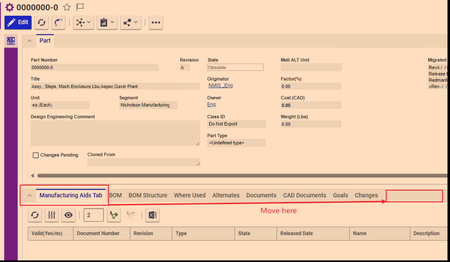
I needed to make a tab visible to certain identity. Therefore, I selected "Hide All" in the relationship types and used the CUI control to make a new tab. I need this tab to be all the way to right. Sort Order fields don't work, neither in the Relationship Type nor in cui_windowSection. Pictures below147Views0likes3Comments
Error loading Recipient Relationship tab of DCO and EDR change management giving error when refreshing the CM tab
Hi, when opening ECO/EDR the first time there is no Proplem opening the Recipients Relationship tap, but when opening another a second ECO/EDR the recipients Relationship tap doesnt load. when trying to refresh the item it gives an error message 'The method "cui_ivicb_refresh_click" failed.' only when changing to another relationship tap i can click on refresh with no error, then if changed back to Recipients the recipients list will appear. this issue was not there before the updates were done on .NET code. please help me if you have an idea about this problem and how to approach it. thanks76Views0likes1CommentUpload missing document relationship in Process Plan. "Add" statement doesn't work
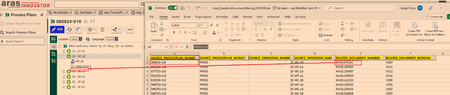
I need to upload relationship between Operation Document and the Documents. As you can see from the picture below the hierarchy of Process Plan is: Process Plan--> Operation Number (which is `sort_order`, in this case it is 20)-->Document I have an excel sheet of the missing documents that need to show under an operation (20) The document relationship cannot by uploaded just to Operation because the operation 20 will exist under other Process Plans. However, under one process plan the operation number is unique, so in this case there will be only one operation with sort_order 20. The documents already exist, I just need them to be shown here. From the AML script I have the `get` command works. The code is below. <AML> <Item type="mpp_processPlan" action="get"> <item_number>080824-S10</item_number> <Relationships> <Item type="mpp_Operation" action="get"> <sort_order>20</sort_order> <Relationships> <Item type="mpp_operationDocument" action="get"> </Item> </Relationships> </Item> </Relationships> </Item> </AML> However, in the above script in the line `<Item type="mpp_operationDocument" action="get">` when `action = Update` it won't work. Basically the following doesn't work <AML> <Item type="mpp_processPlan" action="get"> <item_number>080824-S10</item_number> <Relationships> <Item type="mpp_Operation" action="get"> <sort_order>20</sort_order> <Relationships> <Item type="mpp_operationDocument" action="Update"> <item_number>MADL074161</item_number> </Item> </Relationships> </Item> </Relationships> </Item> </AML> Result of scriopt with all `action=get` [embed:dc8ab71f-3b98-42d9-b0f6-e21e02a0f8e2:b4eb42d4-78c3-44de-b633-1a7d250b7129:type=text&text=%3CSOAP-ENV%3AEnvelope%20xmlns%3ASOAP-ENV%3D%22http%3A%2F%2Fschemas.xmlsoap.org%2Fsoap%2Fenvelope%2F%22%3E%0A%3CSOAP-ENV%3ABody%3E%0A%3CResult%3E%0A%3CItem%20type%3D%22mpp_ProcessPlan%22%20typeId%3D%224E030A4723224002B3E94F40F01AC1DE%22%20id%3D%22767F3FCDCC0F4CCF95F3CA3D9DB9D391%22%3E%0A%3Cconfig_id%20keyed_name%3D%22080824-S10%22%20type%3D%22mpp_ProcessPlan%22%3E767F3FCDCC0F4CCF95F3CA3D9DB9D391%3C%2Fconfig_id%3E%0A%3Ccreated_by_id%20keyed_name%3D%22Data%20Migration%22%20type%3D%22User%22%3E08880028FF8C43D48CB02B44EB74B127%3C%2Fcreated_by_id%3E%0A%3Ccreated_on%3E2024-02-20T11%3A49%3A02%3C%2Fcreated_on%3E%0A%3Ccurrent_state%20name%3D%22Released%22%20keyed_name%3D%22Released%22%20type%3D%22Life%20Cycle%20State%22%3E7109CDD337C84AFF87F55B21CCAC34AC%3C%2Fcurrent_state%3E%0A%3Cdescription%3E%3C%2Fdescription%3E%0A%3Cgeneration%3E1%3C%2Fgeneration%3E%0A%3Chas_change_pending%3E0%3C%2Fhas_change_pending%3E%0A%3Cid%20keyed_name%3D%22080824-S10%22%20type%3D%22mpp_ProcessPlan%22%3E767F3FCDCC0F4CCF95F3CA3D9DB9D391%3C%2Fid%3E%0A%3Cis_current%3E1%3C%2Fis_current%3E%0A%3Cis_released%3E1%3C%2Fis_released%3E%0A%3Ckeyed_name%3E080824-S10%3C%2Fkeyed_name%3E%0A%3Clocation%3E10%3C%2Flocation%3E%0A%3Cmajor_rev%3EPP000%3C%2Fmajor_rev%3E%0A%3Cmodified_on%3E2024-02-20T11%3A49%3A02%3C%2Fmodified_on%3E%0A%3Cname%3ESlitter%20Knife%20Arm%2C%20Rotary%20Tip%2C%2035%22%20Ring%2C%20C%2FR%3C%2Fname%3E%0A%3Cnew_version%3E1%3C%2Fnew_version%3E%0A%3Cnot_lockable%3E0%3C%2Fnot_lockable%3E%0A%3Cowned_by_id%20keyed_name%3D%22Mfg%20Eng%22%20type%3D%22Identity%22%3ED46B8ECBDB0C4D94BFF7A93D36FAB474%3C%2Fowned_by_id%3E%0A%3Cpermission_id%20keyed_name%3D%22Process%20Plan%20-%20Released%22%20type%3D%22Permission%22%3EE4EB045B2622409BA09AC91778FAE18C%3C%2Fpermission_id%3E%0A%3Crelease_date%3E2024-01-29T00%3A00%3A00%3C%2Frelease_date%3E%0A%3Cstate%3EReleased%3C%2Fstate%3E%0A%3Citem_number%3E080824-S10%3C%2Fitem_number%3E%0A%3Citemtype%3E4E030A4723224002B3E94F40F01AC1DE%3C%2Fitemtype%3E%0A%3CRelationships%3E%0A%3CItem%20type%3D%22mpp_Operation%22%20typeId%3D%2291B674D7C7AF47F99CA1C2FB26C38DBF%22%20id%3D%2277DD37200C7B4858833A6D6D8A48F4FA%22%3E%0A%3Cconfig_id%20keyed_name%3D%2220%22%20type%3D%22mpp_Operation%22%3E77DD37200C7B4858833A6D6D8A48F4FA%3C%2Fconfig_id%3E%0A%3Ccreated_by_id%20keyed_name%3D%22Data%20Migration%22%20type%3D%22User%22%3E08880028FF8C43D48CB02B44EB74B127%3C%2Fcreated_by_id%3E%0A%3Ccreated_on%3E2024-02-20T12%3A06%3A27%3C%2Fcreated_on%3E%0A%3Ccycle_time%3E60%3C%2Fcycle_time%3E%0A%3Cdescription%20xml%3Alang%3D%22en%22%3EMC-1B%20MC2%20CNC%20Machine%20Centre%20S10%3C%2Fdescription%3E%0A%3Cgeneration%3E1%3C%2Fgeneration%3E%0A%3Cid%20keyed_name%3D%2220%22%20type%3D%22mpp_Operation%22%3E77DD37200C7B4858833A6D6D8A48F4FA%3C%2Fid%3E%0A%3Cis_current%3E1%3C%2Fis_current%3E%0A%3Cis_released%3E0%3C%2Fis_released%3E%0A%3Ckeyed_name%3E20%3C%2Fkeyed_name%3E%0A%3Cmajor_rev%3EPP000%3C%2Fmajor_rev%3E%0A%3Cmodified_on%3E2024-02-20T12%3A06%3A27%3C%2Fmodified_on%3E%0A%3Cname%20xml%3Alang%3D%22en%22%3EMC-1B%3C%2Fname%3E%0A%3Cnew_version%3E1%3C%2Fnew_version%3E%0A%3Cnmg_erp_name%3EMC-1B%3C%2Fnmg_erp_name%3E%0A%3Cnmg_location_id%3E10%3C%2Fnmg_location_id%3E%0A%3Cnot_lockable%3E0%3C%2Fnot_lockable%3E%0A%3Cpermission_id%20keyed_name%3D%22Process%20Plan%20-%20Released%22%20type%3D%22Permission%22%3EE4EB045B2622409BA09AC91778FAE18C%3C%2Fpermission_id%3E%0A%3Csetup_time%3E0%3C%2Fsetup_time%3E%0A%3Csource_id%20keyed_name%3D%22080824-S10%22%20type%3D%22mpp_ProcessPlan%22%3E767F3FCDCC0F4CCF95F3CA3D9DB9D391%3C%2Fsource_id%3E%0A%3Cwi_details%20xml%3Alang%3D%22en%22%3E%3C%2Fwi_details%3E%0A%3Csort_order%3E20%3C%2Fsort_order%3E%0A%3CRelationships%3E%0A%3CItem%20type%3D%22mpp_OperationDocument%22%20typeId%3D%2238BA57E0616B49A58317C267E436AE4C%22%20id%3D%22106F5032EE7F4C5497717888370A3BB6%22%3E%0A%3Cconfig_id%20keyed_name%3D%22106F5032EE7F4C5497717888370A3BB6%22%20type%3D%22mpp_OperationDocument%22%3E106F5032EE7F4C5497717888370A3BB6%3C%2Fconfig_id%3E%0A%3Ccreated_by_id%20keyed_name%3D%22Data%20Migration%22%20type%3D%22User%22%3E08880028FF8C43D48CB02B44EB74B127%3C%2Fcreated_by_id%3E%0A%3Ccreated_on%3E2024-02-20T12%3A36%3A02%3C%2Fcreated_on%3E%0A%3Cgeneration%3E1%3C%2Fgeneration%3E%0A%3Cid%20keyed_name%3D%22106F5032EE7F4C5497717888370A3BB6%22%20type%3D%22mpp_OperationDocument%22%3E106F5032EE7F4C5497717888370A3BB6%3C%2Fid%3E%0A%3Cis_current%3E1%3C%2Fis_current%3E%0A%3Cis_released%3E0%3C%2Fis_released%3E%0A%3Ckeyed_name%3E106F5032EE7F4C5497717888370A3BB6%3C%2Fkeyed_name%3E%0A%3Cmajor_rev%3EA%3C%2Fmajor_rev%3E%0A%3Cmodified_on%3E2024-02-20T12%3A36%3A02%3C%2Fmodified_on%3E%0A%3Cnew_version%3E1%3C%2Fnew_version%3E%0A%3Cnot_lockable%3E0%3C%2Fnot_lockable%3E%0A%3Cpermission_id%20keyed_name%3D%22Process%20Plan%20-%20Released%22%20type%3D%22Permission%22%3EE4EB045B2622409BA09AC91778FAE18C%3C%2Fpermission_id%3E%0A%3Crelated_id%20keyed_name%3D%22MADL074152%22%20type%3D%22Document%22%3E%0A%3CItem%20type%3D%22Document%22%20typeId%3D%22B88C14B99EF449828C5D926E39EE8B89%22%20id%3D%22BD9ECB6D5C5D4AEEBC0ED65680C5505C%22%3E%0A%3Cclassification%3EManufacturing%20Aid%3C%2Fclassification%3E%0A%3Cconfig_id%20keyed_name%3D%22MADL074152%22%20type%3D%22Document%22%3EBD9ECB6D5C5D4AEEBC0ED65680C5505C%3C%2Fconfig_id%3E%0A%3Ccreated_by_id%20keyed_name%3D%22NMIS%20_MADL%22%20type%3D%22User%22%3E41E9090B65234C899CAFF690C7C0F562%3C%2Fcreated_by_id%3E%0A%3Ccreated_on%3E2024-02-19T11%3A12%3A07%3C%2Fcreated_on%3E%0A%3Ccurrent_state%20name%3D%22Released%22%20keyed_name%3D%22Released%22%20type%3D%22Life%20Cycle%20State%22%3E8EDE39438A7E4A56A1B4A9D07EF4A2FF%3C%2Fcurrent_state%3E%0A%3Cdescription%3E35%22%20SLITTER%20ARM%20C%2FR%3C%2Fdescription%3E%0A%3Ceffective_date%3E2018-11-16T14%3A35%3A00%3C%2Feffective_date%3E%0A%3Cgeneration%3E1%3C%2Fgeneration%3E%0A%3Chas_change_pending%3E0%3C%2Fhas_change_pending%3E%0A%3Chas_files%3E1%3C%2Fhas_files%3E%0A%3Cid%20keyed_name%3D%22MADL074152%22%20type%3D%22Document%22%3EBD9ECB6D5C5D4AEEBC0ED65680C5505C%3C%2Fid%3E%0A%3Cis_current%3E1%3C%2Fis_current%3E%0A%3Cis_released%3E1%3C%2Fis_released%3E%0A%3Cis_template%3E0%3C%2Fis_template%3E%0A%3Ckeyed_name%3EMADL074152%3C%2Fkeyed_name%3E%0A%3Cmajor_rev%3EV007%3C%2Fmajor_rev%3E%0A%3Cmodified_on%3E2007-07-09T08%3A17%3A00%3C%2Fmodified_on%3E%0A%3Cname%3E080824%3C%2Fname%3E%0A%3Cnew_version%3E0%3C%2Fnew_version%3E%0A%3Cnmg_department%3EManufacturing%3C%2Fnmg_department%3E%0A%3Cnmg_type%3EProgram%20%28CAD%2FCAM%29%3C%2Fnmg_type%3E%0A%3Cnot_lockable%3E0%3C%2Fnot_lockable%3E%0A%3Cowned_by_id%20keyed_name%3D%22Mfg%20Eng%22%20type%3D%22Identity%22%3ED46B8ECBDB0C4D94BFF7A93D36FAB474%3C%2Fowned_by_id%3E%0A%3Cpermission_id%20keyed_name%3D%22Released%20Document%22%20type%3D%22Permission%22%3E74C205C37E7C4D56BBBE99B52B28431E%3C%2Fpermission_id%3E%0A%3Crelease_date%3E2018-11-16T14%3A35%3A00%3C%2Frelease_date%3E%0A%3Cstate%3EReleased%3C%2Fstate%3E%0A%3Citem_number%3EMADL074152%3C%2Fitem_number%3E%0A%3Citemtype%3EB88C14B99EF449828C5D926E39EE8B89%3C%2Fitemtype%3E%0A%3C%2FItem%3E%0A%3C%2Frelated_id%3E%0A%3Csource_id%20keyed_name%3D%2220%22%20type%3D%22mpp_Operation%22%3E77DD37200C7B4858833A6D6D8A48F4FA%3C%2Fsource_id%3E%0A%3C%2FItem%3E%0A%3C%2FRelationships%3E%0A%3C%2FItem%3E%0A%3C%2FRelationships%3E%0A%3C%2FItem%3E%0A%3C%2FResult%3E%0A%3C%2FSOAP-ENV%3ABody%3E%0A%3C%2FSOAP-ENV%3AEnvelope%3E]114Views0likes4CommentsI want to see all item bout related item in relationship tab
I developing a request form When I make a Item to request I want to a view a bout the item that I can request I manage the Item list by a Item type And I make a relationship type to connect the request item type and item list item type I need how to view all of the Item in my relationship tab bout the related item type I using aras 1231Views0likes0Comments
How to edit individual relationship properties from a Form?
Hi community, has anyone of you experience with editing multiple relationship properties directly from a Form? I have an ItemType with a couple of sub relationships, something like this: -- MyTopItemType -----Null-Relationship 1 -------Null-Relationship 2 ---------Null-Relationship 3 I don´t want the users to have to click through all the relationship levels, so I want to provide an alternative rendering of ALL levels inside a Form. I want to completely hide the relationships later. Display all the data at once is not a problem. We can use fetch/getRelationships to get the individual levels when user open the Form and then display the data. I right now use a simply table rendering that groups the different levels. Some of the cells in the table are (custom) dropdowns where use can select values that shall later be stored in the corresponding relationship. I am right now struggle to find the best way to update the relationships without using too much individual queries. One working solution was to fire an edit query each time user change a cell value. But this one will fire a lot of events. I think a better way would be just edit the existing context item and then store the updated values in the database once the users clicks "Save". Editing the context item / document.thisItem some kind of works, but the values will not be stored reliable. I tried this one: // Get the relationshps from level 1 var NullRel1Items = document.thisItem.fetchRelationships("MyTopItemType").getRelationships("NullRel1Item"); // Edit one single relatiionship from level 1 NullRel1Items.getItemByIndex(0).setProperty("mycustomproperty","newvalue"); NullRel1Items.node.setAttribute("action", "update"); This variant works from a button event. It will not live-update the relationships, but store the new value when users click save. But I have to fetch the main item including all relationships every time again and again. I weren´t able to reuse the current context item. So this variant hadn´t worked when fired from multiple cells. Does anyone know a working variant to edit relationships? I know that Aras does similar editing inside Innovator. But have haven´t find a easy to reuse sample yet. So any hints would be welcomed! Thanks! Angela1.9KViews0likes2Comments
ARAS REST API - How do I get properties of a RelationshipType
The Properties of an ItemType can be retrieved using the below URL /odata/ItemType('<<item_type_id>>')/Property But when we try to do the same for RelationshipType using the below URL, getting 404 not found error /odata/RelationshipType('<<relationship_type_id>>')/Property { "error": { "code": "NotFound", "message": "Property 'Property' of 'RelationshipType' itemtype not found" } } How do I retrieve properties of a RelationshipType using ARAS REST API?127Views0likes3Comments