Conversion Task failing due to 'License text is empty' error
Hello Team, I need help with Aras CAD to PDF conversion issue. Conversion task was working earlier, but it is now failing with the below license-related error in Conversion Task errors Event Handler: InvokeStandardConverter Event Type: OnConvert Status: Failed Event Handler Error: Aras.ConversionFramework.Exceptions.EventCallbackErrorException: See inner exception for details: ---> System.Exception ---> System.ServiceModel.FaultException: Error occurred during conversion: Exit Code:1 Command line arguments were: --sc_compute_bounding_boxes "All" --input_pdf_template_file "C:\Aras_Server\12_AutoLEAN\Hoops_Converter\Templates\Blank_Template_L.pdf" --output_pdf "C:\Aras_Server\12_AutoLEAN\ConversionServer\temp\B60C9C5C4F184FA4AB4231D949D24761\shock spring adjustment NUT.pdf" --output_png "C:\Aras_Server\12_AutoLEAN\ConversionServer\temp\B60C9C5C4F184FA4AB4231D949D24761\shock spring adjustment NUT.png" --output_png_resolution "150x150" --output_scs "C:\Aras_Server\12_AutoLEAN\ConversionServer\temp\B60C9C5C4F184FA4AB4231D949D24761\shock spring adjustment NUT.scs" --output_xml_assemblytree "C:\Aras_Server\12_AutoLEAN\ConversionServer\temp\B60C9C5C4F184FA4AB4231D949D24761\shock spring adjustment NUT.xml" --output_prc "C:\Aras_Server\12_AutoLEAN\ConversionServer\temp\B60C9C5C4F184FA4AB4231D949D24761\shock spring adjustment NUT.prc" --background_color "1.0, 1.0, 1.0" --output_logfile "C:\Aras_Server\12_AutoLEAN\ConversionServer\temp\B60C9C5C4F184FA4AB4231D949D24761\shock spring adjustment NUT" --input "C:\Aras_Server\12_AutoLEAN\ConversionServer\temp\B60C9C5C4F184FA4AB4231D949D24761\shock spring adjustment NUT.par" View the following log for details: License log 06/06/2026 09:39:14: Consume ArasCadConverter data was started. 06/06/2026 09:39:15: Server was unable to process request. ---> Aras.Server.Licensing.FeatureLicenseValidationException ---> The feature license you are attempting to use has encountered a restriction. Converter log Converter output License text is empty at System.ServiceModel.Channels.ServiceChannel.HandleReply(ProxyOperationRuntime operation, ProxyRpc& rpc) at System.ServiceModel.Channels.ServiceChannel.EndCall(String action, Object[] outs, IAsyncResult result) at System.ServiceModel.Channels.ServiceChannelProxy.TaskCreator.<>c__DisplayClass1_0.<CreateGenericTask>b__0(IAsyncResult asyncResult) --- End of stack trace from previous location --- at Aras.Server.Conversion.Activities.RunConvertOperationHandler.ExecuteConvertOperationAsync(ConversionServiceClient client, String task, ConversionOperationContext context, Uri conversionServerUrl, ProtocolInfo protocolInfo, IAuthenticator authenticator, Boolean isFirstTry) in C:\Builds\CI\40942\Innovator.git\CompilableCode\Aras.Server.Conversion\Activities\RunConvertOperation\RunConvertOperationHandler.cs:line 135 --- End of inner exception stack trace --- at Aras.ConversionFramework.Models.ConversionTask.<>c__DisplayClass40_0.<OnConvertCompleted>b__1() in C:\Builds\CI\40942\Innovator.git\CompilableCode\ConversionFramework\ConversionManager\Models\ConversionTask.cs:line 254 at Aras.ConversionFramework.Models.ConversionTaskEventHandler.Execute(ConversionTask task) in C:\Builds\CI\40942\Innovator.git\CompilableCode\ConversionFramework\ConversionManager\Models\ConversionTaskEventHandler.cs:line 166 --- End of inner exception stack trace --- at Aras.ConversionFramework.Models.ConversionTaskEventHandler.Execute(ConversionTask task) in C:\Builds\CI\40942\Innovator.git\CompilableCode\ConversionFramework\ConversionManager\Models\ConversionTaskEventHandler.cs:line 170 at Aras.ConversionFramework.Models.ConversionTask.ExecuteEventHandlers(ConversionTaskEventType eventType) in C:\Builds\CI\40942\Innovator.git\CompilableCode\ConversionFramework\ConversionManager\Models\ConversionTask.cs:line 319 This is happening during CAD to PDF conversion using the Conversion Server/HOOPS converter. Though I have already activated all required licenses, but the conversion task is still failing. Please revert me back if somebody has already faced this.149Views0likes1Comment
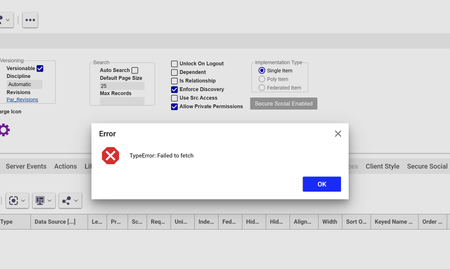
Failed to Fetch error
Hi all, I have been getting a 'failed to fetch' message over the past month when opening and searching across Aras. I get the message and the content usually won't load, but sometimes does. It's very intermittent (few times per week), and I've tried local troubleshooting but am not having any luck getting it to go away permanently. Has anyone seen this? I'm on version 22 (SaaS).248Views1like2Comments
ARAS31 import.mf deployment issue
Hai, We recently upgraded our environment from Aras Innovator 11 to Aras Innovator 31, and we are running into several issues while deploying our solution packages. I wanted to share the details here to see if anyone has faced similar challenges or has suggestions. In Aras 11, we used an import.mf file with the following structure, and everything deployed without issues: <imports> <package name="DatabaseIdentifier" path="com\aras\innovator\DatabaseIdentifier" /> <package name="com.aras.innovator.solution.PLM" path="PLM\Import" /> <package name="com.aras.innovator.solution.Project" path="Project\Import"> <dependson name="com.aras.innovator.solution.PLM" /> </package> <package name="com.aras.innovator.core" path=".\" /> <package name="com.aras.innovator.cui_default" path=".\" /> <package name="Custom_Pkg1" path="CustomPkg1\Import" /> <package name="Custom_Pkg2" path="CustomPkg2\Import" /> </imports> After upgrading to Aras 31, we tried using the same .mf configuration, but we are encountering multiple deployment errors. Issues Observed 1. Null Reference Error Object reference not set to an instance of an object. 2. Method Not Found Error It points to this AML:→ Error: “No items of type Method found.” <Item type='ItemType' id='8052A558B9084D41B9F11805E464F443' action='edit'> <Relationships> <Item type="Server Event" action="add"> <related_id keyed_name="FileOnGet" type="Method"> <Item type="Method" action="get" select="id"> <name>FileOnGet</name> </Item> </related_id> </Item> </Relationships> </Item> Import package 'com.aras.innovator.core' failed with message: No items of type Method not found. 3. Timeout Error During Import The package was then marked as a failed release (seen for custom_Pkg). faultcode: 999 faultstring: System.Net.WebException: The operation has timed out 1. In Aras 31, are we required to use manifest.json instead of the old import.mf format for custom packages? 2. If yes, where exactly should the manifest.json file be placed, and what structure should it follow? 3. How should we handle customizations or extensions to system-level packages like com.aras.innovator.core and com.aras.innovator.cui_default that previously existed in Aras 11? 4. Has anyone encountered the faultcode 999 / timeout issue during import — and how did we resolve it? Thanks in Advance SaliniSolved340Views0likes9Comments
HTTP Error 502.5 - ANCM Out-Of-Process Startup Failure
I install ARAS in win10, iis 10 and .net 9 SDK, with Hosting Bundle also, but it display a error like this: I have no idea how to deal with it, where is the system event log? how to Enable logging message? HTTP Error 502.5 - ANCM Out-Of-Process Startup Failure Common solutions to this issue: The application process failed to start The application process started but then stopped The application process started but failed to listen on the configured port Troubleshooting steps: Check the system event log for error messages Enable logging the application process' stdout messages Attach a debugger to the application process and inspectSolved525Views0likes3Comments
UI doesn't load for one user - anyone had a similar problem?
On our test server, on one particular database, one particular user doesn't get an UI when logging in. I've tried digging into the frontend calls, and it seems it's this call: https://{our test server}/Server/MetaData.asmx/GetConfigurableUi?accept=json&database={one particular db}&date=2025-05-02T13%3A01%3A58.94&item_classification=%25all_grouped_by_classification%25&item_type_id=&lang=en&location_name=TOC&user={me} which fails, with a "not a single item" fault. I am in fact logged in, and can e.g. go see the session information on the user button. Deleting all client side caches or logging in with incognito mode makes no difference. Have anyone else experienced this?143Views0likes5Comments
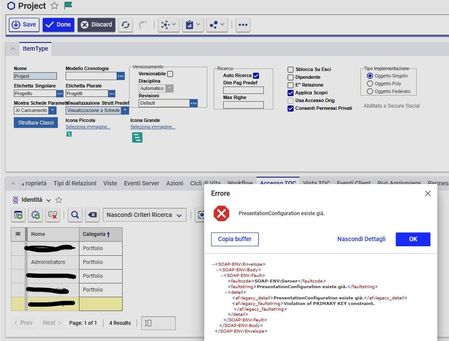
Problem enabling user for Project/program TOC: PresentationConfiguration already exists
Hi, I have this problem: When I try to add a new user in the TOC access I have the error: PresentationConfiguration already exists I can't understand where is the problem, the presentation configuration is empty Thanks Stefano103Views0likes3CommentsMPP 2025 Release (14.0.3) Corrupt Archive
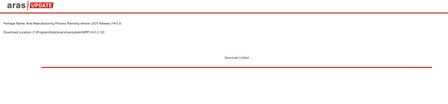
Hello, When attempting to download Manufacturing Process Planning version 2025 Release (14.0.3) via Aras Update, the "Download is failed." Aras Update logs: [embed:dc8ab71f-3b98-42d9-b0f6-e21e02a0f8e2:a821e795-7faf-4c9d-bb35-be36ae44a7df:type=text&text=2025-09-02%2009%3A54%3A55%2C868%20%5BERROR%5D%20%2811%29%20-%20System.IO.InvalidDataException%3A%20A%20local%20file%20header%20is%20corrupt.%0D%0A%20%20%20at%20System.IO.Compression.ZipArchiveEntry.ThrowIfNotOpenable%28Boolean%20needToUncompress%2C%20Boolean%20needToLoadIntoMemory%29%0D%0A%20%20%20at%20System.IO.Compression.ZipArchiveEntry.OpenInReadMode%28Boolean%20checkOpenable%29%0D%0A%20%20%20at%20System.IO.Compression.ZipFileExtensions.ExtractToFile%28ZipArchiveEntry%20source%2C%20String%20destinationFileName%2C%20Boolean%20overwrite%29%0D%0A%20%20%20at%20System.IO.Compression.ZipFileExtensions.ExtractToDirectory%28ZipArchive%20source%2C%20String%20destinationDirectoryName%29%0D%0A%20%20%20at%20System.IO.Compression.ZipFile.ExtractToDirectory%28String%20sourceArchiveFileName%2C%20String%20destinationDirectoryName%2C%20Encoding%20entryNameEncoding%29%0D%0A%20%20%20at%20Aras.Tools.ArasUpdateCore.Implementations.FileManager.DecompressZip%28String%20packagePath%2C%20String%20zipPath%2C%20String%20extractPath%2C%20Boolean%20isDeleteAfterDecompress%29%0D%0A%20%20%20at%20Aras.Tools.ArasUpdateCore.Implementations.Archiver.DecompressZip%28String%20packagePath%2C%20String%20zipPath%2C%20Boolean%20isDeleteAfterDecompress%29%0D%0A%20%20%20at%20Aras.Tools.ArasUpdateCore.Implementations.Commands.DecompressZipCommand.Execute%28CancellationToken%20cancellationToken%29%0D%0A%20%20%20at%20Aras.Tools.ArasUpdateCore.Implementations.Commands.CompositeCommands.DownloadCommand.Execute%28CancellationToken%20cancellationToken%29] Opened C:\ProgramData\Aras\ArasUpdate\MPP and attempted to manually extract 14.03.130, and extract fails: Tested the archive for 14.03.130 with 7-Zip, and it is reported as not an archive: Additionally, this issue was replicated on several systems, and I attempted to run Aras Update as Administrator. Are there any other options for getting the archive? I am not a subscriber, so I do not have FTP access.Solved194Views0likes3Comments
Getting name property mismatch error while changing data type - Text to Date
The Property has data type Text and we are trying to set to Date on that time we are getting : - does not match the required 'name' property pattern: ^[a-zA-Z](\w*| +\w+)*$]] Request: <Item type="ItemType" id="5738793931D64D938F02558135C20FE8" action="add" doGetItem="0"><Relationships><Item type="Property" id="41C87DE9CAC2484DBE736F80016D1C87" action="add"><data_type>date</data_type><pattern>short_date_time</pattern></Item></Relationships></Item> Response: <SOAP-ENV:Envelope xmlns:SOAP-ENV="http://schemas.xmlsoap.org/soap/envelope/"><SOAP-ENV:Body><SOAP-ENV:Fault xmlns:af="http://www.aras.com/InnovatorFault"><faultcode>SOAP-ENV:Server.PatternMismatchException</faultcode><faultstring><*$]]></faultstring><detail><af:legacy_detail><*$]]></af:legacy_detail><af:exception message="The specified value () does not match the required 'name' property pattern: ^[a-zA-Z](\w*| +\w+)*$" type="Aras.Server.Core.PatternMismatchException" /><af:item type="ItemType"><af:property name="name" value="" /></af:item></detail></SOAP-ENV:Fault></SOAP-ENV:Body></SOAP-ENV:Envelope>Solved135Views0likes2CommentsRESTFul API Delete Method Error 405
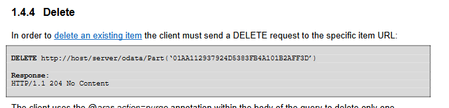
I tried to delete ItemType by following the Document about RESTful API in Aras. For example, PostMan was called as below (DELETE) localhost/.../exItemType ('abcde') If you call it url A 405.0 - Method Not Allowed error message is returned. Additionally, I tried to remove the RelationshipShip for itemType, but the same error occurred. Relationship remove was also carried out according to Document's method. For example, PostMan was called as below (DELETE) localhost/.../$ref This also returns an error of 405. How can I use RESTful to remove itemType?110Views0likes2CommentsARAS 31 soap-env:server authentication failed for admin authentication failed for admin
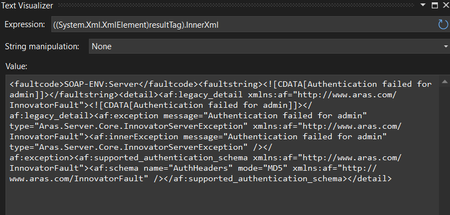
Hai, We have upgraded to ARAS 31 from 12. The migration is in progress. While login from application Its working fine. But while login from web API we are getting an error "soap-env:server authentication failed for admin authentication failed for admin" We have tried to give the password in MD5 hash format for username admin. But the error not yet solved. can anyone help us on this? Thanks in advance, Salini296Views0likes6Comments