How to highlight a custom CUI Button like the Notification Button based on events of interest?
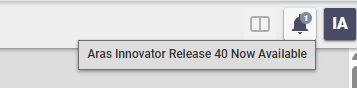
Hi community, does anyone know where Aras stores the "New Release" information that is shown in the CUI notification button (see screenshot)? I want to implement a similar button-highlighting mechanism. I have a time-tracking system in Innovator that is launched via a similar CUI button in the main header. I want users to be able to see at a glance whether their timer is currently running. (the timer is used for something not PLM related if you wonder about the use case) I know that we can use Messages/Notifications to make the button react, but I don't want to use the Messages feature itself. I think CUI buttons that can indicate a "status" of something could be a powerful feature. Thanks for any hints! Angela64Views0likes6Comments
TDF - Change an Element to Different Schema Type (Text > Heading)
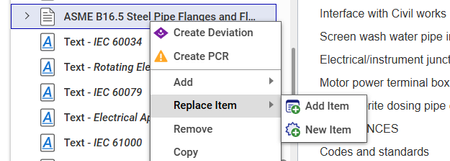
Hello All, Has anyone come up with an easy way to convert one DocumentSchemaElement into another one? We are dealing with importing Word documents into Tech Docs and rather than trying to hard-code in all the possible different style scenarios we're looking at some sort of CUI element to click a document node and then convert it to something else. Examples: Text to a Chapter or Section Text to a List Item There's a 'Replace Item' OOTB action, but I'm just curious if anyone has looked at swapping an element type. Example from OOTB below. Thanks in advance!30Views0likes0Comments
Displaying In-Line Units for xClass xProperties
Migrating from another system, they have a lot of properties that also include units. Like this: How can I modify the Extended Classification display to show units in line like this? My plan so far is to build out ItemTypes for each type of measurement (Length, Temperature, etc) similar to the default 'Measurement Units', including a conversion value to whatever base unit is decided. (Anyone know why there is a 'viewer' on this itemtype?) So then I could build xProperties linked to the ItemType for that type of unit, and add it to the xClass which would put the UoM as another line in the xProperties So the question is how would I modify the xClass Display so that I could pair up the two properties and get an in-line display of the units? (and do it for some properties, not others, and for many properties within an xClass)169Views0likes1Comment
Save User choices or Create Default list in Refine button CUI
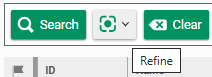
When clicking the refine button : a list is presented : with already checked values corresponding to the columns (properties) of the presented ItemType. The method responsible of the Init of the button is : cui_common_refine_init Code : Toolbar.extendFormatters({ refine: columnSelectionMediator.cuiToolbarFormatter.bind(columnSelectionMediator) }); return { type: 'refine' }; I would like to know if it's possible to personalize these filters on the search by code or configuration, or associated to user preferences, or saving when checked/unchecked by User ? Everything is already checked and some users would like to be able to have a "default" view. Thanks101Views0likes1Comment
Trouble Exporting HTML Table to Excel in Aras Innovator Custom Button
Hello everyone, I've been working on a custom button within the search tab for parts in Aras Innovator. The goal is to export a list of specific parts and their properties through a query and display them in an HTML table. Here's a snippet of the code I'm using to convert the HTML table to Excel and download the Excel file: [embed:dc8ab71f-3b98-42d9-b0f6-e21e02a0f8e2:4ac1465e-c931-489c-a19e-bb242bc1c5f6:type=javascript&text=var%20htmlCode%20%3D%60%0A%3Chtml%3E%0A%3Chead%3E%0A%3Cmeta%20http-equiv%3D%27Content-Type%27%20content%3D%27text%2Fhtml%3B%20charset%3Dutf-8%27%20%2F%3E%0A%3Cscript%20src%3D%27https%3A%2F%2Fcdnjs.cloudflare.com%2Fajax%2Flibs%2Fxlsx%2F0.16.9%2Fxlsx.full.min.js%27%3E%3C%2Fscript%3E%0A%3Cscript%20src%3D%27https%3A%2F%2Fcdnjs.cloudflare.com%2Fajax%2Flibs%2FFileSaver.js%2F2.0.5%2FFileSaver.min.js%27%3E%3C%2Fscript%3E%0A%3Cscript%3E%0Afunction%20substituteTableToExcel%28%29%7B%0Avar%20table%20%3D%20document.getElementById%28%27all_Parts_AML%27%29%3B%0Avar%20sheet_name%20%3D%20%27ALL_Parts_AML%27%3B%0Avar%20workbook%20%3D%20XLSX.utils.table_to_book%28table%2C%20%7Bsheet%3A%20sheet_name%2C%20cellStyles%3A%20true%7D%29%3B%0Avar%20wbout%20%3D%20XLSX.write%28workbook%2C%20%7B%20bookType%3A%20%27xlsx%27%2C%20bookSST%3A%20true%2C%20type%3A%20%27array%27%2C%20cellStyles%3A%20true%20%7D%29%3B%0AsaveAs%28new%20Blob%28%5Bwbout%5D%2C%20%7B%20type%3A%20%27application%2Foctet-stream%27%20%7D%29%2C%20%27ALL_Parts_AML.xlsx%27%29%3B%0A%7D%0Adocument.addEventListener%28%27DOMContentLoaded%27%2C%20function%28%29%20%7B%0AsubstituteTableToExcel%28%29%3B%0A%7D%29%3B%0A%3C%2Fscript%3E%0A%3Clink%20rel%3D%27stylesheet%27%20type%3D%27text%2Fcss%27%20href%3D%27styles.css%27%3E%0A%3C%2Fhead%3E%0A%3Cbody%3E%0A%24%7BexcelTable%7D%0A%3C%2Fbody%3E%0A%3C%2Fhtml%3E%60%3B] return htmlCode; I'm encountering issues with the export functionality. When I click the custom button, the HTML table is generated correctly, but the Excel file download doesn't seem to work. Could someone kindly review the code snippet above and provide any insights or suggestions on how to troubleshoot and resolve this issue? I would greatly appreciate it. Thank you in advance! Version 12.0 SP8Solved152Views0likes2CommentsHow to use CUI Checkboxes and Dropdowns + how get their values from other elements?
Hi Community, I right now play around with CUI CommandBarCheckboxes and CommandBarDropdowns. Does anyone of you have worked with these two elements already? I look for a solution how to get their selected values from another (!) CUI element. CommandBarCheckboxes doesn´t seem to work at all. I have added one to the test case in the picture, but it stays invisible. I've done some research and Aras doesn't seem to have ever used CommandBarCheckboxes in I12 and I14. So probably even Aras hasn´t noticed yet that they don´t work. Fear my testing skills, you can't hide anything! [emoticon:388f399768cb4510bc3d4c26fd6771f6] Anyway. Much more useful than the checkboxes are CommandBarDropdowns and MenuDropDowns. They luckily work quite straightforward and I was able to add one as seen in the picture. When using a click Method, we can get the selection of the dropdown with "const xyz = target.value". But in my case, I want to use the selected option from the dropdown in the click Method at the "CommandBarButton" left to the dropdown. I am able to get the dropdown element itself. But there is right now nothing that could tell me, which value is selected. When I look-up the element in the browser debugger, there is nothing that indicates which value is currently selected Does anyone know more? As alternative idea, we could maybe pass the value in the background. But that´s not my favorite approach. Thanks for any ideas! AngelaSolved171Views0likes2CommentsHow to enforce update of CUI elements in GUI via code?
Hi community, does anyone know a function or Method to force Innovator to re-render the CUI elements? Whenever I create a test-database, I execute a script that changes a few things (especially when the test database is a copy of the main database). E.g. I change the top-left logo to something that strongly indicates that we are in a test database or add some SavedSearches/Favorites to easy track which elements were changed since the test database was created. So basically the script does a lot of CUI changes to optimize the database for testing and cuts a few connections the original database normally would have to the outside world. After I have executed my script, I have to restart Innovator to see the UI changes. I am aware that´s a trivial and extravagant requirement - but it is somehow possible to automate this step? Innovator itself re-renders the TOC when an additional item is added. If we modify CUI elements, at least admins normally see the changes instantly. So there have to be some function that triggers these updates. But I haven´t found them yet. Does anyone know more? Used version is Innovator 12, but I also take a I14+ solution. :D Thanks and best regards! Angela50Views0likes0CommentsHow to update form field from CUI button in item window command bar?
Hi community, has anyone of you ever updated a Form field from a CUI button event from the ItemView.ItemCommandBar (=the main toolbar with the Edit/Done/etc. button when a Form is opened)? I am right now look for some code sample for this use case, but haven´t found the right one yet. I want to move some regular buttons from the Form to the ItemCommandBar cause it better fits the use case. With regular Form buttons updating Form fields is pretty easy. We can use window.handleItemChange("xyz","newValue") to update the fields. But we cannot use the same function from a CUI button in the ItemCommandBar. Does anyone already have a sample Method for this one? Thanks for any help! Angela Edit: thisItem.setProperty("xyz","123"); updates the context item, but it doesn´t do a live update in the Form field. So with the one the new value only appears after the user clicked save. I want to live update the Form with CUI, just like it would do with handleItemChangeSolved162Views0likes3Comments
Adding a CUI button, getting context item
Hi aras team, I am adding a cui button to the command bar, but random question... How can I get the context item for my method? The usual ways don't seem to apply and I am getting an error: "identifier 'options' has already been declared" the onClick event I setup has attempted to run against document.item, document.thisItem and I also tried parent :/ All the blogs seem to focus on get selected items in a grid, not the active window item.Solved3KViews0likes7Comments