How to highlight a custom CUI Button like the Notification Button based on events of interest?
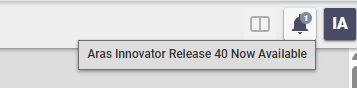
Hi community, does anyone know where Aras stores the "New Release" information that is shown in the CUI notification button (see screenshot)? I want to implement a similar button-highlighting mechanism. I have a time-tracking system in Innovator that is launched via a similar CUI button in the main header. I want users to be able to see at a glance whether their timer is currently running. (the timer is used for something not PLM related if you wonder about the use case) I know that we can use Messages/Notifications to make the button react, but I don't want to use the Messages feature itself. I think CUI buttons that can indicate a "status" of something could be a powerful feature. Thanks for any hints! Angela64Views0likes6Comments
Refresh challenge of CommandBarSectionItem - Dropdown
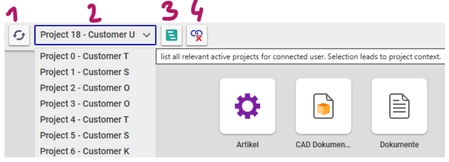
Dear Aras community, This is my first discussion thread, so please let me briefly introduce myself. I am the team manager of a small CAD/PLM team at a German company, and we recently managed to transition from a 20‑year‑old PLM system to a new one that all of you should know. We went live in December 2024, and little by little the Aras fan base in our company is growing. 1. UseCase introduction We handle many of our customizations ourselves, and we make extensive use of Aras Program Management. To track the work we do for our customers, everything needs to be linked to a customer project. That’s why we implemented a project_origin_id on every relevant business object (Part, Document, CAD, ECO, and other processes). If a user is connected to a project, then anything they add (create) is automatically associated with that project. This is visible through relationships on the Project ItemType. Users can connect themselves to a project via an action on the project called Assign Project Context. Now, after more than one year of running the system in production, we want to improve this feature for changing the project context. The idea is to have a dropdown list that displays every relevant and active Project item. When the user selects a project from the list, the OnClick method will attach the user to that project: (user.project_context_id = dropdown.value). In the following screenshot you will see our implementation so far: 1: should refresh the list (2) 2: dropdown list with all relevant customer projects 3: opens the current selected project in a new tab 4: detach the user from the project and should refresh the list (2) 2. The challenge The dropdown initialization and the OnClick method work as expected. However, we are facing a very frustrating challenge: the dropdown list needs to be refreshed whenever Button 1 or Button 4 is clicked. Unfortunately, we have not been able to implement this. At the moment, the dropdown list is only re‑rendered when the user logs in to Aras. 2.1 Include Events We could identify that the Command Bar Section Item of the dropdown item has a configuration field which is called IncludeEvents. When you select an event named Update State than the dropdown list gets initiallized too often: Perform a search on an random ItemType -> 4 x dropdown init gets started Perform a refresh an an random ItemType form -> 2x dropdown init gets started Switch tabs -> 2x dropdown init gets started Commit a change on a random ItemType -> 2x dropdown init gets started Because of performance issues we can not use IncludeEvents. 2.2 Initialiaze Dropdown We did manage to initiallize the dropdown when other Buttons gets clicked. But the values and labels does not gets rendered in the dropdown item. Below you see our code example for Button 1 (refresh). let dropdown = control.data.get("user_project_scope_list"); // Name = Name des CommandBarItem (DropdownListe) if (!dropdown){ aras.AlertError("The dropdown list was not found. This is an unknown error. Please contact your administrator."); return; } let newOptions = {value: "testID", label: "Project Test - Customer Test"}; dropdown.options = newOptions; dropdown.value = "testID"; // TODO: INIT oder REFRESH, ODER RENDER aras.AlertSuccess("The button has been refreshed."); When I am debugging this method I see that in my local scope the object this: Window exist. this.mainLayout.init seems to initialize the whole window but I only want to initialize my dropdown button. 3. The Question So my questions is if anyone of you did manage to new render a Command Bar Section Item in the header of Aras which is found under Command Bar Section: com.aras.innovator.cui_default.mwh_header? This would helps us a lot to gets this new feature Live in 3 weeks. I would appreciate every hint you can give me. Regards Patrick Ps.: Sry for formating ... I could not publish my very first discussion here without any disallowed html tags.Solved334Views0likes8Comments
TDF - Change an Element to Different Schema Type (Text > Heading)
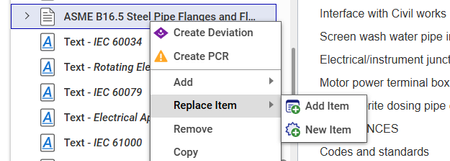
Hello All, Has anyone come up with an easy way to convert one DocumentSchemaElement into another one? We are dealing with importing Word documents into Tech Docs and rather than trying to hard-code in all the possible different style scenarios we're looking at some sort of CUI element to click a document node and then convert it to something else. Examples: Text to a Chapter or Section Text to a List Item There's a 'Replace Item' OOTB action, but I'm just curious if anyone has looked at swapping an element type. Example from OOTB below. Thanks in advance!30Views0likes0CommentsIs there a keyboard shortcut to switch through opened tabs?
Hi community, does anyone know, if there are any keyboards shortcut available to switch through opened tabs? I am looking for a keyboard shortcut to - set the focus to the tabs pane - move back and forth inside the tab pane - set focus back from tab pane to item window I think some simple shortcuts would ease up navigation - especially for administrators that have a tendency the mouse arm syndrome. I noticed that I most of the time switch to the mouse for the sole purpose of selecting another tab. Does anyone know a secret shortcut that could work? Or has somebody an idea to build this on, maybe with CUI? Any input welcomed! Thanks! Angela12KViews0likes7CommentsPass a property into a window.open() command
This seems simple, but I'm struggling with it. I've got a button added to a toolbar that I want to open an external URL with. The URL is saved as a property against the item. Have tied a method to the button and it's a Client-side javascript. Problem I'm getting is that the command window.open doesn't recognize the variable or const. I've tried various forms of this including nesting the getProperty into the window.open, but nothing seems to work. I have some HTML that works on the form, but I'd really like this as a button in the toolbar instead. Here's the working code in the HTML form: <a id="newlink2" href="#" onclick="return showURL2();" target="_blank" style="color: #3668B1;text-decoration: underline">Open 3D Model</a> <script> function showURL2() { debugger; var description2 = document.thisItem.getProperty("_forgemodelurl"); if (description2) { document.getElementById("newlink2").href = description2; } else { top.aras.AlertError("Please Enter the Forge 3D Link with value."); return false; } }; </script>Solved2.9KViews0likes3Comments
Displaying In-Line Units for xClass xProperties
Migrating from another system, they have a lot of properties that also include units. Like this: How can I modify the Extended Classification display to show units in line like this? My plan so far is to build out ItemTypes for each type of measurement (Length, Temperature, etc) similar to the default 'Measurement Units', including a conversion value to whatever base unit is decided. (Anyone know why there is a 'viewer' on this itemtype?) So then I could build xProperties linked to the ItemType for that type of unit, and add it to the xClass which would put the UoM as another line in the xProperties So the question is how would I modify the xClass Display so that I could pair up the two properties and get an in-line display of the units? (and do it for some properties, not others, and for many properties within an xClass)169Views0likes1Comment
CUI Table views not working
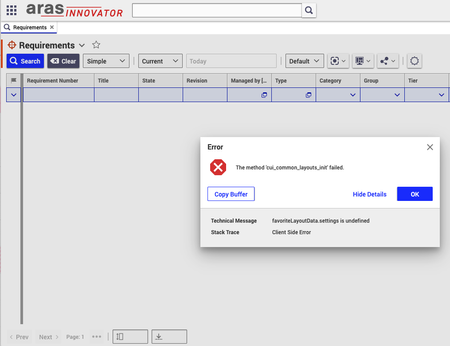
We have found a strange issue with the tool. We have found nothing in the available installation guides and support forums, and we would be very grateful if you could help us figure out the underlying issue here. We have an installation of Aras Innovator 2024 (2024 Release Build 14.0.25.40942) that was working for a while, but last week, it started to throw error messages whenever we open any table view (e.g. the Requirement table), or we use any user interface feature related to this view, e.g., change pagination size, select a requirement, etc. In each case, the error message relates to the favoriteLayoutData settings being not found. More specifically, the following message was emitted: > The method 'cui_common_layouts_init' failed. favoriteLayoutData.settings is undefined Client Side Error We have tried to reset the user preferences and try it out with another user, different browsers, and cleaning up locally stored cookies, but the issue persisted. We have also checked the server logs but have not found anything that might be helpful. The issue breaks the user interface quite severely, making it basically unusable, but have no idea where to look for possible causes.Solved780Views0likes43Comments
Save User choices or Create Default list in Refine button CUI
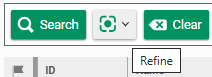
When clicking the refine button : a list is presented : with already checked values corresponding to the columns (properties) of the presented ItemType. The method responsible of the Init of the button is : cui_common_refine_init Code : Toolbar.extendFormatters({ refine: columnSelectionMediator.cuiToolbarFormatter.bind(columnSelectionMediator) }); return { type: 'refine' }; I would like to know if it's possible to personalize these filters on the search by code or configuration, or associated to user preferences, or saving when checked/unchecked by User ? Everything is already checked and some users would like to be able to have a "default" view. Thanks101Views0likes1Comment
Zombie tabs
At least two places in our system we experience zombie tabs, tabs that after an error message are impossible to close. I can now reproduce the issue: We have a custom "Delivery Risks" tab on parts. If I add a new risk and open it, the UI thinks the object is in a dirty state. Just opening it and closing it again, I get a popup with "Changes have not been saved. What do you want to do?". If I select "save" here, I get the error "The Command for the Command Alias 'SaveItem' failed." and the form still thinks the object has unsaved changes. However, if I click "Discard", I get the following error in the web console: Uncaught (in promise) CUIError: The Command for the Command Alias 'UnlockItem' failed. at T0 (factory.ts:152:8) at Object.execute (factory.ts:169:24) at onUnlockCommand (include.aspx?classes=tearoffWindow:915:36) at async eval (eval at x0 (factory.ts:53:9), <anonymous>:30:10) at async T0 (factory.ts:140:10) and I now have a zombie tab which is impossible to close. I can avoid creating a zombie tab by clicking "Edit" and "Save" manually in the form. Even though there are no changes, that apparently syncs the state properly. Requesting the object with AML studio, newly created items in potential zombie state look exactly like ones which have been edited and saved, so the problem isn't in the database end. Fully logging out and logging in again also clears potential zombie state, but merely closing the Part does not. So it's some kind of Item cache in the frontend which thinks the Risk object is dirty - or possibly it's the Form Item which is dirty. I suspect it has something to do with how I save the item. It's saved in a slightly unusual way, in a popup form. But before I dig into explaining how, does any of this sound familiar to you? Perhaps someone with better understanding of how the front end caching in Aras works can immediately tell me what's wrong here. This is Aras 31 by the way.Solved173Views0likes4Comments
Trouble Exporting HTML Table to Excel in Aras Innovator Custom Button
Hello everyone, I've been working on a custom button within the search tab for parts in Aras Innovator. The goal is to export a list of specific parts and their properties through a query and display them in an HTML table. Here's a snippet of the code I'm using to convert the HTML table to Excel and download the Excel file: [embed:dc8ab71f-3b98-42d9-b0f6-e21e02a0f8e2:4ac1465e-c931-489c-a19e-bb242bc1c5f6:type=javascript&text=var%20htmlCode%20%3D%60%0A%3Chtml%3E%0A%3Chead%3E%0A%3Cmeta%20http-equiv%3D%27Content-Type%27%20content%3D%27text%2Fhtml%3B%20charset%3Dutf-8%27%20%2F%3E%0A%3Cscript%20src%3D%27https%3A%2F%2Fcdnjs.cloudflare.com%2Fajax%2Flibs%2Fxlsx%2F0.16.9%2Fxlsx.full.min.js%27%3E%3C%2Fscript%3E%0A%3Cscript%20src%3D%27https%3A%2F%2Fcdnjs.cloudflare.com%2Fajax%2Flibs%2FFileSaver.js%2F2.0.5%2FFileSaver.min.js%27%3E%3C%2Fscript%3E%0A%3Cscript%3E%0Afunction%20substituteTableToExcel%28%29%7B%0Avar%20table%20%3D%20document.getElementById%28%27all_Parts_AML%27%29%3B%0Avar%20sheet_name%20%3D%20%27ALL_Parts_AML%27%3B%0Avar%20workbook%20%3D%20XLSX.utils.table_to_book%28table%2C%20%7Bsheet%3A%20sheet_name%2C%20cellStyles%3A%20true%7D%29%3B%0Avar%20wbout%20%3D%20XLSX.write%28workbook%2C%20%7B%20bookType%3A%20%27xlsx%27%2C%20bookSST%3A%20true%2C%20type%3A%20%27array%27%2C%20cellStyles%3A%20true%20%7D%29%3B%0AsaveAs%28new%20Blob%28%5Bwbout%5D%2C%20%7B%20type%3A%20%27application%2Foctet-stream%27%20%7D%29%2C%20%27ALL_Parts_AML.xlsx%27%29%3B%0A%7D%0Adocument.addEventListener%28%27DOMContentLoaded%27%2C%20function%28%29%20%7B%0AsubstituteTableToExcel%28%29%3B%0A%7D%29%3B%0A%3C%2Fscript%3E%0A%3Clink%20rel%3D%27stylesheet%27%20type%3D%27text%2Fcss%27%20href%3D%27styles.css%27%3E%0A%3C%2Fhead%3E%0A%3Cbody%3E%0A%24%7BexcelTable%7D%0A%3C%2Fbody%3E%0A%3C%2Fhtml%3E%60%3B] return htmlCode; I'm encountering issues with the export functionality. When I click the custom button, the HTML table is generated correctly, but the Excel file download doesn't seem to work. Could someone kindly review the code snippet above and provide any insights or suggestions on how to troubleshoot and resolve this issue? I would greatly appreciate it. Thank you in advance! Version 12.0 SP8Solved152Views0likes2Comments