Tree Grid View slow: reads whole branch on expand — improvement ideas?
Hi Aras Community Folks, I’m facing a performance issue with the Aras TGV, expanding a node is extremely slow at large data volumes (~10 minutes at 1M items), and it looks like the server reads all descendant rows even though only the first 100 are shown. Details below — would really appreciate any guidance. Environment: Aras Innovator 14.36(14 SP36). Standard TreeGridView over a recursive Query Definition. Short version of the problem: When a user expands a node, the grid shows only the first 100 children (page size 100, with a “Show More” row). But under the hood, the server reads every descendant item beneath that branch — hundreds of thousands of rows — even though only 100 are displayed and none of the descendants are returned in the response. At 1Million items this makes a single expand take ~10 minutes. Root item (starting point) │ └─ Level B item ← via root's reference property │ ├─ [B → B] Count(child B) > 0 │ └─ Level B item ⟲ "Reuse Query Element Definition" → back to B (recursion) │ └─ [B → C] Count(C) > 0 └─ Level C item (is_current = 1) │ └─ [C → C] Count(C) > 0 └─ Level C item ⟲ "Reuse Query Element Definition" → back to C (recursion) Page size (max_child_items) = 100 | Default grow depth = 2 Two recursive legs: B→B and C→C, each gated by Count(...) > 0 Two recursive legs: B→B and C→C, each via Reuse Query Element Definition. Each relationship is gated by a Count(...) > 0 child-existence filter. TGV settings: page size max_child_items = 100, default grow depth = 2. What we measured: Expand one mid-level B node at 1M items: ~8 min. Shows 100 B rows + “Show More”, 0 C rows — but SQL reads the full descendant set (hundreds of thousands of rows) twice (paging query + property read). Count(...) > 0 already compiles to a permission-aware EXISTS; the cost is the broad descendant read, tied to the expand-icon (hasChild) check. Relationship source_id/related_id indexes already exist. Questions: On expand of an item, only the first 100 children are shown — but the server reads all descendants beneath the branch (full data) first, then returns 100 items. The descendants are read in full just to show 100 rows and to decide each row’s “+” expand icon. Is there a supported way to fetch only the 100 displayed rows from the start, and to make the expand-icon check stop at the first match instead of reading everything? Regarding the global tgv_MaxFetchItemsCount variable (default 1,000,000): we’re considering temporarily lowering it (e.g. to 100) before an expand and restoring the default afterwards, to limit how much is fetched. Does it actually limit the result to that many rows (return just the first N), or does it only reject an over-limit request with an error? And is it checked before the heavy SQL runs (so it saves the work), or after (so the rows are already read)? Would really appreciate any guidance or suggestions on the queries above106Views0likes3Comments
How can I control behavior of BOM on revision up
Hi community, Here is an use case that User want to control Part by item that make the BOM are float or fixed when revision up. I read some solution that you can use a customized property and replace the action when creating a new revision. But I need more explain on doing this. Thanks to read this.47Views0likes0Comments
Add Documents To BOM Structure
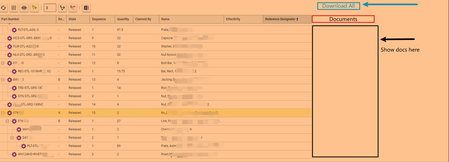
Like the title says. I need the PDF version of all CAD documents to be shown in BOM and BOM Structure. Also, these have to be downloadable, if I can add a "Download All' button that would be cherry on top! I saw a post there similar to this. Do I need to edit the SQL query for this? Add joins to bring in the CAD documents? Which sql query would need to be edited? and is the "Download All" button implemented. If someone can give me the detailed steps to accomplish this that would be awesome. Thanks!85Views0likes1CommentRecursive API call to explode BOM
The internal reporting tool in Aras doesn't work for us therefore we have to use external tools. I need to explode the BOM downwards for parts. Use this data in PowerBi to create reports. I have figured how get the BOM structure but it only gives level 1. How do I drill down? This is my call to get level 1 BOM url/Part('9A75B30B66A5465BA372C30384133345') BOM($select=quantity,nmg_material_record;$expand=related_id($select=item_number,unit,major_rev))38Views0likes0Comments
BOM Structure view with Substitute details
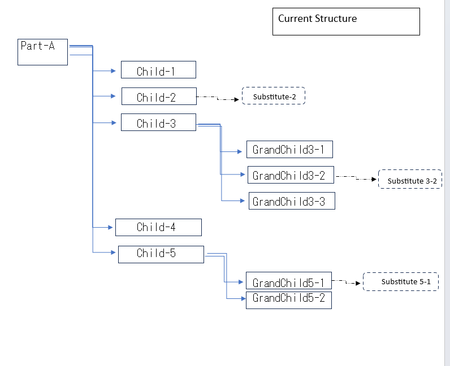
We are trying to fetch set of specific BOM substitute parts that are added on the Part BOM relationship of Root Part. And display it similar to BOM Structure tree view with addition filters on property. The substitute part added has to be replaced on the view with the Part on with it is present but the BOM Structure for the remaining has to be the same.44Views0likes0CommentsCustomize Bills of Materials (BOM)
Hello, I need to make a new BOM form where the BOM level is only 1 and I need to remove some of the columns that appear in the default BOM form. Also, need to add a logo to the form. Super new to Aras, therefore, if someone can point me in the right direction that would be great. I need to know which topic in the Aras documentation to look for. If someone can provide birds-eye-view of the whole process that would be great.242Views0likes3Comments
Need to Hide few Columns in Part relationship BOM Tab
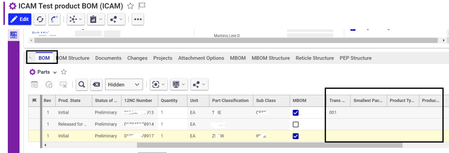
Hello Aras Experts, I have a business requirement related to the BOM (Bill of Materials) tab. In my current scenario, there is a need to hide specific columns, illustrated by the black-highlighted sections in the attached screenshot. Typically, to hide a column, one would navigate through ItemType -> Part -> Property -> and check the Hidden & Hidden2 values. However, in my case, these columns seem to be non-existent in this structure. I've also attempted to use JavaScript in the formload and formpopulated events to hide the columns, but unfortunately, this approach has not yielded the desired results. I would greatly appreciate any suggestions or guidance you can provide to address this issue. columns to hide - Transgroup, smallest pack, product type etc ( highlighted below) Regards, S. Senthurpari169Views0likes1Comment
Printing a Multi-Level BOM Report for an Effectivity Resolved BOM
Experts - How do I print a multilevel BOM report for an effectivity resolved BOM? More details: We built a 150% BOM with model effectivity. We resolve the BOM to 100% by applying the model effectivity. Now we want to print this as a Multi-level BOM Report so that procurement can do their stuff? Exporting to excel is not an option, since the report is formatted and does not need all of the properties. Kamran1.9KViews0likes5CommentsHow do you import Excel BOM data into Aras Innovator open version?
Hello, I currently use the open, free version of Aras Innovator and am having difficulty figuring out how to store BOM data within the tool. I have seen from other posts that subscribers have access to a direct import functionality and also some kind of batch loader. For the latest free version of ARAS, what are the exact steps to import an excel file containing BOM data into Aras? Any help would be greatly appreciated.6.5KViews1like7Comments