Solved
Refresh challenge of CommandBarSectionItem - Dropdown
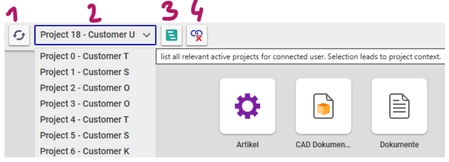


I made a short tests...this one worked!!!
Ah ok, I think we need a bit more to make this work. I did a quick test. I added two buttons to the mwh header. One acts as regular button, the other one renders the content as text.
I added following click Method to the button:
const key = "ai_mytestlabel"; // Name of second CUI element
const data = control.data.get(key);const updatedDataObject = Object.assign({}, data, {
value: "testvalue",
label:"testlabel"
});
control.data.set(key, updatedDataObject);
control.render();
When I click the button, the label is updated -->
I think this concept could also work for a dropdown update, but I haven´t tried yet....
EDIT: Also my idea is probably not the perfect solution. Instead of reloading the dropdown, the concept would add the content manually.
But if it leads to the same results, users would not notice a difference. So it would be a sufficient workaround.
I will try to render the dropdown content if I find some time. It´s an interesting use case!


