Refresh challenge of CommandBarSectionItem - Dropdown
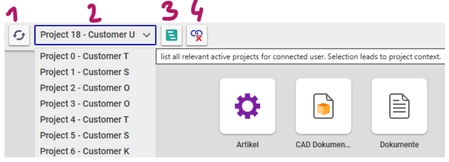
Dear Aras community, This is my first discussion thread, so please let me briefly introduce myself. I am the team manager of a small CAD/PLM team at a German company, and we recently managed to transition from a 20‑year‑old PLM system to a new one that all of you should know. We went live in December 2024, and little by little the Aras fan base in our company is growing. 1. UseCase introduction We handle many of our customizations ourselves, and we make extensive use of Aras Program Management. To track the work we do for our customers, everything needs to be linked to a customer project. That’s why we implemented a project_origin_id on every relevant business object (Part, Document, CAD, ECO, and other processes). If a user is connected to a project, then anything they add (create) is automatically associated with that project. This is visible through relationships on the Project ItemType. Users can connect themselves to a project via an action on the project called Assign Project Context. Now, after more than one year of running the system in production, we want to improve this feature for changing the project context. The idea is to have a dropdown list that displays every relevant and active Project item. When the user selects a project from the list, the OnClick method will attach the user to that project: (user.project_context_id = dropdown.value). In the following screenshot you will see our implementation so far: 1: should refresh the list (2) 2: dropdown list with all relevant customer projects 3: opens the current selected project in a new tab 4: detach the user from the project and should refresh the list (2) 2. The challenge The dropdown initialization and the OnClick method work as expected. However, we are facing a very frustrating challenge: the dropdown list needs to be refreshed whenever Button 1 or Button 4 is clicked. Unfortunately, we have not been able to implement this. At the moment, the dropdown list is only re‑rendered when the user logs in to Aras. 2.1 Include Events We could identify that the Command Bar Section Item of the dropdown item has a configuration field which is called IncludeEvents. When you select an event named Update State than the dropdown list gets initiallized too often: Perform a search on an random ItemType -> 4 x dropdown init gets started Perform a refresh an an random ItemType form -> 2x dropdown init gets started Switch tabs -> 2x dropdown init gets started Commit a change on a random ItemType -> 2x dropdown init gets started Because of performance issues we can not use IncludeEvents. 2.2 Initialiaze Dropdown We did manage to initiallize the dropdown when other Buttons gets clicked. But the values and labels does not gets rendered in the dropdown item. Below you see our code example for Button 1 (refresh). let dropdown = control.data.get("user_project_scope_list"); // Name = Name des CommandBarItem (DropdownListe) if (!dropdown){ aras.AlertError("The dropdown list was not found. This is an unknown error. Please contact your administrator."); return; } let newOptions = {value: "testID", label: "Project Test - Customer Test"}; dropdown.options = newOptions; dropdown.value = "testID"; // TODO: INIT oder REFRESH, ODER RENDER aras.AlertSuccess("The button has been refreshed."); When I am debugging this method I see that in my local scope the object this: Window exist. this.mainLayout.init seems to initialize the whole window but I only want to initialize my dropdown button. 3. The Question So my questions is if anyone of you did manage to new render a Command Bar Section Item in the header of Aras which is found under Command Bar Section: com.aras.innovator.cui_default.mwh_header? This would helps us a lot to gets this new feature Live in 3 weeks. I would appreciate every hint you can give me. Regards Patrick Ps.: Sry for formating ... I could not publish my very first discussion here without any disallowed html tags.Solved334Views0likes8Comments
What characters are forbidden in regular Innovator passwords?
Hi community, when creating regular Aras accounts (no LDAP) I noticed that certain characters in passwords don´t work. The user cannot login if certain characters are used in the password, e.g. " or §. Is there an official list of characters to avoid? Thanks! Angela160Views0likes5CommentsHow to use Variables 'Logon allowed to' and 'Relationship Access Control'?
Hi Community, does anyone know the purpose of these two Variables? - Logon allowed to - Relationship Access Control You can find them in TOC->Administration->Variables The Logon allowed to Variable seems to be intended for update purposes. I expected that only Admins are able to login when I change this one to Administrators. But nothing happened after I changed this Variable. Non-admins were able to login just the same way as before. The Relationship Access Control Variable sound like it is related to the new MAC and DAC features. But I didn´t find any hint how to use this one. Any ideas? Thanks for any input! Angela5.7KViews0likes2Comments