Logging & Progressbars Inside Innovator
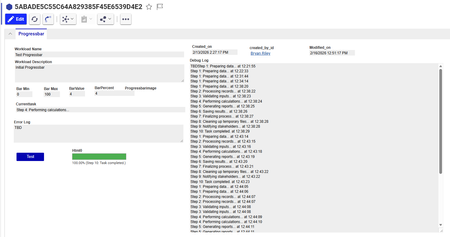


Many thanks for the post! We haven’t had these kinds of experimental projects in this forum for years!
Here is a collection of random thoughts I have regarding the idea:
Progress bar ideas
Thanks! I've continued working on this project, and am successfully using it as a progressbar & logging mechanism for one of our server methods.
I moved the trigger to an action on a part, that javascript method creates the progressbar item and passes any required information (part ID, etc) to the progressbar item, and onload of the form it triggers the second javascript method which 'initializes' the process and then repeatedly calls the server method to do the processing. So a 3-method system... trigger, controller, server
This appears to have the benefit of giving the server a break so it doesn't bog down, and I introduced a timer to all me to adjust that spacing between calls... and I can also put debugging information into the console if I like
Using the conversion server is a good idea too, how do you tell Aras what server to process a method on?
I was also wondering about the Async methods, I'm guessing its there (C# supports it), but I haven't tried it. but it doesn't solve my logging needs.
It also goes very slow if its 1 by 1 part on a large BOM (too much updating) so now it can call the server method in 'chunks' , ex it processes 100 parts in a BOM at a time... but the progressbar is going in chunks too so I'm trying to figure out how to balance the visual with the performance.
The CSS idea is fantastic! I'll try it this week and let you know how it goes (I'm not great with the HTML / CSS world). Where did you put the '.state...' code into Aras? Images was my backup plan, I could probably make .jpg of the bar at 1% increments and change it and it would update on a refresh? maybe not that much better than the % number I already have...


