Error on Replication Transactions vault
Hi to all, I have configured a cloud replication vault in addition to the Default vault hosted on a local server. However, I am getting the following error in the Replication Transactions: Error processing replication transaction for file with ID=7C78086233CC4E239A66960DDDD59AF0: SendRequestToVaultServer: The remote server returned an error: (404) Not Found. For reference: I have opened port 443 bidirectionally between the Application Server and the Vault Server. I have correctly configured the replication.config file on the Application Server. The InnovatorServerUrl value in the vault.config file is correct. The certificates are valid and correctly configured. What could be causing this issue?Solved104Views0likes1Comment
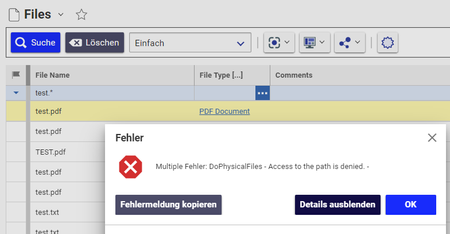
"Multiple Errors: DoPhysicalFiles - Access to the path is denied. " when deleting files. What permission shall I use?
Hi community, I want to delete some orphaned files in the File Vault. We don´t use the "delete automatically" variable. I am able to discover the affected files in the file vault. But when I try to delete one orphaned file manually in the File ItemType I get the following error message: Multiple Errors: DoPhysicalFiles - Access to the path is denied. - I assume I have add an additional permission to the Vault-folder structure in the File vault. But which one shall I use? I remember I added one additional permission in the past on my old MS Server 2012. But I didn´t use the setting on my new 2022 instance. I assume I used "IIS_USRS" or similar in the past. But I never knew if this was the "correct" permission to use. Does anyone know the "official" solution for this one? Thanks and best regards! Angela1.3KViews1like4Comments
Configuring Alternate Vault Installations
Hi Colleagues, I am trying to install an alternate vault for Aras V12SP18. I have set out following the installation guide to the letter, but this fails when the guides says that I should update the file: "C:\Program Files\Aras\Innovator\VaultServerConfig.xml" since this files does not exist in my installation. Is the "ARAS Innovator - Installation Guide" out of date, or am I missing something? Please any help will be appreciated, this forum is full of posts requesting Alt Vault assistance, but no clear answer on the steps for creating alternative vaults. Kind Regards Riaan3.5KViews0likes2Comments
Aras 12.0 SP9 VaultServer config
how to config file url token in 12.0 SP9? In the previous version we can config like this: <enforce_user_credentials>0</enforce_user_credentials> But there is no such file "VaultServerConfig.xml" at 12.0 SP9. I only found the file "vault.config" ,but don't know the key name in the appsetting.4.4KViews0likes1Comment