Is it possible to change color for TGV row/cell based on some conditions
Hi Experts, We have use case to change color of TGV row/cell based on some conditions. We are exploring various options to implement color change in TGV row/cell or at least text color. But not able to get any working solutions. Could you please suggest if it possible to achieve it. If yes, could you please share steps to implement solution. Example: Change TGV cell for rows with State - Released or Change Text color 'Released' to Red/Green168Views0likes3Comments
Tree Grid Views but with additional filters to hide data we don´t need - what options do we have?
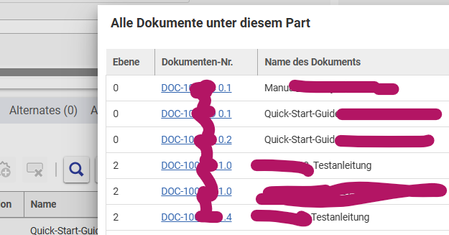
Hi community, let´s assume we have a multilevel BOM with many Parts. Some of them have Documents attached. There are Documents on level 0, 3 and 7 of the BOM. I want to have an tree-like overview of the Parts and the Documents, but I don´t want to display the Parts with no documents. We can use AML or SQL to get the data. E.g. I currently use following custom AML solution to get all documents and their levels in a simple grid rendering, SQL would work similiar: In the past I already used some 3rd part libs to render lightweight trees. But these custom trees often don´t blend in well if we don´t spend a lot of time with styling. So my idea is right now to use TGV for the tree rendering. I made a very test with QD and TGV. Data is missing intentionally as it´s just a functional sample. TGVs work well for trees, but they will show the complete BOM structure. Is there any way to hide the data we don´t need? We can use parameters to filter the data. But this filter option currently only hides the text of the elements and not the complete grid row itself. This behavior probably has a reason. In a multilevel BOM scenario Innovator cannot tell on which BOM level we have documents. TGVs need the complete data for the rendering. But I would be awesome if we would have some additional filter options to play around with appearance of the data AFTER query execution. Does anyone has an idea to do these kind of tree renderings? Thanks for any input!!! Angela141Views1like4Comments
Tree Grid Filtering on multiple levels
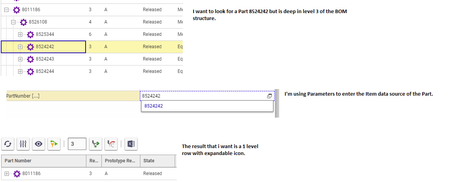
Hello, I'm looking through the community forum for some information regarding filtering/searching on PE_BomStructure tree grid view and query definition. I've got a multi-level BOM that I'd like users to be able to filter by Part Number ( string or item). I followed the Query Element Builders Guide and the blog post "Filter a Tree Grid View with Parameters"; however it only works with the parameters at the top level. Is there any way to effectively filter the 2nd level rows and return the expandable level 1 rows where the item is found? I added a visualization in the attachment.104Views0likes3CommentsBOM Structure view with Substitute details
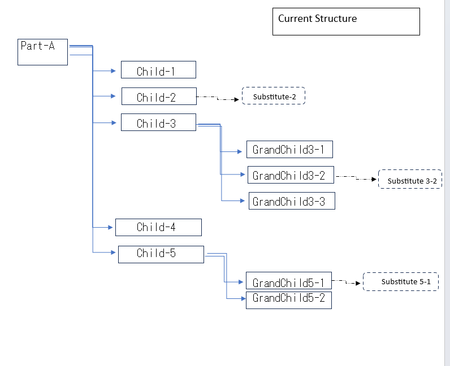
We are trying to fetch set of specific BOM substitute parts that are added on the Part BOM relationship of Root Part. And display it similar to BOM Structure tree view with addition filters on property. The substitute part added has to be replaced on the view with the Part on with it is present but the BOM Structure for the remaining has to be the same.39Views0likes0Comments
Edit a tree grid view cell value
Hi, Can someone please provide a sample javascript code that will allow to update a tree grid view’s cell text with a dynamic value . In my case the value is not fetched as part of query definition, instead it’s calculated dynamically in the UI based on a tool bar button click method26Views0likes0Comments
TGV Parameters Filtering doesn't show record if value is blank
Hello All, I have created TGV on part and I have added parameters to search and filter on custom "state" property . I have given default value as * . It works well and able to search and filter on state column but there is one issue if any record has state "Blank" . That record is skipped from TGV results and which is causing me showing incorrect TGV results . Help me to understand cause. Thanks in advance .92Views0likes1Comment
Tree Grid View Filtering
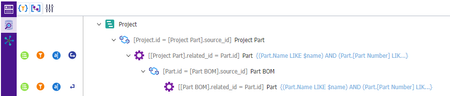
Hello, I've got a multi-level BOM that I'd like users to be able to filter by Name or Part Number. I followed the Query Element Builders Guide and the blog post "Filter a Tree Grid View with Parameters"; however it only works with the parameters at the top level. So if for instance, I've got a part (top level) with a Name of "Part_1" and I use the parameters on the TGV with that, it filters fine. But if I have a sub-part to that, with say a name of "Part_2" and I use the parameters on the TGV to that item, nothing shows up. I'm assuming the problem is in the filter condition... (Name LIKE $name) AND ([Part Number] LIKE $item_number) Can anyone help?Solved1.8KViews0likes4CommentsTree Grid View References to Items that are not available
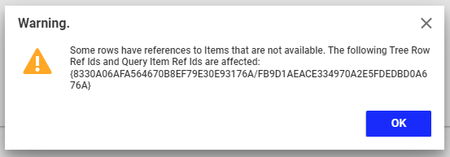
We've successfully created multiple Tree Grid Views following the documentation and various blog posts. However we're run into an issue when a query is updated (say removing elements) before those elements are removed or unmapped from the Tree Grid View. We get this sort of error: Has anyone else encountered this and is there anyway to clean up broken links other than rebuilding the whole TGV? Thanks in advance!Solved3.1KViews0likes5Comments