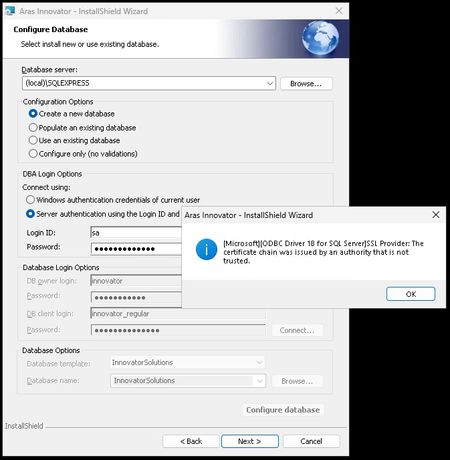
Installation issue : ODBC Driver 18 SSL Provider error
Hello 😊 I'm trying to install Aras Innovation (all in one server for testing purpose) and I'm stuck on this nice message while trying to connect to the DB : Just to inform that my system is under : Windows Server 2025 Datacenter Azure Edition (10.0) IIS server version 10 (10.0.26100.32860) .NET 6.0.36 installed Microsoft SQL Server Express 2025 (17.0.1000) ☝️ And I've already pushed ODBC17/18 but without success regarding the install. Thank you for your precious "lights" 💡 Regards, G.393Views0likes11Comments
Error during database setup and admin login
Hello, I've followed the YouTube installation videos and installation guide PDFs to the letter several times, but it seems I can not get past an error. When I click "configure database" during Aras Innovator installation, after about a minute or two of what seems to be useful work, I get an error message that says: "Error 27506. Error executing SQL script CoreAndSolutions.sql. Line 136543. Must declare the scalar variable "@EXISTING_ID". (137)" I then hit OK and the "database installation process" stops without any further errors. At this point I don't know whether the installer attempted to continue to do other stuff or just gave up after the above error. I then click "Next" in the installer and continue Aras installation. There are no further errors and the installation is completed. I then go to: localhost/.../ and the login screen pops up. I enter "admin" as username and "innovator" as password, but I get the following message and can not proceed further: "Invalid column name 'id'." I started SQL management studio to check the DB, and the "InnovatorSolutions" db appears to be in there. Owner is "sa", size is 62.75MBi Number of users 6, Collation: Turkish_CI_AS This is a Windows 7, 64-bit system. SQL server is SQL Express 2014. Aras innovator is the latest innovator as of June 2018. We tried the entire installation process 3 times to no avail. We'd appreciate any help with this issue.2.7KViews0likes0Comments