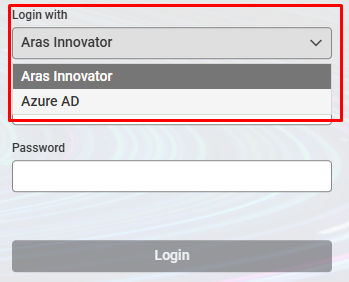
[ARAS 14] Change display order of authentication options
Hello! My company is using ARAS Innovator 14 (release 39). We have two authentication options: Entra ID SSO and local user. By default, the local login option is displayed first in the login page, and we have to choose the SSO option from the drop-down menu. I want to know if there's a build-in method allowing me to change the display order of those two authentication options? Like a config file, a button on AWS console, etc.? I have read through the ARAS documents come with the installer, but there's nothing regarding this matter. Searching through Google and AI didn't help me find any discussions about this topic too. If anyone know about this, please share your experience with me! Thank you! Here's the screenshot of the login page. The 'Aras Innovator' option allows me to login using local username and password. The 'Azure AD' allows me to login using my company SSO account. Extra discussions: My manager also asked if we could disable the local login option, only leave the SSO one in the login page. As I understand, this is not possible with the backend of ARAS, as each SSO user need to be associated with a local user of the same name. And we should keep the ability to login ARAS with local admin/root account in case SSO has issue. But that's just my understanding, please correct me if you have different opinion/best practice about that!131Views0likes5Comments
Permission Per Item Control - Private Permissions
Hello, I am looking for a discussion/recommendation on a permissions question. For the Item Type Part, we want to do control on a part by part (Item) basis. I understand that we could do Private Permissions is there any other way? or is the Private Permission answer an acceptable way to do this.Solved188Views0likes3CommentsSecurity for Project to just allow identities of the relationship of the "Project Team" to see/edit
I have looked into MAC and DAC and basic identity based securities and cannot figure out a solution for this. What I am trying to do is to only allow identities that are on the "Project Team" of the out of the box relationship to project to read/write. Now this is different than a normal "Team" again because it is just a relationship to project that is identities. Any help is appreciated, thank you!63Views0likes1Comment
Apply information security header: X-Content-Type-Options:nosniff File Upload not working
Dear All, Apply information security header: X-Content-Type-Options:nosniff File Upload not working My Env description as follows: 1. IIS 10 2. Aras Innovator 11Sp12 Error Message: Refused to execute script from 'localhost/.../include.aspx Because its MINE type ('text/css') is not executable, and strict MIME type checking is enabled. How to resolve the issue?47Views0likes2CommentsApply information security header: X-Content-Type-Options:nosniff File Upload not work
Dear All, Apply information security header: X-Content-Type-Options:nosniff File Upload not work My Env description as follows: 1. IIS 10 2. Aras Innovator 11Sp12 Error Message: Refused to execute script from 'localhost/.../include.aspx Because its MINE type ('text/css') is not executable, and strict MIME type checking is enabled. How to resolve the issue?86Views0likes7Comments
File Encryption
What can we do to add more security to our files, can the files in the Vault be encrypted? My first take is that one would use a server method on one of the onGet hooks to encode/decode files during the movement from and to the Vault. Can anybody offer any advice doing this ? Kind Regards Riaan3.7KViews0likes3Comments
From the Minerva Vault: How to Create Secure Access Using MAC Policy in Aras Innovator
This blog by Damien Destrez covers an incredibly interesting use case for MAC Policy within Aras Innovator. Intro This blog by Damien Destrez goes over an incredibly interesting use case for MAC Policy within Aras Innovator. If you're unfamiliar with MAC Policies we have an introduction blog which can be found here, as well as another concrete example ...279Views0likes0Comments
Confidential Data Storing in Aras
Hi All , What would be the ideal way to store values in Aras that are confidential. Example : I am calling an url from within an Aras Method and I do not want to expose the URL value in my Method or on the Item. I was wondering that somehow the value should be stored in the database in an encrypted format and decrypted in the Method where it is invoked. Is there a way to achieve this in Aras and is this the correct approach to handle sensitive data. Regards :)2.5KViews0likes2Comments
OAuth - How to use Grant Type "Authorization Code" for token generation
Hi everyone, I recently read this excellent blog post about token authentication using the REST API for Innovator, and in it Christopher Gillis says that ' urrently, I believe "password" is the only authentication type allows [sic]. Aras as a whole is moving towards more types of authentication in 12.0, so this is likely to change in the upcoming releases.' With 12.0 released, I see that OAuthServer\OAuth.config now defines two allowedGrantTypes for the clientRegistry with ID "IOMApp": 'password' - the one that I have been using in my code when generating OAuth tokens for Innovator so far - but also 'authorization_code'. Hence, I was wondering if anyone knows a practical way yet to generate the access token with that grant type, instead of using "password"? Thanks a lot in advance for any info on this subject. Cheers, C8.4KViews2likes2CommentsAttribute suppression with multiple parameters
Hi, I'm looking to add a suppression to my ItemAnalysis.Suppressions xml file using 2 parameters in the same attribute suppression. How do I go about this/is this even possible? Currently we're on Aras 11SP12. We're looking at the following case. We want to enable appointing assignees in a workflow using the batchloader. To do so I need to use the following AML: <AML><Item action="add" type="Activity Assignment"> <source_id><Item type="Activity" action="get" where="[Activity].id IN ( SELECT a.ID AS ID FROM innovator.[ACTIVITY] a LEFT JOIN innovator.[WORKFLOW_PROCESS_ACTIVITY] wpa on a.id = wpa.RELATED_ID LEFT JOIN innovator.[WORKFLOW_PROCESS] wp on wpa.SOURCE_ID = wp.ID LEFT JOIN innovator.[WORKFLOW] w on w.RELATED_ID = wp.id LEFT JOIN innovator.[DOCUMENT] d on d.ID = w.SOURCE_ID WHERE a.LABEL_NL = 'name of some activity recognizable to the user, or @parameter1' AND wp.STATE = 'Active' AND d.ITEM_NUMBER = 'itemnumber of some document, or @parameter2' AND d.IS_CURRENT = '1')"> </Item> </source_id> <related_id><Item type="Identity" action="get" where="[Identity].keyed_name='some known identity'"></Item></related_id> </Item> </AML> So to find the right activity I need the name of that activity (or at least what a user recognizes as such) and the itemnumber of the document the activity assignment ultimately relates to. In order to fit this in the format required by the ItemAnalysis.Suppressions I'd have to supply 2 separate parameters but I don't think this is supported. How can I get this to work, with the knowledge that we're looking to migrate to Aras 12 and therefor adding <operating_parameter key="parse_item" value="false"/> to InnovatorServerConfig.xml won't be a longterm solution?1.5KViews0likes0Comments