Office Connector - PowerPoint Issues
Hello, I am currently working on setting up a template for ARAS Office Connector for Microsoft PowerPoint. By writing a custom VBA script I am able to get the Custom Properties to display on a slide, but the issue I am having is how to have the field/text update when the Custom Property is changed? Has anyone else created a solution for a PowerPoint template that can solve this or approached this in a different way to solve setting up a PowerPoint template?89Views0likes1Comment
get property list from item type, issue reading the result item
hello, i want to get a list of names of propreties that start a certain way 'z%'. i've found aml that was supposed to do it, i' made an iom code to recrate that aml (actually creates the right aml). But what i get is only one item, so i want to know if the aml is actually good or if there is a specific way to get the properties from that one item i get. <AML> <Item action="get" type="itemType" select="name" where="ItemType.name = 'ZFCcontrainteTemplate'"> <name>part</name> <Relationships> <Item type="property" action="get" select="value, label" where="[property].label like 'z%'" /> </Relationships> </Item> </AML> var FCitemType = inn.newItem("itemType", "get"); // FCitemType.setProperty("name","FCcontrainteTemplate"); // FCitemType.setAttribute("select", "name"); FCitemType.setAttribute("where", "[itemType].name like 'ZFCcontrainteTemplate'"); var property = FCitemType.createRelationship("property", "get"); property.setAttribute("select", "label"); property.setAttribute("where", "[property].label like 'z%'"); console.log("FCitemType before apply: "+FCitemType.ToString()); FCitemType = FCitemType.apply(); thanks lucasSolved6.1KViews0likes7Comments
MAC Policy Issue in ARAS 31 – Need Help with Access Restrictions
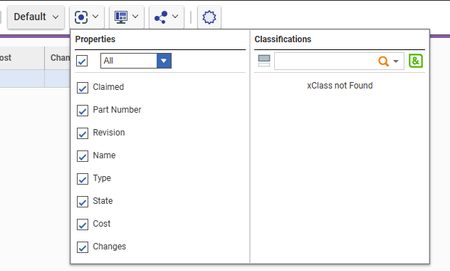
Hi all, I’m working on implementing access restrictions for the a Itemtype in ARAS 31. There are around 46 records, and I want to group them into 5 categories. Each category will be assigned to specific identities, allowing controlled access based on the record's classification. To achieve this, I started configuring MAC policies. However, I’ve run into a few issues: The fields I need are disabled in the MAC Policy Condition Editor. User-defined properties are not accessible in the condition editor either. Has anyone faced similar challenges or found a workaround for this? Any help or guidance would be greatly appreciated! Thanks, Salini193Views0likes2Comments
Override IType Property auto-label
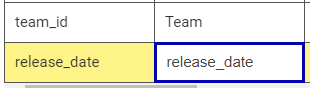
After adding a property to an ItemType and tabbing from the property Name to the property Label there is the annoying behaviour I would like very much to override. I'd rather it stay blank than constantly needing to: Select all, delete, and finally enter a sensible label. I'm only critical of this annoyance because all the default labels are sensible, but whoever put together this auto-label didn't seem to take that into account. For instance, the default label for "team_id" is simply "Team", and the default label for "release_date" is "Release Date". So, why would tab-to automatically copy the property name? I'd like if tab to split on underscore and did a caps op on every word. Then, rather than constantly needing to delete the auto-label to enter one that conforms to the default look of out-the-box Innovator IType labels, it would actually be helpful! This is a quick JS example, and I think if ANY auto-label this should be it: ``` // Change "release_date" property name to desired default-looking, "Release Date": "release_date".split("_").map(x => x.charAt(0).toUpperCase() + x.substr(1,)).join(' ') ````5.7KViews0likes6Comments
Javascript method to set the default value in search grid?
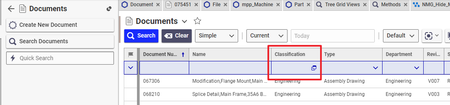
We need to limit the search results of "Document" item for certain identity. The default value of "Classification" should be prefilled to "General" and should be unchangeable by the user. I was thinking if I can get the current identity of the user and then call a function that would prefill the "Classification" to "General" and make it uneditable. I have a code for finding the identity of the user. I need to know how to target the "Classification" field of "Document" item type in the search grid view thanks!138Views0likes2CommentsGetting name property mismatch error while changing data type - Text to Date
The Property has data type Text and we are trying to set to Date on that time we are getting : - does not match the required 'name' property pattern: ^[a-zA-Z](\w*| +\w+)*$]] Request: <Item type="ItemType" id="5738793931D64D938F02558135C20FE8" action="add" doGetItem="0"><Relationships><Item type="Property" id="41C87DE9CAC2484DBE736F80016D1C87" action="add"><data_type>date</data_type><pattern>short_date_time</pattern></Item></Relationships></Item> Response: <SOAP-ENV:Envelope xmlns:SOAP-ENV="http://schemas.xmlsoap.org/soap/envelope/"><SOAP-ENV:Body><SOAP-ENV:Fault xmlns:af="http://www.aras.com/InnovatorFault"><faultcode>SOAP-ENV:Server.PatternMismatchException</faultcode><faultstring><*$]]></faultstring><detail><af:legacy_detail><*$]]></af:legacy_detail><af:exception message="The specified value () does not match the required 'name' property pattern: ^[a-zA-Z](\w*| +\w+)*$" type="Aras.Server.Core.PatternMismatchException" /><af:item type="ItemType"><af:property name="name" value="" /></af:item></detail></SOAP-ENV:Fault></SOAP-ENV:Body></SOAP-ENV:Envelope>Solved135Views0likes2CommentsModifying a Reverse View
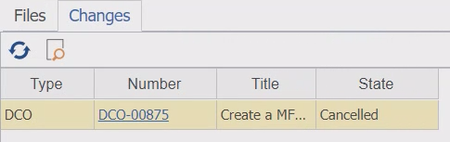
Hi all, On a document container, we have a tab with the view of all the DCOs that affect it: Because this isn't the standard view, the fields/properties that are/aren't shown here do not correlate to their visibility on the DCO item type. My question is, how do you add or remove fields/properties to this view? Please let me know if you need more information. We are using Aras Innovator Version 11 SP9.118Views0likes4CommentsHow to use getid() method to get id?
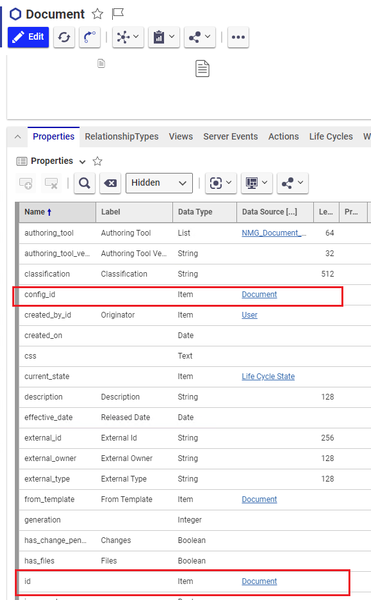
In the system the "Id", and "config-id" are the item name. For Document item, the id is the document name(screenshot below). I need the id property, the one that is unique, to be added to the properties of Document item. I have this method but it doesn't work: Item myItem = this.newItem("Document"); myItem.setID(this.getID()); Item results = myItem.apply(); Error is "Error Number: CS0161, 'ItemMethod.methodCode()': not all code paths return a value" Also, once I have this method working what are the next steps. I guess I will have to add this method to the Server Events, event onBeforeGet, correct? Any help is appriciated. Thanks!215Views0likes5Comments