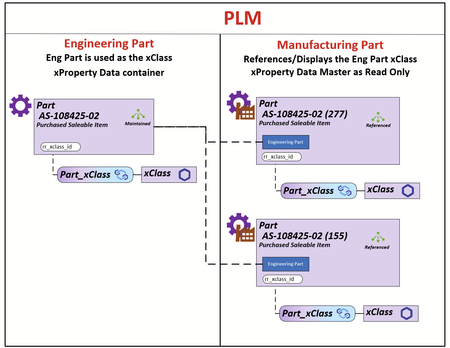
Reference an Engineering Parts xClass xProperty as Engineering Master Data
My client uses the Part Itemtype in 2 contexts Engineering and Manufacturing. The requirement is that all xClass-xProperty data is populated and maintained on the Engineering Part and the xClass-xProperty data on the Manufacturing Part is rendered using the Engineering Parts Id. The Engineering Part that will be used for the reference will be the Latest Released Generation. The illustration demonstrates the relationship between the Engineer Part and its Manufacturing Parts. What I do know is that all the xProperty Data is store in the table set [xp.XpropertyValues#] as shown below. All xProperties can be acquired using the ID of the Engineering Part (I have a SQL query that can do this for reporting for a BOM structure). I have modeled the js/ts methods but I can't figure out how to apply them in this use case. What I can't figure out is: 1) What are the options for rendering the xClass-xProperty container on the Part Manufacturing Form 2) How to populate that container using the ID from the latest Released Engineering Part Any help/ideas would be greatly appreciated. Thanks Scott45Views0likes0Comments
CheckoutManager DownloadFilesAsync - How to use for downloading large amounts of files?
Hi Community, does anyone of you have sample code for "downloadFilesAsync" C# function? Aras Innovator provides the CheckoutManager to download Files from the Filevault to the server. There are a couple of examples that show how to use "DownloadFiles", but I have found none that shows how to use "DownloadFilesAsync". This piece of code does nothing: // Create a checkout manager to download all of the files to the server Aras.IOME.CheckoutManager cm = new Aras.IOME.CheckoutManager(files); //cm.DownloadFiles(filePath, 4); cm.DownloadFilesAsync(filePath, 4); When comparing Aras version of "DownloadFileAsync" to regular WebClient DownloadFilesAsync code, I think Async downloads need some additional event handlers. So I tried something like this: // Create a checkout manager to download all of the files to the server using(Aras.IOME.CheckoutManager cm = new Aras.IOME.CheckoutManager(files)) { //cm.DownloadFiles(filePath, 4); cm.DownloadFilesAsync(filePath, 4); cm.DownloadFileCompleted += DownloadFileCompletedEventHandler; } return this; } // Handle the DownloadFileCompleted event private static void DownloadFileCompletedEventHandler(object sender, EventArgs e) { "DownloadFileCompleted" is not listed in the official Aras Innovator 12.0 .NET API Reference. But when using this function I didn´t get an error message in the Method editor, so the Innovator API definitely supports it. But the 2nd sample of course still does nothing. Does anyone know more? Best regards! Angela857Views0likes4Comments
File checkout (using fetchFileProperty & checkout) not working in custom user with custom identity. how to checkout file in for user not having administrator permissions ?
I'm trying to checkout a file using item method fetchFileProperty in custom user with custom identity which do not have administrator permission. Aras gets hang after this method call, also tried with file.checkout methods behaviour is same. With admin user file checkout with same code is working but not for different user. What is the issue ? is this due to permissions ? what permissions needed to checkout file?5.1KViews0likes2Comments