Release 36 Bug Fix: Search Grids Remain Blank and Strange Horizontal Scroll Behaviour
Hello Innovators, In Release 36 we were facing some strange behaviour: Some grids remaining blank even though items where returned from the search query Horizontal scrolling on grids would result in columns being mixed and glitching After some debugging, we found the issue was caused by 3 files. Attached you find those fixed files and a readme.txt on how to implement them. [View:/community/cfs-file/__key/communityserver-discussions-components-files/10/R36-Blank-Search-Grid-_2B00_-Horziontal-Scroll-Bug-Fix.zip:320:240] I hope this can help anyone else facing this issue. All the best, Daan373Views2likes7CommentsRenewing OAuth Certificates
Hello fellow Aras developers, Here's another niche topic I recently had to tackle: renewing OAuth certificates. If you've been applying Aras patches (upgrade packages) over the years, your OAuth certificates are likely outdated. They expire every few years depending on your configuration and need renewal. I found several instructions online for manually replacing certificates, but they consistently resulted in: Authentication errors on sign-in ANCM Out-Of-Process Startup Failure After multiple attempts working with Aras Support, I took a different approach: Downloaded the out-of-the-box installer for our version (Release 36) and ran it on our production environment. Yes, even though the upgraded Release 36 was already installed. Selected 'Custom Installation' and chose ONLY the OAuth module. This generated a clean OAuth folder with a fresh set of certificates. Copied (overwrite) all the certificates (CTRL + A) into these directories (probably overkill, but redundant certs are harmless and it makes the process much faster): OAuthServer\App_Data\Certificates\ Innovator\Server\App_Data\Certificates\ Innovator\Client\App_Data\Certificates\ SelfServiceReporting\App_Data\Certificates\ VaultServer\App_Data\Certificates\ Updated the OAuth.config file in \OAuthServer\ with our internal production endpoint. iisreset (from command prompt as Administrator) Note: If you run the installer on a machine that already hosts an existing Aras instance, make sure to run changeguid.exe on the innovatorsetup.msi first to avoid impacting the current installation. Done! Please let me know if this helped and/or how I can improve this post. Let's make it a community effort to have up-to-date information for all of us.571Views2likes6Comments
Authority Mismatch on Settings vs. signin state after upgrading from R21 to R27
My R21 environment (dev) had no issues prior to applying the R27 patch. Can't get his resolved. Hopefully somebody else in thee community have had this and resolved this issue. From oidc-clinet-ts.min.js: this._settings.authority !== t.authority && r.throw(new Error("authority mismatch on settings vs. signin state"))310Views0likes6Comments
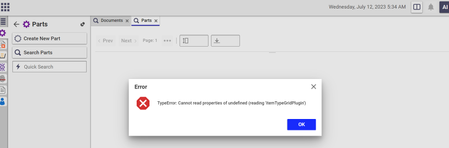
TypeError: Cannot read properties of undefined (reading 'itemTypeGridPlugin')
Dear team, We are currently using Aras version Release19. However, when attempting to perform searches for both parts and documents, we encounter an error stating "TypeError: Cannot read properties of undefined (reading 'itemTypeGridPlugin')." This error is causing the search operation to fail. Could you please advise on how to resolve this issue? I have already checked the error log, but I couldn't find any relevant information. Attaching screenshot for your reference. Regards, S. Senthurpari318Views0likes3Comments
Decimal and Float precision, rounding and overflow errors
I am looking for a solution to the following problems that I am encountering using 12.0 SP9 with Float and Decimal data types. I need to store engineering data that can contain very large and very small numbers. In testing a property using the Float and Decimal types I find that both have problems storing the full precision that SQL Server supports. For Float, large numbers work as expected from -1.79E+308 to +1.79E+308. However small numbers do not. The smallest number that I can store in a Float property from the Aras item's form is 1E-20. I can not store any more digits of precision (for example, 1.000000000000001E-20), either entering the value in scientific or decimal notation. Using MS SQL Server Management Studio I can manually edit the item to store smaller numbers in the database (down to the minimum of 2.23E-308). However these are rounded to 0 in Aras. As an aside, despite the documentation and training saying that you need to specify Precision and Scale for floats, neither of these appear to have any effect on how the Float column is specified in SQL Server - it always uses the default 8 byte float size. For Decimal there are problems with precision, rounding and large numbers. Here Precision and Scale really do matter, as they should. For Precision of 38 and Scale of 0, I should be able to store values up to 10^38-1 = 99999999999999999999999999999999999999, and I can do this directly in SQL. However Aras gives a Conversion Overflow error in search grids and the item form if this is stored in the database. The largest number that Aras can handle is 79228162514264330000000000000. This happens to be 2^96 rounded to 16 digits of precision. If Scale > 0 is specified the largest number possible is reduced. Aras only seems to be able to store 16 or sometimes 17 precise digits in the Decimal type with Precision set to 38, and the rounding behavior is inconsistent. For example entering 11111111111111111 rounds up (!) to 11111111111111112 when the item is saved. 1111111111111111111 also rounds up to 1111111111111111200, but 1111111111111111100 rounds down to 1111111111111111000. My best guess is that Aras is performing internal conversions that result in the rounding and overflow problems, since using SQL Server directly works as expected. Is this a known bug? Is there any way to work around this behavior? Do later service packs fix these issues? Thanks3.2KViews0likes2Comments
GUID showing up in keyed name on change of an item while in edit mode.
After creating an item, if I open the item back up and make a change to it, the keyed name changes from its original name to the GUID. In this case the original keyed name was 'Concept-0047 1' but after making a change it switched to the guid of the item. If I save the item it will go back to the original name of 'Concept-0047 1' so it is only an issue if the user is editing the item. If there is a solution to this please let me know.2.6KViews0likes2Comments
First letter uppercase on field labels in Chrome
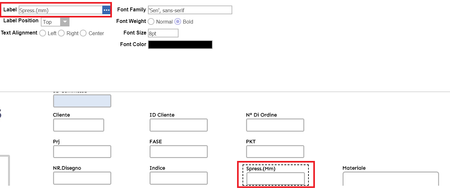
Hello, Hi, How are you all? i hope everyone are fine and safe in these difficult situations. I'm here to ask that, is there any hot fix or a solution for the problem as shown in picture. Filed lables are not appearing as same as defined by Administartor in Chrome, i think Chrome is following first letter uppercase. i checked in Mozilla firefox and is working fine. Is there any solution on this problem. Aras Innovator Version 12.0 Chrome Version: 81 Thanks. Venkat Sai4.4KViews0likes2Comments
Error 500.19
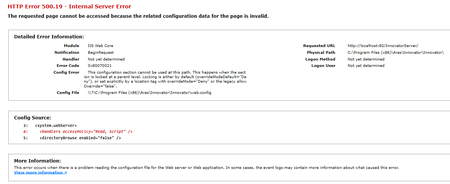
I have a new install of Innovator 12 and have an issue when trying to access the http://localhost/innovatorserver/ I get error 500.19. I have checked a few of the posts here and verified that ASP.NET, .NET 3.5 and 4.0 are installed. I'm running SQL Express 2019. Any help will be appreciated.4.7KViews0likes1Comment
Problems about Aras Innovator Method Plugin
Hello, I'm trying to use the Aras Innovator Method Plugin to debug a sever method in Visual Studio 2017. Here is the URL of Aras Innovator Method Plugin: https://github.com/arasplm/ArasVSMethodPlugin/wiki I build the project successfully, but when i try to debug it the error is 'System.InvalidCastException'. Where the error appeared is 'Aras.Server.Core.CallContext CCO = ((Aras.Server.Core.IOMConnection)serverConnection).CCO;'. I don't know why because it is a template code. Any help would be appreciated. Thank you!4.9KViews1like1Comment