Release 36 Bug Fix: Search Grids Remain Blank and Strange Horizontal Scroll Behaviour
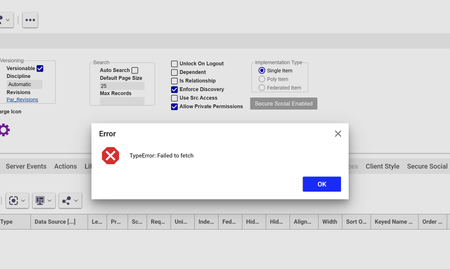
Hello Innovators, In Release 36 we were facing some strange behaviour: Some grids remaining blank even though items where returned from the search query Horizontal scrolling on grids would result in columns being mixed and glitching After some debugging, we found the issue was caused by 3 files. Attached you find those fixed files and a readme.txt on how to implement them. [View:/community/cfs-file/__key/communityserver-discussions-components-files/10/R36-Blank-Search-Grid-_2B00_-Horziontal-Scroll-Bug-Fix.zip:320:240] I hope this can help anyone else facing this issue. All the best, Daan340Views2likes7Comments
Failed to Fetch error
Hi all, I have been getting a 'failed to fetch' message over the past month when opening and searching across Aras. I get the message and the content usually won't load, but sometimes does. It's very intermittent (few times per week), and I've tried local troubleshooting but am not having any luck getting it to go away permanently. Has anyone seen this? I'm on version 22 (SaaS).248Views1like2CommentsReport Manager shows blank page on Aras Innovator 14.35 CE – Hotfix and Reporting 29 guidance needed
Hello Community, I am evaluating Aras Innovator 14.35 Community Edition and am currently facing an issue with Report Manager, where the result page is displayed as a blank screen. Before asking, I would like to clarify that I believe I understand the separation of concerns, and I am seeking confirmation on the correct and minimal path forward. Environment Aras Innovator: 14.35 Community Edition Build: 14.35.0.44037 MS Build Number: 000000.00 Browser: Chrome / Edge (same behavior) OS: Windows Server (IIS) Observed issue When executing a report (Type: General) from Report Manager, the result page is blank. From the browser network trace, I can see that blank.html is requested with an incorrect URL where an X-salt token is injected into the path, for example: .../InnovatorServer/Client/X-salt=std_14.35.0.44037-X/scripts/blank.html Instead of: .../InnovatorServer/Client/scripts/blank.html The AML itself executes successfully (InnovatorServer.aspx returns 200), so the issue seems to be on the client / UI side. What I understand so far Please correct me if anything below is wrong. 1. Hotfix / Patch Hotfixes apply to the Innovator core (Server / Client). MS Build Number = 000000.00 indicates that this environment is likely running a base build without Hotfixes applied. Therefore, this blank page issue may already be a known issue fixed by a Hotfix. 2. Reporting Aras Reporting is a separate product and installer. Reporting 29 requires a dedicated license (Aras.Reporting) and installation. Reporting 28 is not required if installing Reporting 29 as a new installation. My questions To proceed efficiently without rebuilding the environment, I would appreciate guidance on the following: 1. Is it correct that applying the appropriate Hotfix for Innovator 14.35 is a prerequisite, and that Reporting alone would not resolve the blank page issue? 2. Is the blank page / X-salt URL issue a known problem in the base 14.35 build that is addressed by a specific Hotfix? 3. For a Community Edition evaluation environment, is it realistic to: obtain the required Hotfix, and obtain the Aras Reporting 29 CD Image as part of the same guidance / recommendation? 4. If Reporting 29 is installed after the Hotfix, should Report Manager work as expected without additional undocumented steps? Goal / Constraints The goal is to evaluate Report Manager functionality. I would like to avoid rebuilding the existing test environment if possible. I am looking for the shortest correct path, even if it involves multiple steps, as long as the sequence is clear. Any advice, confirmation, or references would be greatly appreciated. Thank you in advance.191Views0likes2CommentsRenewing OAuth Certificates
Hello fellow Aras developers, Here's another niche topic I recently had to tackle: renewing OAuth certificates. If you've been applying Aras patches (upgrade packages) over the years, your OAuth certificates are likely outdated. They expire every few years depending on your configuration and need renewal. I found several instructions online for manually replacing certificates, but they consistently resulted in: Authentication errors on sign-in ANCM Out-Of-Process Startup Failure After multiple attempts working with Aras Support, I took a different approach: Downloaded the out-of-the-box installer for our version (Release 36) and ran it on our production environment. Yes, even though the upgraded Release 36 was already installed. Selected 'Custom Installation' and chose ONLY the OAuth module. This generated a clean OAuth folder with a fresh set of certificates. Copied (overwrite) all the certificates (CTRL + A) into these directories (probably overkill, but redundant certs are harmless and it makes the process much faster): OAuthServer\App_Data\Certificates\ Innovator\Server\App_Data\Certificates\ Innovator\Client\App_Data\Certificates\ SelfServiceReporting\App_Data\Certificates\ VaultServer\App_Data\Certificates\ Updated the OAuth.config file in \OAuthServer\ with our internal production endpoint. iisreset (from command prompt as Administrator) Note: If you run the installer on a machine that already hosts an existing Aras instance, make sure to run changeguid.exe on the innovatorsetup.msi first to avoid impacting the current installation. Done! Please let me know if this helped and/or how I can improve this post. Let's make it a community effort to have up-to-date information for all of us.532Views2likes6Comments
MAC Policy Issue in ARAS 31 – Need Help with Access Restrictions
Hi all, I’m working on implementing access restrictions for the a Itemtype in ARAS 31. There are around 46 records, and I want to group them into 5 categories. Each category will be assigned to specific identities, allowing controlled access based on the record's classification. To achieve this, I started configuring MAC policies. However, I’ve run into a few issues: The fields I need are disabled in the MAC Policy Condition Editor. User-defined properties are not accessible in the condition editor either. Has anyone faced similar challenges or found a workaround for this? Any help or guidance would be greatly appreciated! Thanks, Salini193Views0likes2Comments
CUI Table views not working
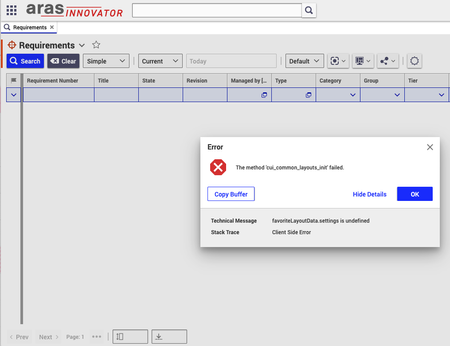
We have found a strange issue with the tool. We have found nothing in the available installation guides and support forums, and we would be very grateful if you could help us figure out the underlying issue here. We have an installation of Aras Innovator 2024 (2024 Release Build 14.0.25.40942) that was working for a while, but last week, it started to throw error messages whenever we open any table view (e.g. the Requirement table), or we use any user interface feature related to this view, e.g., change pagination size, select a requirement, etc. In each case, the error message relates to the favoriteLayoutData settings being not found. More specifically, the following message was emitted: > The method 'cui_common_layouts_init' failed. favoriteLayoutData.settings is undefined Client Side Error We have tried to reset the user preferences and try it out with another user, different browsers, and cleaning up locally stored cookies, but the issue persisted. We have also checked the server logs but have not found anything that might be helpful. The issue breaks the user interface quite severely, making it basically unusable, but have no idea where to look for possible causes.Solved780Views0likes43Comments
Revisions/Item Versions appearing blank
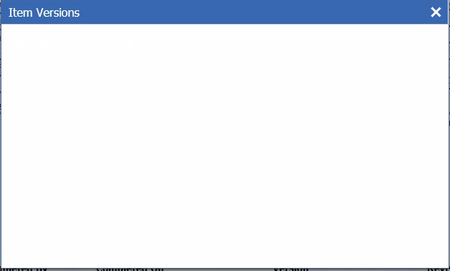
Hi all, Created a new ItemType. Initially, when viewing an instance, Views > Revisions displays the Item Versions. However, after creating a few items, it then appears blank, as illustrated here: I haven't changed anything (as far as I know), it just stops rendering after some time. Any input would be greatly appreciated. Aras Version 11 SP9. Thanks very much.101Views0likes5CommentsBug Report - CAD Document Comparison Rotation
Hi there, I've encountered a bug in Aras version 23. This was previously reported by my organization in version 12SP9 and was confirmed fixed, but appears to have been re-introduced. In brief: Create a CAD Document - ensuring versioning is enabled Add a viewable PDF - save Edit the CAD Document - change the viewable PDF - save Go into the PDF view and user the comparison function Both images get rotated 90 degrees clockwise and the bottom of the PDF gets chopped off. Has this been re-addressed in a later version of Aras? Thank you, Phil MacIntyre SSI61Views0likes2Comments
Authority Mismatch on Settings vs. signin state after upgrading from R21 to R27
My R21 environment (dev) had no issues prior to applying the R27 patch. Can't get his resolved. Hopefully somebody else in thee community have had this and resolved this issue. From oidc-clinet-ts.min.js: this._settings.authority !== t.authority && r.throw(new Error("authority mismatch on settings vs. signin state"))273Views0likes6Comments
TypeError: Cannot read properties of undefined (reading 'itemTypeGridPlugin')
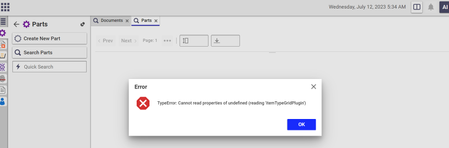
Dear team, We are currently using Aras version Release19. However, when attempting to perform searches for both parts and documents, we encounter an error stating "TypeError: Cannot read properties of undefined (reading 'itemTypeGridPlugin')." This error is causing the search operation to fail. Could you please advise on how to resolve this issue? I have already checked the error log, but I couldn't find any relevant information. Attaching screenshot for your reference. Regards, S. Senthurpari300Views0likes3Comments