Batch Delete Identity Memberships
Hello, We have used the batchloader utility to create new memberships in Innovator. It appears that removals are a bit more difficult due to safeguards in place for the system. What is an easy path forward in creating an AML script (or method) to accomplish this task? For example, we have 89 identities that had incorrect identity membership assignments. The goal is to remove existing memberships of an identity and add a different identity. --CorbinSolved190Views0likes2Comments
How does Aras handle the action(s) on a collection of items in an AML?
I have written a server method that uses some custom XML-like AML to implement an inventory reconciliation. I would like to pass in a collection of items for this method to act on. When I implement a server call like: <AML> <Item type="Part" id="1" action="mymethod"/> <Item type="Part" id="2" ./> </AML> is "this" the collection? Or is the correct approach to pass the collection within an item? <AML> <Item type="Part" id="x" action="mymethod"> <Item type="Part" id="1" ./> <Item type="Part" id="2" ./> </Item> </AML> Or, is it generally considered best practice to have the server method called independently for each item? Thank you!1.2KViews0likes1Comment
ARAS31 import.mf deployment issue
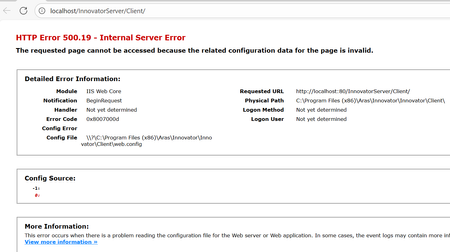
Hai, We recently upgraded our environment from Aras Innovator 11 to Aras Innovator 31, and we are running into several issues while deploying our solution packages. I wanted to share the details here to see if anyone has faced similar challenges or has suggestions. In Aras 11, we used an import.mf file with the following structure, and everything deployed without issues: <imports> <package name="DatabaseIdentifier" path="com\aras\innovator\DatabaseIdentifier" /> <package name="com.aras.innovator.solution.PLM" path="PLM\Import" /> <package name="com.aras.innovator.solution.Project" path="Project\Import"> <dependson name="com.aras.innovator.solution.PLM" /> </package> <package name="com.aras.innovator.core" path=".\" /> <package name="com.aras.innovator.cui_default" path=".\" /> <package name="Custom_Pkg1" path="CustomPkg1\Import" /> <package name="Custom_Pkg2" path="CustomPkg2\Import" /> </imports> After upgrading to Aras 31, we tried using the same .mf configuration, but we are encountering multiple deployment errors. Issues Observed 1. Null Reference Error Object reference not set to an instance of an object. 2. Method Not Found Error It points to this AML:→ Error: “No items of type Method found.” <Item type='ItemType' id='8052A558B9084D41B9F11805E464F443' action='edit'> <Relationships> <Item type="Server Event" action="add"> <related_id keyed_name="FileOnGet" type="Method"> <Item type="Method" action="get" select="id"> <name>FileOnGet</name> </Item> </related_id> </Item> </Relationships> </Item> Import package 'com.aras.innovator.core' failed with message: No items of type Method not found. 3. Timeout Error During Import The package was then marked as a failed release (seen for custom_Pkg). faultcode: 999 faultstring: System.Net.WebException: The operation has timed out 1. In Aras 31, are we required to use manifest.json instead of the old import.mf format for custom packages? 2. If yes, where exactly should the manifest.json file be placed, and what structure should it follow? 3. How should we handle customizations or extensions to system-level packages like com.aras.innovator.core and com.aras.innovator.cui_default that previously existed in Aras 11? 4. Has anyone encountered the faultcode 999 / timeout issue during import — and how did we resolve it? Thanks in Advance SaliniSolved340Views0likes9CommentsHTTP Error 500.19 - Internal Server Error
This error hits while installing the ARAS innovator, if User done install the .Net Hosting bundle. The solution was to download and install the MS .Net 8.0 Hosting bundle from below link. HTTP Error 500.19 after installing Innovator 2025 - Solved - Getting Started - Aras Community - Aras Community146Views0likes0Comments
Item.apply overwriting action, has it always done this?
After upgrading from version 12 to 31, we started getting an error when saving a certain custom datastructure, developed for us by Minerva back in the day: Failed to execute 'serializeToString' on 'XMLSerializer': parameter 1 is not of type 'Node'. From what I can tell, this happens because Minerva's old code calls an action directly on the document.thisItem object var output = document.thisItem.apply("VE_GetCopyTreeGridHeader"); which "pollutes" document.thisItem with that action. When later hitting save, it calls this function instead of doing whatever it ordinarily would (probably a get action), resulting in the error. I observe that if I change the action to "get", it gets rid of the error message and saves any changes in the object itself, but not in a related items treegrid associated with it. If I change the Iaction to "update", it saves everything correctly the way it used to do in version 12. I see that the docs on item apply says that it overwrites the action, but if it always did that, how did this code ever work? (By the way, that .apply() overwrites the action is an error-prone side effect which I can't see any good reason for)71Views0likes1Comment
Need help with AML query to connect two independent ItemTypes via referencing item
Hi community, I am working on an AML query but cannot find a proper solution. It contains a lot of custom ItemTypes, but technically the query would work similar like this: START--------> Part ---------------------> Part BOM --------------------------> Part <------------- MyCustomItemType (part_id) <-------- GOAL is to get properties of this referencing item We start from Part and go downwards to get the complete BOM. Easy. Now I have a second independent ItemType "MyCustomItemType" that also uses Part inside an item property. I want to include this custom ItemType to the query to fetch some additional data. In my case the end result shall combine BOM information with warehouse specific data. Problem: "MyCustomItemType" is not included in the "natural downward path" of Parts. And I want to avoid to include it at all costs. The data is federated and shall only be fetched on demand. So we have only a true reference from "MyCustomItemType" to Part, but no real reference form "Part" to "MyCustomItemType". Question: How can I get the data of MyCustomItemType when we start from the top part? Is this possible at all? Interesting detail: When we use a Query Definition these kind of "inverted" queries would be possible by "using referencing item". Is something similar possible with plain AML? Thanks for any hint! Angela195Views0likes6Comments
What is the correct syntax of writing "where" statement in AML with C#
I need to write just write one line of AML wrapped in C# and store the ID of the item in a variable code: Innovator inn = this.getInnovator(); string amlString= @"<AML><Item type='Document' action='get' where='item_number='MADL002828'' select='Document.id'/></AML>"; Item results = inn.applyAML(amlString); return results; Everything works except for the "where" clause in it. Just can' figure out the what kind of quotation marks does this require. Thanks!295Views0likes1CommentHow to find ECR, ECO, EDR associated with PR using API GET call?
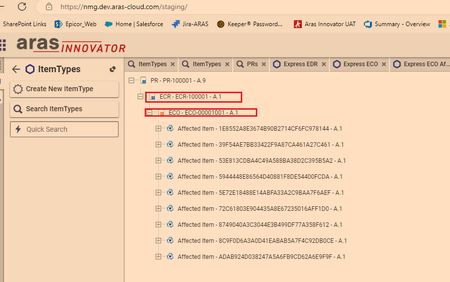
Hi, I need the data for all the PRs and ECR, ECO, EDR etc associated with the PR. By associated I mean the ones that show in the "where used" section of PR and not the relationships. In other words, what is the "where used' equivalent in a GET call? I then need the properties of the Affected Items under each ECR, ECO, EDR. I can get the properties of the relationshipships. GET call in Postman: https://nmg.dev.aras-cloud.com/staging/server/odata/PR?$expand=NMG_PR_AffectedItem This only gets the Affected Items under PR, I can get other relationships and their properties but the issue is there isn't a relationship between PR and ECR under PR item typeSolved126Views0likes2CommentsUpload missing document relationship in Process Plan. "Add" statement doesn't work
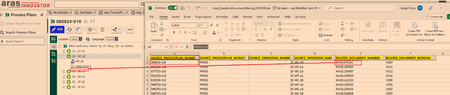
I need to upload relationship between Operation Document and the Documents. As you can see from the picture below the hierarchy of Process Plan is: Process Plan--> Operation Number (which is `sort_order`, in this case it is 20)-->Document I have an excel sheet of the missing documents that need to show under an operation (20) The document relationship cannot by uploaded just to Operation because the operation 20 will exist under other Process Plans. However, under one process plan the operation number is unique, so in this case there will be only one operation with sort_order 20. The documents already exist, I just need them to be shown here. From the AML script I have the `get` command works. The code is below. <AML> <Item type="mpp_processPlan" action="get"> <item_number>080824-S10</item_number> <Relationships> <Item type="mpp_Operation" action="get"> <sort_order>20</sort_order> <Relationships> <Item type="mpp_operationDocument" action="get"> </Item> </Relationships> </Item> </Relationships> </Item> </AML> However, in the above script in the line `<Item type="mpp_operationDocument" action="get">` when `action = Update` it won't work. Basically the following doesn't work <AML> <Item type="mpp_processPlan" action="get"> <item_number>080824-S10</item_number> <Relationships> <Item type="mpp_Operation" action="get"> <sort_order>20</sort_order> <Relationships> <Item type="mpp_operationDocument" action="Update"> <item_number>MADL074161</item_number> </Item> </Relationships> </Item> </Relationships> </Item> </AML> Result of scriopt with all `action=get` [embed:dc8ab71f-3b98-42d9-b0f6-e21e02a0f8e2:b4eb42d4-78c3-44de-b633-1a7d250b7129:type=text&text=%3CSOAP-ENV%3AEnvelope%20xmlns%3ASOAP-ENV%3D%22http%3A%2F%2Fschemas.xmlsoap.org%2Fsoap%2Fenvelope%2F%22%3E%0A%3CSOAP-ENV%3ABody%3E%0A%3CResult%3E%0A%3CItem%20type%3D%22mpp_ProcessPlan%22%20typeId%3D%224E030A4723224002B3E94F40F01AC1DE%22%20id%3D%22767F3FCDCC0F4CCF95F3CA3D9DB9D391%22%3E%0A%3Cconfig_id%20keyed_name%3D%22080824-S10%22%20type%3D%22mpp_ProcessPlan%22%3E767F3FCDCC0F4CCF95F3CA3D9DB9D391%3C%2Fconfig_id%3E%0A%3Ccreated_by_id%20keyed_name%3D%22Data%20Migration%22%20type%3D%22User%22%3E08880028FF8C43D48CB02B44EB74B127%3C%2Fcreated_by_id%3E%0A%3Ccreated_on%3E2024-02-20T11%3A49%3A02%3C%2Fcreated_on%3E%0A%3Ccurrent_state%20name%3D%22Released%22%20keyed_name%3D%22Released%22%20type%3D%22Life%20Cycle%20State%22%3E7109CDD337C84AFF87F55B21CCAC34AC%3C%2Fcurrent_state%3E%0A%3Cdescription%3E%3C%2Fdescription%3E%0A%3Cgeneration%3E1%3C%2Fgeneration%3E%0A%3Chas_change_pending%3E0%3C%2Fhas_change_pending%3E%0A%3Cid%20keyed_name%3D%22080824-S10%22%20type%3D%22mpp_ProcessPlan%22%3E767F3FCDCC0F4CCF95F3CA3D9DB9D391%3C%2Fid%3E%0A%3Cis_current%3E1%3C%2Fis_current%3E%0A%3Cis_released%3E1%3C%2Fis_released%3E%0A%3Ckeyed_name%3E080824-S10%3C%2Fkeyed_name%3E%0A%3Clocation%3E10%3C%2Flocation%3E%0A%3Cmajor_rev%3EPP000%3C%2Fmajor_rev%3E%0A%3Cmodified_on%3E2024-02-20T11%3A49%3A02%3C%2Fmodified_on%3E%0A%3Cname%3ESlitter%20Knife%20Arm%2C%20Rotary%20Tip%2C%2035%22%20Ring%2C%20C%2FR%3C%2Fname%3E%0A%3Cnew_version%3E1%3C%2Fnew_version%3E%0A%3Cnot_lockable%3E0%3C%2Fnot_lockable%3E%0A%3Cowned_by_id%20keyed_name%3D%22Mfg%20Eng%22%20type%3D%22Identity%22%3ED46B8ECBDB0C4D94BFF7A93D36FAB474%3C%2Fowned_by_id%3E%0A%3Cpermission_id%20keyed_name%3D%22Process%20Plan%20-%20Released%22%20type%3D%22Permission%22%3EE4EB045B2622409BA09AC91778FAE18C%3C%2Fpermission_id%3E%0A%3Crelease_date%3E2024-01-29T00%3A00%3A00%3C%2Frelease_date%3E%0A%3Cstate%3EReleased%3C%2Fstate%3E%0A%3Citem_number%3E080824-S10%3C%2Fitem_number%3E%0A%3Citemtype%3E4E030A4723224002B3E94F40F01AC1DE%3C%2Fitemtype%3E%0A%3CRelationships%3E%0A%3CItem%20type%3D%22mpp_Operation%22%20typeId%3D%2291B674D7C7AF47F99CA1C2FB26C38DBF%22%20id%3D%2277DD37200C7B4858833A6D6D8A48F4FA%22%3E%0A%3Cconfig_id%20keyed_name%3D%2220%22%20type%3D%22mpp_Operation%22%3E77DD37200C7B4858833A6D6D8A48F4FA%3C%2Fconfig_id%3E%0A%3Ccreated_by_id%20keyed_name%3D%22Data%20Migration%22%20type%3D%22User%22%3E08880028FF8C43D48CB02B44EB74B127%3C%2Fcreated_by_id%3E%0A%3Ccreated_on%3E2024-02-20T12%3A06%3A27%3C%2Fcreated_on%3E%0A%3Ccycle_time%3E60%3C%2Fcycle_time%3E%0A%3Cdescription%20xml%3Alang%3D%22en%22%3EMC-1B%20MC2%20CNC%20Machine%20Centre%20S10%3C%2Fdescription%3E%0A%3Cgeneration%3E1%3C%2Fgeneration%3E%0A%3Cid%20keyed_name%3D%2220%22%20type%3D%22mpp_Operation%22%3E77DD37200C7B4858833A6D6D8A48F4FA%3C%2Fid%3E%0A%3Cis_current%3E1%3C%2Fis_current%3E%0A%3Cis_released%3E0%3C%2Fis_released%3E%0A%3Ckeyed_name%3E20%3C%2Fkeyed_name%3E%0A%3Cmajor_rev%3EPP000%3C%2Fmajor_rev%3E%0A%3Cmodified_on%3E2024-02-20T12%3A06%3A27%3C%2Fmodified_on%3E%0A%3Cname%20xml%3Alang%3D%22en%22%3EMC-1B%3C%2Fname%3E%0A%3Cnew_version%3E1%3C%2Fnew_version%3E%0A%3Cnmg_erp_name%3EMC-1B%3C%2Fnmg_erp_name%3E%0A%3Cnmg_location_id%3E10%3C%2Fnmg_location_id%3E%0A%3Cnot_lockable%3E0%3C%2Fnot_lockable%3E%0A%3Cpermission_id%20keyed_name%3D%22Process%20Plan%20-%20Released%22%20type%3D%22Permission%22%3EE4EB045B2622409BA09AC91778FAE18C%3C%2Fpermission_id%3E%0A%3Csetup_time%3E0%3C%2Fsetup_time%3E%0A%3Csource_id%20keyed_name%3D%22080824-S10%22%20type%3D%22mpp_ProcessPlan%22%3E767F3FCDCC0F4CCF95F3CA3D9DB9D391%3C%2Fsource_id%3E%0A%3Cwi_details%20xml%3Alang%3D%22en%22%3E%3C%2Fwi_details%3E%0A%3Csort_order%3E20%3C%2Fsort_order%3E%0A%3CRelationships%3E%0A%3CItem%20type%3D%22mpp_OperationDocument%22%20typeId%3D%2238BA57E0616B49A58317C267E436AE4C%22%20id%3D%22106F5032EE7F4C5497717888370A3BB6%22%3E%0A%3Cconfig_id%20keyed_name%3D%22106F5032EE7F4C5497717888370A3BB6%22%20type%3D%22mpp_OperationDocument%22%3E106F5032EE7F4C5497717888370A3BB6%3C%2Fconfig_id%3E%0A%3Ccreated_by_id%20keyed_name%3D%22Data%20Migration%22%20type%3D%22User%22%3E08880028FF8C43D48CB02B44EB74B127%3C%2Fcreated_by_id%3E%0A%3Ccreated_on%3E2024-02-20T12%3A36%3A02%3C%2Fcreated_on%3E%0A%3Cgeneration%3E1%3C%2Fgeneration%3E%0A%3Cid%20keyed_name%3D%22106F5032EE7F4C5497717888370A3BB6%22%20type%3D%22mpp_OperationDocument%22%3E106F5032EE7F4C5497717888370A3BB6%3C%2Fid%3E%0A%3Cis_current%3E1%3C%2Fis_current%3E%0A%3Cis_released%3E0%3C%2Fis_released%3E%0A%3Ckeyed_name%3E106F5032EE7F4C5497717888370A3BB6%3C%2Fkeyed_name%3E%0A%3Cmajor_rev%3EA%3C%2Fmajor_rev%3E%0A%3Cmodified_on%3E2024-02-20T12%3A36%3A02%3C%2Fmodified_on%3E%0A%3Cnew_version%3E1%3C%2Fnew_version%3E%0A%3Cnot_lockable%3E0%3C%2Fnot_lockable%3E%0A%3Cpermission_id%20keyed_name%3D%22Process%20Plan%20-%20Released%22%20type%3D%22Permission%22%3EE4EB045B2622409BA09AC91778FAE18C%3C%2Fpermission_id%3E%0A%3Crelated_id%20keyed_name%3D%22MADL074152%22%20type%3D%22Document%22%3E%0A%3CItem%20type%3D%22Document%22%20typeId%3D%22B88C14B99EF449828C5D926E39EE8B89%22%20id%3D%22BD9ECB6D5C5D4AEEBC0ED65680C5505C%22%3E%0A%3Cclassification%3EManufacturing%20Aid%3C%2Fclassification%3E%0A%3Cconfig_id%20keyed_name%3D%22MADL074152%22%20type%3D%22Document%22%3EBD9ECB6D5C5D4AEEBC0ED65680C5505C%3C%2Fconfig_id%3E%0A%3Ccreated_by_id%20keyed_name%3D%22NMIS%20_MADL%22%20type%3D%22User%22%3E41E9090B65234C899CAFF690C7C0F562%3C%2Fcreated_by_id%3E%0A%3Ccreated_on%3E2024-02-19T11%3A12%3A07%3C%2Fcreated_on%3E%0A%3Ccurrent_state%20name%3D%22Released%22%20keyed_name%3D%22Released%22%20type%3D%22Life%20Cycle%20State%22%3E8EDE39438A7E4A56A1B4A9D07EF4A2FF%3C%2Fcurrent_state%3E%0A%3Cdescription%3E35%22%20SLITTER%20ARM%20C%2FR%3C%2Fdescription%3E%0A%3Ceffective_date%3E2018-11-16T14%3A35%3A00%3C%2Feffective_date%3E%0A%3Cgeneration%3E1%3C%2Fgeneration%3E%0A%3Chas_change_pending%3E0%3C%2Fhas_change_pending%3E%0A%3Chas_files%3E1%3C%2Fhas_files%3E%0A%3Cid%20keyed_name%3D%22MADL074152%22%20type%3D%22Document%22%3EBD9ECB6D5C5D4AEEBC0ED65680C5505C%3C%2Fid%3E%0A%3Cis_current%3E1%3C%2Fis_current%3E%0A%3Cis_released%3E1%3C%2Fis_released%3E%0A%3Cis_template%3E0%3C%2Fis_template%3E%0A%3Ckeyed_name%3EMADL074152%3C%2Fkeyed_name%3E%0A%3Cmajor_rev%3EV007%3C%2Fmajor_rev%3E%0A%3Cmodified_on%3E2007-07-09T08%3A17%3A00%3C%2Fmodified_on%3E%0A%3Cname%3E080824%3C%2Fname%3E%0A%3Cnew_version%3E0%3C%2Fnew_version%3E%0A%3Cnmg_department%3EManufacturing%3C%2Fnmg_department%3E%0A%3Cnmg_type%3EProgram%20%28CAD%2FCAM%29%3C%2Fnmg_type%3E%0A%3Cnot_lockable%3E0%3C%2Fnot_lockable%3E%0A%3Cowned_by_id%20keyed_name%3D%22Mfg%20Eng%22%20type%3D%22Identity%22%3ED46B8ECBDB0C4D94BFF7A93D36FAB474%3C%2Fowned_by_id%3E%0A%3Cpermission_id%20keyed_name%3D%22Released%20Document%22%20type%3D%22Permission%22%3E74C205C37E7C4D56BBBE99B52B28431E%3C%2Fpermission_id%3E%0A%3Crelease_date%3E2018-11-16T14%3A35%3A00%3C%2Frelease_date%3E%0A%3Cstate%3EReleased%3C%2Fstate%3E%0A%3Citem_number%3EMADL074152%3C%2Fitem_number%3E%0A%3Citemtype%3EB88C14B99EF449828C5D926E39EE8B89%3C%2Fitemtype%3E%0A%3C%2FItem%3E%0A%3C%2Frelated_id%3E%0A%3Csource_id%20keyed_name%3D%2220%22%20type%3D%22mpp_Operation%22%3E77DD37200C7B4858833A6D6D8A48F4FA%3C%2Fsource_id%3E%0A%3C%2FItem%3E%0A%3C%2FRelationships%3E%0A%3C%2FItem%3E%0A%3C%2FRelationships%3E%0A%3C%2FItem%3E%0A%3C%2FResult%3E%0A%3C%2FSOAP-ENV%3ABody%3E%0A%3C%2FSOAP-ENV%3AEnvelope%3E]114Views0likes4Comments