Combine and selectively export PDFs in Innovator
Hello! I'm looking for something to add into Innovator that would allow my users to take multiple documents with attached PDFs and be able to selectively output them as a single PDF. For example, I could have 3 3-page PDFs. I want page 1 from PDF 1, page 2 from PDF 2, and page 3 from PDF 3 but not their other pages to be exported a single, new PDF (only 3 pages, not 9). Are there any tools or converters you're aware of which are compatible with Innovator? Preferably something that can be embedded into the Aras installation as our clients use secured, on-prem versions and thus can't make calls out to other websites. Thanks in advance for your help.116Views0likes4Comments
How to bind reference item type used version and latest version in another item type grid view.
Hi All, I have two item type e.g- ItemTypeA, ItemTypeB, ItemTypeB is assigning to ItemTypeA, now i want to display ItemTypeB Used version and Latest Version on grid only not on forms. Thanks for your help in advance.Solved80Views0likes1CommentARAS31 import.mf deployment issue
Hai, We recently upgraded our environment from Aras Innovator 11 to Aras Innovator 31, and we are running into several issues while deploying our solution packages. I wanted to share the details here to see if anyone has faced similar challenges or has suggestions. In Aras 11, we used an import.mf file with the following structure, and everything deployed without issues: <imports> <package name="DatabaseIdentifier" path="com\aras\innovator\DatabaseIdentifier" /> <package name="com.aras.innovator.solution.PLM" path="PLM\Import" /> <package name="com.aras.innovator.solution.Project" path="Project\Import"> <dependson name="com.aras.innovator.solution.PLM" /> </package> <package name="com.aras.innovator.core" path=".\" /> <package name="com.aras.innovator.cui_default" path=".\" /> <package name="Custom_Pkg1" path="CustomPkg1\Import" /> <package name="Custom_Pkg2" path="CustomPkg2\Import" /> </imports> After upgrading to Aras 31, we tried using the same .mf configuration, but we are encountering multiple deployment errors. Issues Observed 1. Null Reference Error Object reference not set to an instance of an object. 2. Method Not Found Error It points to this AML:→ Error: “No items of type Method found.” <Item type='ItemType' id='8052A558B9084D41B9F11805E464F443' action='edit'> <Relationships> <Item type="Server Event" action="add"> <related_id keyed_name="FileOnGet" type="Method"> <Item type="Method" action="get" select="id"> <name>FileOnGet</name> </Item> </related_id> </Item> </Relationships> </Item> Import package 'com.aras.innovator.core' failed with message: No items of type Method not found. 3. Timeout Error During Import The package was then marked as a failed release (seen for custom_Pkg). faultcode: 999 faultstring: System.Net.WebException: The operation has timed out 1. In Aras 31, are we required to use manifest.json instead of the old import.mf format for custom packages? 2. If yes, where exactly should the manifest.json file be placed, and what structure should it follow? 3. How should we handle customizations or extensions to system-level packages like com.aras.innovator.core and com.aras.innovator.cui_default that previously existed in Aras 11? 4. Has anyone encountered the faultcode 999 / timeout issue during import — and how did we resolve it? Thanks in Advance SaliniSolved340Views0likes9Comments
Get the Context Action Name in the Method
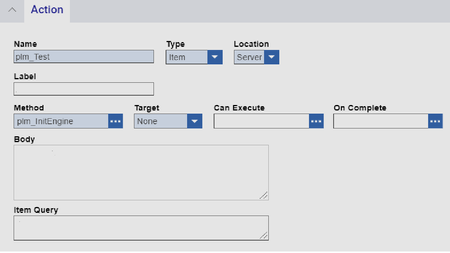
Hi All, I have Multiple Server Side Item Actions Configured on the Part Item , I want the logic/functionality to be performed by each action to be controlled by the same method . In which case , is there a way to pass the Invoking action name to the Method so that based on the value I can chose the function to be performed. For the above action , I want to get the action name "plm_Test" while invoking the method on the Item. This would greatly help me in avoiding creating Multiple Methods for each Action. Thanks.5.4KViews0likes7Comments
apply PE_createNewRevision from client method
hello, My initial goal is to have a confirm pop up when using the action to create a new revision.(for parts) I have an action that run a simple client method like this: if(confirm("creation of new major revision")) { //here i want to launch the PE_CreateNewRevision } I've tried with applyMethod but the method doesn't seem to apply on the part instance. Any help on understanding this is much appreciated. thanks lucasSolved6.3KViews0likes10CommentsHow to Run already existing Action from a relationship
I have this action which runs fine on an itemtype1, I want to use the same action to be triggered when i am on another itemtype2 but itemtype1 is in a relationship. Currently im getting an error when i click that action from the relationship,3.7KViews0likes3Comments
Action on part itemtype
Hi, i need to set up a functionality upon on clicking Action in Part item, it should create three parts for me with three different X class values and three documents with three different X class values has to be create . Example: Action on Part item PART A has to be created with X class 'ABC' Document A has to be created with X class '123' Document A has to be linked to PART A(Files to the document item will be added by user later) PART B has to be created with X class 'DEF' Document B has to be created with X class '456' Document B has to be linked to PART B(Files to the document item will be added by user later) PART C has to be created with X class 'XYZ Document C has to be created with X class '789' Document C has to be linked to PART C(Files to the document item will be added by user later) When ever i trigger this action, above process has to happen. Any Suggestions how to implement this ?5.6KViews0likes1Comment
How can I pass additional event parameters in CUI elements?
Hi community, does anybody know, if it´s possible to pass additional event parameters in CUI elements? Example: I have three CUI menu buttons that do a more or less comparable job. The corresponding Methods just differ in a few lines of code. So I would prefer to use just one unified Method for the three CUI elements. But right now I cannot determine, which of the three buttons acutally triggers the Method. Is it somehow possible to add event parameters to the button item itself? Can I perhaps use the additional data field somehow for this purpose? Or is there a Method that shows me the orignator of the Method call? As alternative, it would also be ok to use standard Actions for this job. But as far as I know, I cannot pass even information in Item Actions. Just ItemType Actions allow us to use the "Body" property. Thanks for any help! AngelaSolved5.4KViews0likes2Comments