"Classification cannot be changed after saving the item" error using the .Net API to update requirement
I am using Aras 11 SP15. I am trying to update a requirement I created. Here is my code: using System; using System.Collections.Generic; using Aras.IOM; namespace TestArasProject { public static class Program { public static void Main(string[] args) { HttpServerConnection conn = IomFactory.CreateHttpServerConnection(serverUrl, dbName, username, password); Innovator inn = IomFactory.CreateInnovator(conn); conn.Login(); Item updateItem = inn.newItem(requirement, "edit"); string internalId = "FB20D91203DC4E3EB30DBA0CFBE4FD0F"; updateItem.setAttribute("where", "[" + requirement.Replace(' ', '_') + "]." + "config_id" + " = '" + internalId + "' AND [" + requirement.Replace(' ', '_') + "]." + "is_current" + "='1'"); // updating the name of the requirement updateItem.setProperty("req_rm_title", "Test Requirement" + Guid.NewGuid()); Item result = updateItem.apply(); Console.WriteLine(result); Console.WriteLine(result.isError()); Console.ReadLine(); conn.Logout(); } } } I am getting the following error: <SOAP-ENV:Envelope xmlns:SOAP-ENV="">schemas.xmlsoap.org/.../" xmlns:i18n="">www.aras.com/I18N"><SOAP-ENV:Body><SOAP-ENV:Fault> <faultcode>1</faultcode> <faultactor /> <faultstring>Classification cannot be changed after saving the item.</faultstring></SOAP-ENV:Fault></SOAP-ENV:Body></SOAP-ENV:Envelope> I checked the XML which was getting created to update, this XML did not even contain the Classification property nor am I trying to update it. Here is the XML: <Item isNew=\"1\" isTemp=\"1\" type=\"re_Requirement\" action=\"edit\" where=\"[re_Requirement].config_id = '3AFD850B785E43F1B854EE404469FA87' AND [re_Requirement].is_current='1'\"> <req_title>2019_06_24_12_25_42_850_-{AB}</req_title> </Item> I noticed that Classification (Type) is a default value on UI still I need to explicitly pass it through the API. This is not the case with Risk or Complexity type of fields. How do I update a requirement?20KViews0likes14Comments
Aras.OAuth.Model error when trying to connect using IOM.dll in a .Net Core app
I'm trying to integrate the IOM.dll into a .net core application and I get the error below. "Could not load file or assembly 'Aras.OAuth.Model, Version=12.0.0.21092, Culture=neutral, PublicKeyToken=524d880b05474146'. The system cannot find the file specified." I have the following code with the variable values changed: string serverUrl = "">server/.../InnovatorServer.aspx"; string database = "DataBaseName"; string userName = "user"; string password = "userPassword"; HttpServerConnection connection = IomFactory.CreateHttpServerConnection( serverUrl, database, userName, password); Item loginResult = connection.Login(); //Get Error Here Innovator inn = IomFactory.CreateInnovator(connection); I have added the IOM.dll, Aras.Net.dll, and Aras.Diagnostics.dll as refrences from the Aris installation folder, and added a using Aras.IOM.2.6KViews0likes1Comment
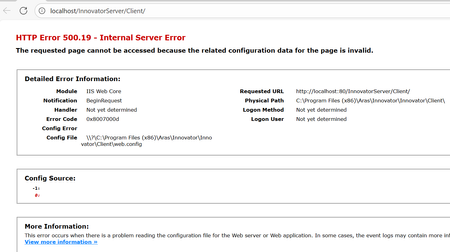
HTTP Error 500.19 - Internal Server Error
This error hits while installing the ARAS innovator, if User done install the .Net Hosting bundle. The solution was to download and install the MS .Net 8.0 Hosting bundle from below link. HTTP Error 500.19 after installing Innovator 2025 - Solved - Getting Started - Aras Community - Aras Community76Views0likes0Comments
How to load aras 2023 dll with cpp host cli without native net core?
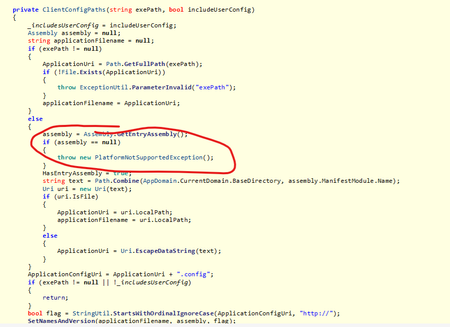
[embed:dc8ab71f-3b98-42d9-b0f6-e21e02a0f8e2:4aacaea8-0c4c-471c-aefc-402fbf171d8a:type=text&text=%23using%20%22C%3A%2Ftemp%2Faras2023dlls%2Fbin%2FIOM.dll%22%0D%0A%23using%20%22C%3A%2Ftemp%2Faras2023dlls%2Fbin%2FSystem.Configuration.ConfigurationManager.dll%22%0D%0A%23using%20%22C%3A%2Ftemp%2Faras2023dlls%2Fbin%2FAras.Net.dll%22%0D%0A%0D%0Ausing%20namespace%20System%3B%0D%0Ausing%20namespace%20System%3A%3AIO%3B%0D%0Ausing%20namespace%20System%3A%3AReflection%3B%0D%0Ausing%20namespace%20System%3A%3AConfiguration%3B%20%20%0D%0A%0D%0A%0D%0Avoid%20arasDo%28%29%0D%0A%7B%0D%0A%20%20%2F%2F%20sample%20aras%20code%0D%0A%20%20System%3A%3AString%20%5E%20url%20%3D%20%22http%3A%2F%2Fdevaras2023%2FInnovatorServer%2FServer%2FInnovatorServer.aspx%22%3B%0D%0A%20%20System%3A%3AString%20%5E%20database%20%3D%20%22InnovatorSolutions%22%3B%0D%0A%20%20System%3A%3AString%20%5E%20user%20%3D%20%22admin%22%3B%0D%0A%20%20System%3A%3AString%20%5E%20password%20%3D%20%22innovator%22%3B%0D%0A%0D%0A%20%0D%0A%20%20auto%20conn%20%3D%20Aras%3A%3AIOM%3A%3AIomFactory%3A%3ACreateHttpServerConnection%28url%2C%20database%2C%20user%2C%20password%29%3B%0D%0A%20%20auto%20result%20%3D%20conn-%3ELogin%28%29%3B%0D%0A%20%20auto%20s%20%3D%20result-%3EToString%28%29%3B%0D%0A%7D%0D%0A%0D%0Astatic%20Assembly%20%5E%0D%0A%20%20LoadFromSameFolder%28Object%20%5E%20sender%2C%20ResolveEventArgs%20%5E%20args%29%20%7B%0D%0A%20%20%20%20String%20%5E%20folderPath%20%3D%20%22C%3A%5C%5Ctemp%5C%5Caras2023dlls%5C%5Cbin%22%3B%0D%0A%20%20%20%20String%20%5E%20assemblyPath%20%3D%20Path%3A%3ACombine%28folderPath%2C%20%28gcnew%20AssemblyName%28args-%3EName%29%29-%3EName%20%2B%20%22.dll%22%29%3B%0D%0A%20%20%20%20if%20%28File%3A%3AExists%28assemblyPath%29%20%3D%3D%20false%29%0D%0A%20%20%20%20%20%20return%20nullptr%3B%0D%0A%20%20%20%20Assembly%20%5E%20assembly%20%3D%20Assembly%3A%3ALoadFrom%28assemblyPath%29%3B%0D%0A%20%20%20%20return%20assembly%3B%0D%0A%20%20%7D%0D%0A%0D%0Avoid%20aras%28%29%0D%0A%7B%0D%0A%20%20%2F%2F%20put%20this%20somewhere%20you%20know%20it%20will%20run%20%28early%2C%20when%20the%20DLL%20gets%20loaded%29%0D%0A%20%20System%3A%3AAppDomain%20%5E%20currentDomain%20%3D%20AppDomain%3A%3ACurrentDomain%3B%0D%0A%20%20currentDomain-%3EAssemblyResolve%20%2B%3D%20gcnew%20ResolveEventHandler%28LoadFromSameFolder%29%3B%0D%0A%20%20arasDo%28%29%3B%0D%0A%7D] The exePath does not exist Assembly.GetEntryAssembly() returns a NULL Can someone explain me how to execute the added cpp sample code so I can load the aras 2023 dlls?59Views0likes2Comments
Compatibility of IOM.dll with .NET Core 8
Hello Innovators, I am currently trying to integrate the IOM.dll with .NET Core 8. Has anyone successfully managed to get it working? If not, are there any recommended workarounds or alternative approaches? Looking forward to your insights. Best regards, DaanSolved56Views0likes1Comment