Edge upgrade kills search grid - find workaround here
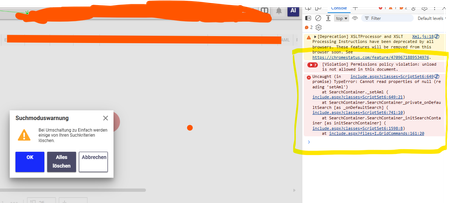


Hello,
Thank you for posting this workaround.
I am new to Aras administration and I am having the same issue on Aras Innovator 12 SP9 (Build 24090) with Edge 154.0.4258.37.
Could you please provide more detailed instructions for Solution #2?
I am not sure where the SearchMode ItemType is located, how to add it to the TOC, and where the highlighted code should be modified.
Thank you in advance.
I was already wondering how long it would take for the first reply to this post. I think there will be many more to come.
I currently work on a better solution. The workaround will have some minor impact to Saved Searches / Favorites. The patch eliminates the automatic switch to SearchMode AML or Advanced.
Then
Then
Thank you so much! it really worked. For now, that's more than enough, this was causing a huge problem for users.

