A question for Item characteristic list value.
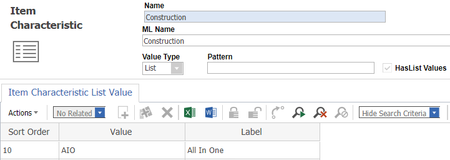


Hi Nara,
Thank you so much for your reply.
As you said, I saved one more time. But, it still doesn't show. (I tried to save more than one time. But, no difference.)
It's very strange.

Hi Joseph,
Can u try to run this AML and check the result.
<Item type="Part" action="get" where="Part.id ='15D5218E9E1B439DB3939B47A1EDC249'">
<Relationships>
<Item type="Part Item Characteristic Value" action="get">
<item_characteristic_label>Construction</item_characteristic_label>
</Item>
</Relationships>
</Item>
15D5218E9E1B439DB3939B47A1EDC249 is part ID
in the result check for <Item type="Part Item Characteristic Value"
and see what is the value for below tags
<text_value>AIO</text_value>
<display_value>All In One</display_value>
if value matching, then there is some issue in "ItemCharacteristicAddToPart" method.
If value is not matching, then try to edit the part using below AML
<AML>
<Item type="Part Item Characteristic Value" action="edit" where="[Part_Item_Characteristic_Value].source_id = '15D5218E9E1B439DB3939B47A1EDC249' AND [Part_Item_Characteristic_Value].id = '6FDAA3712F594933ABAEB6F52654DCAA'" doGetItem="0" serverEvents="0">
<text_value>AIO</text_value>
<display_value>All In One</display_value>
</Item>
</AML>
Now check the part from innovator UI.
If it works fine, then there is some issue in "ItemCharacteristicAddToPart" method.
Can u run below AML
<Item type="Part" action="get" where="Part.id ='15D5218E9E1B439DB3939B47A1EDC249'">
<Relationships>
<Item type="Part Item Characteristic Value" action="get">
<item_characteristic_label>Construction</item_characteristic_label>
</Item>
</Relationships>
</Item>
15D5218E9E1B439DB3939B47A1EDC249 is part ID
from the result check for <Item type="Part Item Characteristic Value"
<text_value>AIO</text_value>
<display_value>All In One</display_value>
if above values are macthing your result, then there is some isue in "ItemCharacteristicAddToPart" method.
if not edit part using below AML
<AML>
<Item type="Part Item Characteristic Value" action="edit" where="[Part_Item_Characteristic_Value].source_id = '15D5218E9E1B439DB3939B47A1EDC249' AND [Part_Item_Characteristic_Value].id = '6FDAA3712F594933ABAEB6F52654DCAA'" doGetItem="0" serverEvents="0">
<text_value>AIO</text_value>
<display_value>All In One</display_value>
</Item>
</AML>
Go to Aras UI and check "Construction" value, if it is not matching , then there is some isue in "ItemCharacteristicAddToPart" method.



