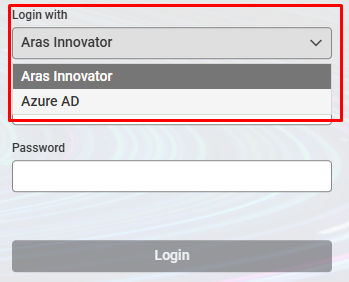
[ARAS 14] Change display order of authentication options


Good Morning
I am not aware of a supported built-in method to change the order of authentication providers in the "Login with" drop-down. The authentication plugins expose an AuthenticationType and a DisplayName, but I have not found any documented configuration option that controls the order in which providers are displayed.
If your goal is to make Azure AD / Entra ID the preferred login method, you may want to investigate the Default Authentication Plugin. This OAuth Server plugin allows administrators to define a DefaultAuthenticationType, which can automatically preselect or redirect users to a specific authentication provider instead of requiring users to choose from the drop-down.
The plugin is configured in the OAuth Server configuration. The documentation provides the following example:
{
"Name": "Aras.OAuth.Server.Plugins.DefaultAuthentication",
"Enabled": true,
"Options": {
"DefaultAuthenticationType": "<AuthenticationType>",
"DefaultDatabase": "<Database>"
}
}
DefaultAuthenticationType must match the authentication provider's configured AuthenticationType, not necessarily the display name shown to users in the login page.
Regarding disabling the local Aras Innovator login option entirely, I would recommend keeping it available. Even if all regular users authenticate through Entra ID, maintaining at least one local administrative login is a good practice:
In practice, many organizations keep local login available for administrative recovery while directing normal users to SSO by configuring a default authentication provider.
Regards
Michael

Thank you for your reply,
Per your suggestion, I have tried searching for keywords "Default Authentication Plugin" and "Aras.OAuth.Server.Plugins.DefaultAuthentication" of ARAS but couldn't find any documents about it. At least, that's the result of searching using Google, community.aras.com and docs.aras.com.
Could it be that it's a premium feature of ARAS, so it doesn't have public documents?
Or in case my keywords are not the right one, can you share a document link with me?
Much appreciated!


