Aras Update Guide: Self-Upgrading Innovator Independently
After plenty of trial and error – and some much-needed help from Aras Denmark – we finally got the Aras Update application working. We wanted to handle upgrades independently to reduce reliance on the upgrade team and speed up our deployment cycles. The catch? The Aras Update installer only runs smoothly on a clean, out-of-the-box Innovator installation, which is rarely the case in real-world production environments. To save others from the same headaches, I’ve documented the steps for anyone brave enough to attempt a self-upgrade. Note: This process is supported from Release 14 onwards. It’s recommended that an experienced software engineer performs these steps. Attempt at your own risk. 1. Prepare a Clone of Production Install your current Aras version on a separate machine using the ‘Configure Only’ option. Restore a recent production .bak file in SQL Server Management Studio. Run the following queries against the cloned database: exec sp_change_users_login 'Update_One', 'innovator', 'innovator'; exec sp_addrolemember 'db_owner','innovator'; exec sp_change_users_login 'Update_One', 'innovator_regular', 'innovator_regular'; exec sp_addrolemember 'db_owner','innovator_regular'; Update the InnovatorServiceConfig.xml with the correct SQL connection string 2. Install Prerequisites Install all required prerequisites from the Installation Guide PDF for the desired target version. 3. Back Up Your Code Make a backup of the Innovator folder (your code tree). 4. Download the Patch Get the desired patch from the Aras FTP. You do not have to go through each version. E.g., you can go from Release 26 to Release 34 directly. 5. Customize Patch Files In the following files, append a custom suffix to the <name> property (e.g., <name>VersionServiceUpdate[YOURCOMPANYNAME]</name>): VersionBuild.xml VersionLabel.xml VersionMajor.xml VersionMinor.xml VersionServiceUpdate.xml 6. Launch Aras Update Run Aras Update as Administrator. 7. Add the Patch Package Click ‘Local’ in the left menu and add a new package. Select the extracted patch folder. 8. Install the Patch Click ‘Install’ in Aras Update. 9. Update Each Module For each applicable module: Select only one module at a time (this helps isolate issues). Enter the required application/server/SQL credentials. Click ‘Install’. If errors occur: Login to Innovator failed: Check prerequisites and ensure IIS is running. TRUNCATE or FOREIGN KEY errors: Compare the affected ItemType with one from a clean install. Adjust the related XML file in .\Aras Innovator 34 Patch\Imports\com\aras\innovator\ as needed, or temporarily remove it from the manifest (keep a backup for step 11). Oftentimes, it has something to do with property lengths, foreign properties and permissions. Innovator Variables issues: Revisit step 5. GetMethodsKey endpoint (500 Internal Server Error): Make sure a user with loginname clientadmin exists in the database. Add it through nash.aspx Other: If you hit something else, prepare for some blood, sweat, and forum searches – or maybe it’s time to reach out to the support team. Do not forget to leave the error message and solution in the comments down below. Tip: if you need many attempts running the Aras Update installer, do not click 'Exit' when it fails. If you click 'Home' instead you do not have to enter the server credentials every attempt. 10. Verify the Update If the update completes without errors, try logging in. If login fails: Use the NASH endpoint (e.g., localhost/.../nash.aspx) to manually execute the contents of any removed XML manifest files. Use DevTools (F12 > Network) to check for failed requests. 11. Test Everything Test all features and modules. If Aras features have changed, manual conversion may be needed. I recommend writing down test plans with relevant key-users to confirm everything still works Review Release Notes for all versions between your source and target version and perform tests accordingly. Keep a checklist of manual actions required. Repeat the entire process – including running the Aras Update installer and performing all your documented manual actions – until a clean test environment upgrades completely without errors or issues, and all tests pass, before moving on to the cutover step. 12. Plan Production Cutover Schedule a cutover weekend to upgrade production. Run your customized Aras Update Patch and complete any manual steps identified in testing. Congratulations You’ve now performed a self-upgrade. Time to celebrate. Just remember: this isn’t formal documentation, and I’m not responsible for any production issues you may face as a result of following these steps.522Views8likes7CommentsRenewing OAuth Certificates
Hello fellow Aras developers, Here's another niche topic I recently had to tackle: renewing OAuth certificates. If you've been applying Aras patches (upgrade packages) over the years, your OAuth certificates are likely outdated. They expire every few years depending on your configuration and need renewal. I found several instructions online for manually replacing certificates, but they consistently resulted in: Authentication errors on sign-in ANCM Out-Of-Process Startup Failure After multiple attempts working with Aras Support, I took a different approach: Downloaded the out-of-the-box installer for our version (Release 36) and ran it on our production environment. Yes, even though the upgraded Release 36 was already installed. Selected 'Custom Installation' and chose ONLY the OAuth module. This generated a clean OAuth folder with a fresh set of certificates. Copied (overwrite) all the certificates (CTRL + A) into these directories (probably overkill, but redundant certs are harmless and it makes the process much faster): OAuthServer\App_Data\Certificates\ Innovator\Server\App_Data\Certificates\ Innovator\Client\App_Data\Certificates\ SelfServiceReporting\App_Data\Certificates\ VaultServer\App_Data\Certificates\ Updated the OAuth.config file in \OAuthServer\ with our internal production endpoint. iisreset (from command prompt as Administrator) Note: If you run the installer on a machine that already hosts an existing Aras instance, make sure to run changeguid.exe on the innovatorsetup.msi first to avoid impacting the current installation. Done! Please let me know if this helped and/or how I can improve this post. Let's make it a community effort to have up-to-date information for all of us.504Views2likes6Comments
ARAS31 import.mf deployment issue
Hai, We recently upgraded our environment from Aras Innovator 11 to Aras Innovator 31, and we are running into several issues while deploying our solution packages. I wanted to share the details here to see if anyone has faced similar challenges or has suggestions. In Aras 11, we used an import.mf file with the following structure, and everything deployed without issues: <imports> <package name="DatabaseIdentifier" path="com\aras\innovator\DatabaseIdentifier" /> <package name="com.aras.innovator.solution.PLM" path="PLM\Import" /> <package name="com.aras.innovator.solution.Project" path="Project\Import"> <dependson name="com.aras.innovator.solution.PLM" /> </package> <package name="com.aras.innovator.core" path=".\" /> <package name="com.aras.innovator.cui_default" path=".\" /> <package name="Custom_Pkg1" path="CustomPkg1\Import" /> <package name="Custom_Pkg2" path="CustomPkg2\Import" /> </imports> After upgrading to Aras 31, we tried using the same .mf configuration, but we are encountering multiple deployment errors. Issues Observed 1. Null Reference Error Object reference not set to an instance of an object. 2. Method Not Found Error It points to this AML:→ Error: “No items of type Method found.” <Item type='ItemType' id='8052A558B9084D41B9F11805E464F443' action='edit'> <Relationships> <Item type="Server Event" action="add"> <related_id keyed_name="FileOnGet" type="Method"> <Item type="Method" action="get" select="id"> <name>FileOnGet</name> </Item> </related_id> </Item> </Relationships> </Item> Import package 'com.aras.innovator.core' failed with message: No items of type Method not found. 3. Timeout Error During Import The package was then marked as a failed release (seen for custom_Pkg). faultcode: 999 faultstring: System.Net.WebException: The operation has timed out 1. In Aras 31, are we required to use manifest.json instead of the old import.mf format for custom packages? 2. If yes, where exactly should the manifest.json file be placed, and what structure should it follow? 3. How should we handle customizations or extensions to system-level packages like com.aras.innovator.core and com.aras.innovator.cui_default that previously existed in Aras 11? 4. Has anyone encountered the faultcode 999 / timeout issue during import — and how did we resolve it? Thanks in Advance SaliniSolved306Views0likes9Comments
Using Aras to Manage Aras Upgrade Planning, Test Plans, Test Records
I'm in the process to upgrade Aras, and I'm looking at the topic of Test cases and records. There seems to be some decent documentation about how to do this, it seems to be leaning on some external tool for this (looked around but things like TestRail is expensive... It appears to me to be a good use case for Aras to build in. ) Has anybody implemented an Aras Upgrade Planning / Testing Configuration? Any suggestions or potential pitfalls you see with this? Seems like if the structure was somewhat standardized, we could build a library of tests to share as a community, like this post suggested176Views2likes4Comments
Upgrading Aras Innovator Version 11 Service Pack Versions
Hi all, We are currently on Aras Innovator Version 11.0 SP9. From my understanding, the latest service pack available for Version 11.0 is SP15. My question is, is it still possible to upgrade from SP9 to SP15? If so, what would be the effort/duration required to do so? Is it a complicated procedure or a relatively simple one? Thanks!92Views0likes1Comment
How to update local v12
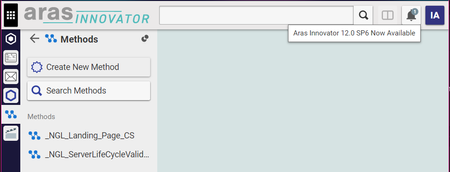
I can't seem to find how to upgrade a local v12 to the latest revision, or service pack. I still have issues with Chrome, and cannot instruct the company to adjust their chrome settings, and I cannot enforce HTTPS on our internal servers, and I *think* the latest SP somehow squashed same origin issues? Anyway, my v12 doesn't even have tab and secondary menu item pinning and I really really want that after going through a class this week. So nice! On my class v12 there's this: But, no prompt on my local machine, and no apparent click-to upgrade on any menu. Please tell me how to upgrade ASAP!? Thank you, Neil3.1KViews0likes2Comments
Upgrade from 10 to 11
Hi, I am currently looking for any information related to upgrading Aras Innovator from version 10 to version 11. Do I just install version 11 and begin using the import/export tool to migrate out item types and such. Is this also what I would use to migrate our existing data as well? Also, how would I handle upgrading the vault. Is this done in the same way? Any information would be greatly appreciated or links to information that is currently out there. Thanks6.1KViews0likes3Comments