How to call a server method with applyMethod() from a client method, and use the results coming back from server
Server Method : [Get_Identity_Details] Can run this and get results I want. Hard coded guid for test Innovator inn = this.getInnovator(); string sessionuserid = this.getProperty("sessionuser","invalid"); if (sessionuserid == ""){} StringBuilder sql = new StringBuilder(); sql.AppendLine("SELECT ID,KEYED_NAME FROM [ArasDev].[innovator].[IDENTITY] WHERE CLASSIFICATION='Group' AND ID in "); sql.AppendLine(" ( SELECT SOURCE_ID from [ArasDev].[innovator].[MEMBER] where RELATED_ID in"); sql.AppendLine("( SELECT ID FROM [ArasDev].[innovator].[IDENTITY] WHERE CLASSIFICATION='Role' AND ID in"); sql.AppendLine("( SELECT SOURCE_ID from [ArasDev].[innovator].[MEMBER] where RELATED_ID in"); sql.AppendLine("(SELECT RELATED_ID from [ArasDev].[innovator].[ALIAS] where SOURCE_ID='<USER GUID>'"); sql.AppendLine("))))"); Item results = inn.applySQL(sql.ToString()); return results; ======================================= Client method : calls the server method. Can see the result in debug from server method, but it does not work after that. How to make use of the results from server method? var inn = new Innovator(); var userid = inn.getUserID(); var itemTypeDropdownComponent = getFieldComponentByName("owned_by_id"); var itemTypeDropdownList = []; var body = "<sessionuser>" + userid + "</sessionuser>"; var res = aras.applyMethod("NOV_Identity_Details",body); if (res.isError()) { aras.AlertError(res); return; } else if (res.getItemCount() === 0) { //do something } else { for (var i=0;i<res.getItemCount();i++) { var currentItem = res.getItemByIndex(i); itemTypeDropdownList.push({label: currentItem.getProperty("KEYED_NAME"), value: currentItem.getProperty("ID")}) } } itemTypeDropdownComponent.component.setState({ list: itemTypeDropdownList }); return null;13KViews0likes4Comments
using the SQL item type as a view
Querying a SQL view I built in SSMS from an Aras server method: string SQL_View = "innovator.my_custom_sql_view"; string SQL = "select * from " + SQL_View; Item SQL_qry = inn.applySQL(SQL); This is quick for me because I do a lot in SQL, but I know it is bad practice. So, I want to replace this SQL injection using IOM: I created a new SQL item, type=View, with the contents from the custom SSMS view. What is the correct C# code to get the view results? Item SQL_qry = inn.newItem("SQL", "get"); SQL_qry.setProperty("keyed_name", SQL_View); SQL_qry = SQL_qry.apply(); This code just gets the SQL item, not the contents of the View. I couldn't find anything in the Programmers guide for this, and the Blog posts were only about Stored Procedures, not Views. I'm thinking it should work the same way, but I haven't figured out the correct IOM syntax. Thanks, Paul SheehySolved8KViews0likes4CommentsHow do I set a where statement on a Query Definition against the current date the query is run?
I want to only have it pull a specific relationship (Part AML) if a custom date field "Valid To" is greater than the current date. I am able to create the Where that compares it against a specific date, but this query definition is pulled by another process automatically and I don't want to have to update the Query Definition every day with the current date for whoever ends up running it that day. I currently have: [Valid to] > '2021-11-29T00:00:00' I want something like (this doesn't work) [Valid to] > current_date()3.5KViews0likes5Comments
How to use SQL functions inside Innovator for large and complex queries?
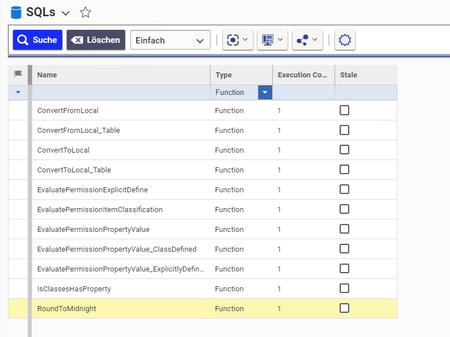
Hi community, inside Innovator the "SQL" ItemTypes contains some Procedures, Functions and other things used for internal purposes: It´s also possible to add own custom items. Common for example is the use of procedures that can be called e.g. this way: Item callframe = this.newItem("SQL","SQL PROCESS"); callframe.setProperty("name","update_has_files_flag"); callframe.setProperty("PROCESS","CALL"); callframe.setProperty("ARG1", source_it.getProperty("name")); callframe.setProperty("ARG2", source_id); callframe = callframe.apply(); In my case I want to store a pretty huge SQL query as function within the SQL ItemType. Unfortunately I don´t know how to call these kind of functions from my Method. Does any one has an idea how we can use Functions? Many thanks for your help! Angela1.6KViews0likes0CommentsVery large ItemTypes/tables in Innovator with SQL Express - what is your experience?
Hi Community, can anyone of you share some experience when using ItemTypes that contain a large number of items? I have a Innovator ItemType that is intended to store up to 1-2 Million items for the start. For me this amount of data is already "a lot". But I assume for other users this is still a very small amount of data. Anyway, I assume that ItemTypes intended for huge amounts of data also requires admins to pay extra attention to ensure system performance. Do you have practical experience in working with large amount of data? Then I would be happy if you could give me some tips! 1. Did you ever face performance issues, especially when using SQL Server Express (which as some performance limitations by default)? 2. Can you recommend me some tips to optimize my ItemType for large data in general? E.g. I want to prevent that users try to display all items as once in the grid. Can I limit this one with max records or are there better options? 3. Anything else that is important to know? Many thanks for any input and best regards! Angela872Views0likes0Comments
C# SQL Date Query
Good day all, I am trying to create a dynamic report to produce the time it take between starting an activity and ending an activity. I can get the information I am looking for by using SQL, but it will not limit the returns based on dates. I have tried a few different ways to do this, but nothing is working for me. Thanks for any help you can provide. StringBuilder sql = new StringBuilder(); sql.AppendLine( "Select " + "WP.name AS change, " + "WP.state AS status, " + "Act.name AS activity, " + "ClosedBy.keyed_name AS closed_by, " + "Act_Assign.created_on, " + "Act_Assign.closed_on, " + "Act_Assign.modified_on, " + "GETDATE() AS today, " + "DATEDIFF (d, [Act_Assign].created_on, [Act_Assign].closed_on) + 1 AS date_diff " + "FROM [Workflow_Process] AS WP " + "INNER JOIN [Workflow_Process_Activity] AS WPA ON WPA.source_id = WP.id " + "INNER JOIN [Activity] AS Act ON Act.id = WPA.related_id " + "INNER JOIN [Activity_Assignment] AS Act_Assign ON Act_Assign.source_id = Act.id " + "INNER JOIN [sm_Change] as Change ON Change.item_number = WP.name " + "LEFT OUTER JOIN [User] AS ClosedBy ON ClosedBy.id = Act_Assign.closed_by " + "WHERE WP.name = 'CR-1091' OR WP.name = 'CR-1169' " + // AND Act.name = 'ECR Approval' "AND Act_Assign.modified_on BETWEEN '2023-08-01' AND '2023-08-02' " + "ORDER BY WP.name, Act_Assign.created_on ASC, Act_Assign.closed_on DESC " );Solved200Views0likes7Comments