For API GET call, not receiving item type in the payload for custom part.
Hi, We have following scenario, If I do a get call for Part or Requirement, I'm receiving the respective item-types id as 'itemtype':'id' in payload. But if I do get call for a custom Item I'm not receiving the 'itemtype':'id' in its payload. If I have to get the 'itemtype':'id' for a custom item, do I need to update my item type or my API call? Below, I have added API calls and responses for different items. Get Call for Requirement: instance/Server/odata/re_Requirement('D2E185A3F91248CEB219C848C56EC97C')?$expand= Payload: { "@odata.context": "instance/Server/odata/$metadata#re_Requirement/$entity", "classification": "Requirement", "content": "<Requirement aras:id=\"4c2ebcb8a3d544769f42e1238ddb0b55\" reqId=\"70F10587B45F4B7DB612CD2455089234\" xmlns:aras=\"http://aras.com/ArasTechDoc\" xmlns=\"http://www.aras.com/REStandard\"><Requirement-Info aras:id=\"1e9e767cf6d24c838d902d3e1e3e5c65\"><Requirement-Chapter aras:id=\"d1c3cc1e37954198b01ad944bfb74150\"><aras:emph emphtype=\"text\"></aras:emph></Requirement-Chapter><Requirement-Title aras:id=\"7b86d25939b248d99aa3fc6a27aac6ff\"><aras:emph emphtype=\"text\">Asot Req 1</aras:emph></Requirement-Title><Requirement-Number aras:id=\"fe249c8cbe1f4926843bcc65703fa948\"><aras:emph emphtype=\"text\">REQ-000000272</aras:emph></Requirement-Number></Requirement-Info><Text aras:id=\"27be607cf9014ff591071e5a4b62a1e6\" /></Requirement>", "[email protected]": "en", "created_on": "2026-01-14T07:01:01", "[email protected]": "Draft", "generation": 2, "global_version": "32007", "id": "D2E185A3F91248CEB219C848C56EC97C", "is_current": "1", "is_released": "0", "keyed_name": "REQ-000000272 Asot Req 1", "major_rev": "A", "modified_on": "2026-01-19T07:39:05", "new_version": "0", "not_lockable": "0", "req_complexity": "Low", "req_priority": "Low", "req_risk": "Low", "root_element_name": "Requirement", "root_element_type": "Single", "state": "Draft", "item_number": "REQ-000000272", "req_title": "Asot Req 1", "itemtype": "55515617CB224C90AB5A9DAC0F061C2A" } Get Call for Custom Item: instance/Server/odata/poc_ASOT_Item('EE714F53C7D8438990900B58658C5763')?$expand= Payload: { "@odata.context": "instance/Server/odata/$metadata#poc_ASOT_Item/$entity", "created_on": "2026-01-19T13:57:35", "generation": 1, "id": "EE714F53C7D8438990900B58658C5763", "is_current": "1", "is_released": "0", "keyed_name": "ASOT_00086", "major_rev": "A", "modified_on": "2026-01-19T13:57:35", "new_version": "1", "not_lockable": "0", "poc_channel_name": "234", "poc_datasource": "DOORS_SOURCE_1", "poc_datasourcetype": "DOORS", "poc_displayname": "xyz", "poc_fqn": "rr33ee55", "poc_item_number": "ASOT_00086" } Do you know how to do this? Thanks in advance. Best regards TanjumSolved134Views0likes2Comments
Editing an item via REST API without item id. Can we specify a WHERE attribute?
Hi community, I want to edit a custom item in Innovator via REST API. Typically the command looks like this: PATCH {base url}/Part(’16AA95A80DEB4B56BD8BA9BC509EAF0C’) My 2nd software that shall do the REST call doesn´t know the target item id. I only have the serial number (item_number) of the target item in Innovator. For regular AML queries we can use the WHERE attribute to perform these kinds of edit operations. Is something similar available in the REST API? An alternative solution would be to do a regular GET request first to get the ID. Or maybe a custom Method that does the edit with a standard AML query. Any ideas? What would you recommend? Thanks! AngelaSolved247Views0likes6Comments
Aras REST Api
Hi, I am trying to build a C# HttpClient that will interact with Aras REST Api, I have followed the setup from this document Aras Rest API I noticed that I have to log into a pop up window very X minutes. Does anyone know if there is a way to pass user credentials into the token call? Thanks,309Views0likes4Comments
RESTFul API Delete Method Error 405
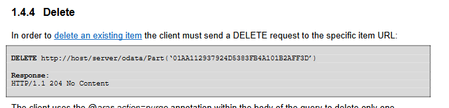
I tried to delete ItemType by following the Document about RESTful API in Aras. For example, PostMan was called as below (DELETE) localhost/.../exItemType ('abcde') If you call it url A 405.0 - Method Not Allowed error message is returned. Additionally, I tried to remove the RelationshipShip for itemType, but the same error occurred. Relationship remove was also carried out according to Document's method. For example, PostMan was called as below (DELETE) localhost/.../$ref This also returns an error of 405. How can I use RESTful to remove itemType?110Views0likes2CommentsIs there an "in" operator in the Aras REST API?
Hi community, Is there a way to optimize the following REST request that gets a number of specific items? https: // arasmagiccastle.com/test/server/odata/MagicItemType ?$ filter=serial_number eq '9879' or serial_number eq '678' or serial_number eq '643' or serial_number eq '123' or serial_number eq '234'........ Problems: 1. The number of requested items isn´t fixed, so the query can get super long 2. I don´t like it (solid argument, don´t question it! [emoticon:33306c418930400bac28808410f8ac8b]) What I would love to have: https://beautifulplm.com/test/server/odata/MagicItemType?$filter=serial_number in ('9879','678','643','123','234'). Good alternative: Another option would be to use a POST operation with @aras.action=get. This would allow us to use the filter condition inside the body. But Innovator doesn´t seem to support this variant yet. Browsers support URLs with a few thousand characters. The long query isn´t a problem right now. But I wonder if there is a more elegant solution to write requests like this? Thanks for any hint! @Aras: If you need more ideas for REST...Here you go! :)129Views0likes3Comments
Recursive API call to explode BOM
The internal reporting tool in Aras doesn't work for us therefore we have to use external tools. I need to explode the BOM downwards for parts. Use this data in PowerBi to create reports. I have figured how get the BOM structure but it only gives level 1. How do I drill down? This is my call to get level 1 BOM url/Part('9A75B30B66A5465BA372C30384133345') BOM($select=quantity,nmg_material_record;$expand=related_id($select=item_number,unit,major_rev))32Views0likes0Comments
Can <servername> in an ARAS URL include a path parameter?
link As per the above document, a valid ARAS server URL is of the pattern "https://<servername>/<web alias>/oauthserver/connect/authorize" In the above pattern, can a valid ARAS server include a path parameter within the <servername> part, before <web_alias>? for example, Is it valid to have "/aras" in the below URLs?: Access Token URL: sample.company.com/aras/<web alias>/oauthserver/connect/token Part Request URL: sample.company.com/aras/<web alias>/server/odata/Part33Views0likes0Comments
REST API does not return properties with Item datatype
Hi, I am using Release 15 and trying to GET all Properties of an Item using REST API with this request: http://server/innovatorserver/server/odata/par('D193004BBD7D4EF390925A859A4E371D') It does return all properties except the ones which are datatype = Item. I am able to get the missing items properties one-by-one with such requests: http://server/innovatorserver/server/odata/par('D193004BBD7D4EF390925A859A4E371D')/lead_est I tried with other ItemTypes as well and find same issue. Is this normal for OData or I am missing something in the API request? Or may be newer version has this issue fixed already? Of course AML requests do return all properties though. Regards92Views0likes1Comment