ARAS31 import.mf deployment issue
Hai, We recently upgraded our environment from Aras Innovator 11 to Aras Innovator 31, and we are running into several issues while deploying our solution packages. I wanted to share the details here to see if anyone has faced similar challenges or has suggestions. In Aras 11, we used an import.mf file with the following structure, and everything deployed without issues: <imports> <package name="DatabaseIdentifier" path="com\aras\innovator\DatabaseIdentifier" /> <package name="com.aras.innovator.solution.PLM" path="PLM\Import" /> <package name="com.aras.innovator.solution.Project" path="Project\Import"> <dependson name="com.aras.innovator.solution.PLM" /> </package> <package name="com.aras.innovator.core" path=".\" /> <package name="com.aras.innovator.cui_default" path=".\" /> <package name="Custom_Pkg1" path="CustomPkg1\Import" /> <package name="Custom_Pkg2" path="CustomPkg2\Import" /> </imports> After upgrading to Aras 31, we tried using the same .mf configuration, but we are encountering multiple deployment errors. Issues Observed 1. Null Reference Error Object reference not set to an instance of an object. 2. Method Not Found Error It points to this AML:→ Error: “No items of type Method found.” <Item type='ItemType' id='8052A558B9084D41B9F11805E464F443' action='edit'> <Relationships> <Item type="Server Event" action="add"> <related_id keyed_name="FileOnGet" type="Method"> <Item type="Method" action="get" select="id"> <name>FileOnGet</name> </Item> </related_id> </Item> </Relationships> </Item> Import package 'com.aras.innovator.core' failed with message: No items of type Method not found. 3. Timeout Error During Import The package was then marked as a failed release (seen for custom_Pkg). faultcode: 999 faultstring: System.Net.WebException: The operation has timed out 1. In Aras 31, are we required to use manifest.json instead of the old import.mf format for custom packages? 2. If yes, where exactly should the manifest.json file be placed, and what structure should it follow? 3. How should we handle customizations or extensions to system-level packages like com.aras.innovator.core and com.aras.innovator.cui_default that previously existed in Aras 11? 4. Has anyone encountered the faultcode 999 / timeout issue during import — and how did we resolve it? Thanks in Advance SaliniSolved340Views0likes9CommentsMAC Policy Issue in ARAS 31 – Need Help with Access Restrictions
Hi all, I’m working on implementing access restrictions for the a Itemtype in ARAS 31. There are around 46 records, and I want to group them into 5 categories. Each category will be assigned to specific identities, allowing controlled access based on the record's classification. To achieve this, I started configuring MAC policies. However, I’ve run into a few issues: The fields I need are disabled in the MAC Policy Condition Editor. User-defined properties are not accessible in the condition editor either. Has anyone faced similar challenges or found a workaround for this? Any help or guidance would be greatly appreciated! Thanks, Salini193Views0likes2Comments
Error loading Recipient Relationship tab of DCO and EDR change management giving error when refreshing the CM tab
Hi, when opening ECO/EDR the first time there is no Proplem opening the Recipients Relationship tap, but when opening another a second ECO/EDR the recipients Relationship tap doesnt load. when trying to refresh the item it gives an error message 'The method "cui_ivicb_refresh_click" failed.' only when changing to another relationship tap i can click on refresh with no error, then if changed back to Recipients the recipients list will appear. this issue was not there before the updates were done on .NET code. please help me if you have an idea about this problem and how to approach it. thanks76Views0likes1Comment
How to change the position of a Relationship Accordion tab
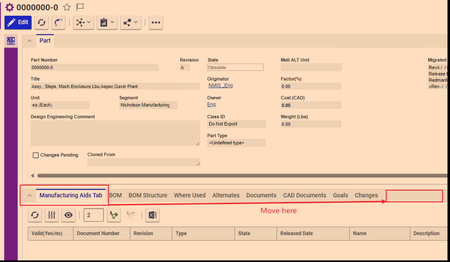
I needed to make a tab visible to certain identity. Therefore, I selected "Hide All" in the relationship types and used the CUI control to make a new tab. I need this tab to be all the way to right. Sort Order fields don't work, neither in the Relationship Type nor in cui_windowSection. Pictures below147Views0likes3CommentsUpload missing document relationship in Process Plan. "Add" statement doesn't work
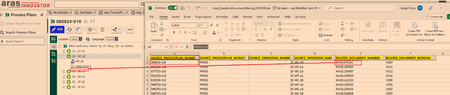
I need to upload relationship between Operation Document and the Documents. As you can see from the picture below the hierarchy of Process Plan is: Process Plan--> Operation Number (which is `sort_order`, in this case it is 20)-->Document I have an excel sheet of the missing documents that need to show under an operation (20) The document relationship cannot by uploaded just to Operation because the operation 20 will exist under other Process Plans. However, under one process plan the operation number is unique, so in this case there will be only one operation with sort_order 20. The documents already exist, I just need them to be shown here. From the AML script I have the `get` command works. The code is below. <AML> <Item type="mpp_processPlan" action="get"> <item_number>080824-S10</item_number> <Relationships> <Item type="mpp_Operation" action="get"> <sort_order>20</sort_order> <Relationships> <Item type="mpp_operationDocument" action="get"> </Item> </Relationships> </Item> </Relationships> </Item> </AML> However, in the above script in the line `<Item type="mpp_operationDocument" action="get">` when `action = Update` it won't work. Basically the following doesn't work <AML> <Item type="mpp_processPlan" action="get"> <item_number>080824-S10</item_number> <Relationships> <Item type="mpp_Operation" action="get"> <sort_order>20</sort_order> <Relationships> <Item type="mpp_operationDocument" action="Update"> <item_number>MADL074161</item_number> </Item> </Relationships> </Item> </Relationships> </Item> </AML> Result of scriopt with all `action=get` [embed:dc8ab71f-3b98-42d9-b0f6-e21e02a0f8e2:b4eb42d4-78c3-44de-b633-1a7d250b7129:type=text&text=%3CSOAP-ENV%3AEnvelope%20xmlns%3ASOAP-ENV%3D%22http%3A%2F%2Fschemas.xmlsoap.org%2Fsoap%2Fenvelope%2F%22%3E%0A%3CSOAP-ENV%3ABody%3E%0A%3CResult%3E%0A%3CItem%20type%3D%22mpp_ProcessPlan%22%20typeId%3D%224E030A4723224002B3E94F40F01AC1DE%22%20id%3D%22767F3FCDCC0F4CCF95F3CA3D9DB9D391%22%3E%0A%3Cconfig_id%20keyed_name%3D%22080824-S10%22%20type%3D%22mpp_ProcessPlan%22%3E767F3FCDCC0F4CCF95F3CA3D9DB9D391%3C%2Fconfig_id%3E%0A%3Ccreated_by_id%20keyed_name%3D%22Data%20Migration%22%20type%3D%22User%22%3E08880028FF8C43D48CB02B44EB74B127%3C%2Fcreated_by_id%3E%0A%3Ccreated_on%3E2024-02-20T11%3A49%3A02%3C%2Fcreated_on%3E%0A%3Ccurrent_state%20name%3D%22Released%22%20keyed_name%3D%22Released%22%20type%3D%22Life%20Cycle%20State%22%3E7109CDD337C84AFF87F55B21CCAC34AC%3C%2Fcurrent_state%3E%0A%3Cdescription%3E%3C%2Fdescription%3E%0A%3Cgeneration%3E1%3C%2Fgeneration%3E%0A%3Chas_change_pending%3E0%3C%2Fhas_change_pending%3E%0A%3Cid%20keyed_name%3D%22080824-S10%22%20type%3D%22mpp_ProcessPlan%22%3E767F3FCDCC0F4CCF95F3CA3D9DB9D391%3C%2Fid%3E%0A%3Cis_current%3E1%3C%2Fis_current%3E%0A%3Cis_released%3E1%3C%2Fis_released%3E%0A%3Ckeyed_name%3E080824-S10%3C%2Fkeyed_name%3E%0A%3Clocation%3E10%3C%2Flocation%3E%0A%3Cmajor_rev%3EPP000%3C%2Fmajor_rev%3E%0A%3Cmodified_on%3E2024-02-20T11%3A49%3A02%3C%2Fmodified_on%3E%0A%3Cname%3ESlitter%20Knife%20Arm%2C%20Rotary%20Tip%2C%2035%22%20Ring%2C%20C%2FR%3C%2Fname%3E%0A%3Cnew_version%3E1%3C%2Fnew_version%3E%0A%3Cnot_lockable%3E0%3C%2Fnot_lockable%3E%0A%3Cowned_by_id%20keyed_name%3D%22Mfg%20Eng%22%20type%3D%22Identity%22%3ED46B8ECBDB0C4D94BFF7A93D36FAB474%3C%2Fowned_by_id%3E%0A%3Cpermission_id%20keyed_name%3D%22Process%20Plan%20-%20Released%22%20type%3D%22Permission%22%3EE4EB045B2622409BA09AC91778FAE18C%3C%2Fpermission_id%3E%0A%3Crelease_date%3E2024-01-29T00%3A00%3A00%3C%2Frelease_date%3E%0A%3Cstate%3EReleased%3C%2Fstate%3E%0A%3Citem_number%3E080824-S10%3C%2Fitem_number%3E%0A%3Citemtype%3E4E030A4723224002B3E94F40F01AC1DE%3C%2Fitemtype%3E%0A%3CRelationships%3E%0A%3CItem%20type%3D%22mpp_Operation%22%20typeId%3D%2291B674D7C7AF47F99CA1C2FB26C38DBF%22%20id%3D%2277DD37200C7B4858833A6D6D8A48F4FA%22%3E%0A%3Cconfig_id%20keyed_name%3D%2220%22%20type%3D%22mpp_Operation%22%3E77DD37200C7B4858833A6D6D8A48F4FA%3C%2Fconfig_id%3E%0A%3Ccreated_by_id%20keyed_name%3D%22Data%20Migration%22%20type%3D%22User%22%3E08880028FF8C43D48CB02B44EB74B127%3C%2Fcreated_by_id%3E%0A%3Ccreated_on%3E2024-02-20T12%3A06%3A27%3C%2Fcreated_on%3E%0A%3Ccycle_time%3E60%3C%2Fcycle_time%3E%0A%3Cdescription%20xml%3Alang%3D%22en%22%3EMC-1B%20MC2%20CNC%20Machine%20Centre%20S10%3C%2Fdescription%3E%0A%3Cgeneration%3E1%3C%2Fgeneration%3E%0A%3Cid%20keyed_name%3D%2220%22%20type%3D%22mpp_Operation%22%3E77DD37200C7B4858833A6D6D8A48F4FA%3C%2Fid%3E%0A%3Cis_current%3E1%3C%2Fis_current%3E%0A%3Cis_released%3E0%3C%2Fis_released%3E%0A%3Ckeyed_name%3E20%3C%2Fkeyed_name%3E%0A%3Cmajor_rev%3EPP000%3C%2Fmajor_rev%3E%0A%3Cmodified_on%3E2024-02-20T12%3A06%3A27%3C%2Fmodified_on%3E%0A%3Cname%20xml%3Alang%3D%22en%22%3EMC-1B%3C%2Fname%3E%0A%3Cnew_version%3E1%3C%2Fnew_version%3E%0A%3Cnmg_erp_name%3EMC-1B%3C%2Fnmg_erp_name%3E%0A%3Cnmg_location_id%3E10%3C%2Fnmg_location_id%3E%0A%3Cnot_lockable%3E0%3C%2Fnot_lockable%3E%0A%3Cpermission_id%20keyed_name%3D%22Process%20Plan%20-%20Released%22%20type%3D%22Permission%22%3EE4EB045B2622409BA09AC91778FAE18C%3C%2Fpermission_id%3E%0A%3Csetup_time%3E0%3C%2Fsetup_time%3E%0A%3Csource_id%20keyed_name%3D%22080824-S10%22%20type%3D%22mpp_ProcessPlan%22%3E767F3FCDCC0F4CCF95F3CA3D9DB9D391%3C%2Fsource_id%3E%0A%3Cwi_details%20xml%3Alang%3D%22en%22%3E%3C%2Fwi_details%3E%0A%3Csort_order%3E20%3C%2Fsort_order%3E%0A%3CRelationships%3E%0A%3CItem%20type%3D%22mpp_OperationDocument%22%20typeId%3D%2238BA57E0616B49A58317C267E436AE4C%22%20id%3D%22106F5032EE7F4C5497717888370A3BB6%22%3E%0A%3Cconfig_id%20keyed_name%3D%22106F5032EE7F4C5497717888370A3BB6%22%20type%3D%22mpp_OperationDocument%22%3E106F5032EE7F4C5497717888370A3BB6%3C%2Fconfig_id%3E%0A%3Ccreated_by_id%20keyed_name%3D%22Data%20Migration%22%20type%3D%22User%22%3E08880028FF8C43D48CB02B44EB74B127%3C%2Fcreated_by_id%3E%0A%3Ccreated_on%3E2024-02-20T12%3A36%3A02%3C%2Fcreated_on%3E%0A%3Cgeneration%3E1%3C%2Fgeneration%3E%0A%3Cid%20keyed_name%3D%22106F5032EE7F4C5497717888370A3BB6%22%20type%3D%22mpp_OperationDocument%22%3E106F5032EE7F4C5497717888370A3BB6%3C%2Fid%3E%0A%3Cis_current%3E1%3C%2Fis_current%3E%0A%3Cis_released%3E0%3C%2Fis_released%3E%0A%3Ckeyed_name%3E106F5032EE7F4C5497717888370A3BB6%3C%2Fkeyed_name%3E%0A%3Cmajor_rev%3EA%3C%2Fmajor_rev%3E%0A%3Cmodified_on%3E2024-02-20T12%3A36%3A02%3C%2Fmodified_on%3E%0A%3Cnew_version%3E1%3C%2Fnew_version%3E%0A%3Cnot_lockable%3E0%3C%2Fnot_lockable%3E%0A%3Cpermission_id%20keyed_name%3D%22Process%20Plan%20-%20Released%22%20type%3D%22Permission%22%3EE4EB045B2622409BA09AC91778FAE18C%3C%2Fpermission_id%3E%0A%3Crelated_id%20keyed_name%3D%22MADL074152%22%20type%3D%22Document%22%3E%0A%3CItem%20type%3D%22Document%22%20typeId%3D%22B88C14B99EF449828C5D926E39EE8B89%22%20id%3D%22BD9ECB6D5C5D4AEEBC0ED65680C5505C%22%3E%0A%3Cclassification%3EManufacturing%20Aid%3C%2Fclassification%3E%0A%3Cconfig_id%20keyed_name%3D%22MADL074152%22%20type%3D%22Document%22%3EBD9ECB6D5C5D4AEEBC0ED65680C5505C%3C%2Fconfig_id%3E%0A%3Ccreated_by_id%20keyed_name%3D%22NMIS%20_MADL%22%20type%3D%22User%22%3E41E9090B65234C899CAFF690C7C0F562%3C%2Fcreated_by_id%3E%0A%3Ccreated_on%3E2024-02-19T11%3A12%3A07%3C%2Fcreated_on%3E%0A%3Ccurrent_state%20name%3D%22Released%22%20keyed_name%3D%22Released%22%20type%3D%22Life%20Cycle%20State%22%3E8EDE39438A7E4A56A1B4A9D07EF4A2FF%3C%2Fcurrent_state%3E%0A%3Cdescription%3E35%22%20SLITTER%20ARM%20C%2FR%3C%2Fdescription%3E%0A%3Ceffective_date%3E2018-11-16T14%3A35%3A00%3C%2Feffective_date%3E%0A%3Cgeneration%3E1%3C%2Fgeneration%3E%0A%3Chas_change_pending%3E0%3C%2Fhas_change_pending%3E%0A%3Chas_files%3E1%3C%2Fhas_files%3E%0A%3Cid%20keyed_name%3D%22MADL074152%22%20type%3D%22Document%22%3EBD9ECB6D5C5D4AEEBC0ED65680C5505C%3C%2Fid%3E%0A%3Cis_current%3E1%3C%2Fis_current%3E%0A%3Cis_released%3E1%3C%2Fis_released%3E%0A%3Cis_template%3E0%3C%2Fis_template%3E%0A%3Ckeyed_name%3EMADL074152%3C%2Fkeyed_name%3E%0A%3Cmajor_rev%3EV007%3C%2Fmajor_rev%3E%0A%3Cmodified_on%3E2007-07-09T08%3A17%3A00%3C%2Fmodified_on%3E%0A%3Cname%3E080824%3C%2Fname%3E%0A%3Cnew_version%3E0%3C%2Fnew_version%3E%0A%3Cnmg_department%3EManufacturing%3C%2Fnmg_department%3E%0A%3Cnmg_type%3EProgram%20%28CAD%2FCAM%29%3C%2Fnmg_type%3E%0A%3Cnot_lockable%3E0%3C%2Fnot_lockable%3E%0A%3Cowned_by_id%20keyed_name%3D%22Mfg%20Eng%22%20type%3D%22Identity%22%3ED46B8ECBDB0C4D94BFF7A93D36FAB474%3C%2Fowned_by_id%3E%0A%3Cpermission_id%20keyed_name%3D%22Released%20Document%22%20type%3D%22Permission%22%3E74C205C37E7C4D56BBBE99B52B28431E%3C%2Fpermission_id%3E%0A%3Crelease_date%3E2018-11-16T14%3A35%3A00%3C%2Frelease_date%3E%0A%3Cstate%3EReleased%3C%2Fstate%3E%0A%3Citem_number%3EMADL074152%3C%2Fitem_number%3E%0A%3Citemtype%3EB88C14B99EF449828C5D926E39EE8B89%3C%2Fitemtype%3E%0A%3C%2FItem%3E%0A%3C%2Frelated_id%3E%0A%3Csource_id%20keyed_name%3D%2220%22%20type%3D%22mpp_Operation%22%3E77DD37200C7B4858833A6D6D8A48F4FA%3C%2Fsource_id%3E%0A%3C%2FItem%3E%0A%3C%2FRelationships%3E%0A%3C%2FItem%3E%0A%3C%2FRelationships%3E%0A%3C%2FItem%3E%0A%3C%2FResult%3E%0A%3C%2FSOAP-ENV%3ABody%3E%0A%3C%2FSOAP-ENV%3AEnvelope%3E]114Views0likes4CommentsI want to see all item bout related item in relationship tab
I developing a request form When I make a Item to request I want to a view a bout the item that I can request I manage the Item list by a Item type And I make a relationship type to connect the request item type and item list item type I need how to view all of the Item in my relationship tab bout the related item type I using aras 1231Views0likes0Comments
ARAS REST API - How do I get properties of a RelationshipType
The Properties of an ItemType can be retrieved using the below URL /odata/ItemType('<<item_type_id>>')/Property But when we try to do the same for RelationshipType using the below URL, getting 404 not found error /odata/RelationshipType('<<relationship_type_id>>')/Property { "error": { "code": "NotFound", "message": "Property 'Property' of 'RelationshipType' itemtype not found" } } How do I retrieve properties of a RelationshipType using ARAS REST API?127Views0likes3Comments
How do I "edit"/"update" a Relationship instance using js or AML.
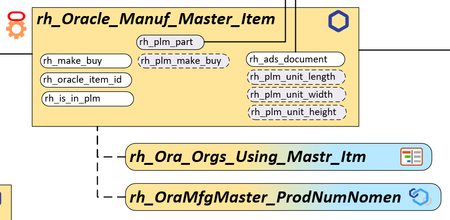
All, I am trying to "edit"/"update" the properties on a Non-Related Relationship; "rh_OraMfgMaster_ProdNumNomen". I must be missing something. I tried the following AML from AML Studio: <AML> <Item type="rh_Oracle_Manuf_Master_Item" action="edit" id="C323F3AB54D84E70B54D895158EE3CB7"> <Relationships> <Item type="rh_OraMfgMaster_ProdNumNomen" action="edit" where="[rh_OraMfgMaster_ProdNumNomen].source_id = 'C323F3AB54D84E70B54D895158EE3CB7'"> <RH_PRODUCT_CATEGORY_CODE>Z</RH_PRODUCT_CATEGORY_CODE> <RH_TRADE_BRAND_CODE>F</RH_TRADE_BRAND_CODE> </Item> </Relationships> </Item> </AML> <AML> <Item type="rh_Oracle_Manuf_Master_Item" action="edit" id="C323F3AB54D84E70B54D895158EE3CB7"> <Relationships> <Item type="rh_OraMfgMaster_ProdNumNomen" action="edit" id="3A40258510F24D1685B044270F4B296A"> <RH_PRODUCT_CATEGORY_CODE>Z</RH_PRODUCT_CATEGORY_CODE> <RH_TRADE_BRAND_CODE>F</RH_TRADE_BRAND_CODE> </Item> </Relationships> </Item> </AML> This does not work. I tried [Item type="rh_OraMfgMaster_ProdNumNomen" action="update"] and that did not work. I can delete the existing Relationship using: <AML> <Item type="rh_Oracle_Manuf_Master_Item" action="edit" id="C323F3AB54D84E70B54D895158EE3CB7"> <Relationships> <Item type="rh_OraMfgMaster_ProdNumNomen" action="delete" id="A9BB4FEB593F4D09A5427B108937B216"> </Item> </Relationships> </Item> </AML> And then Add a new Relationship instance (with 'hasProdNomen ' = "NO") with the updated data. let hasProdNomen = HasProductNomenclature(parentId); let arasAction = "edit"; if(hasProdNomen === "NO"){ arasAction = "add";} //let oracleMasterItem = inn.getItemById("rh_Oracle_Manuf_Master_Item",parentId); let prodNumNomen = inn.newItem("rh_OraMfgMaster_ProdNumNomen", arasAction); if(hasProdNomen === "YES"){ prodNumNomen.setAttribute("Where", "[rh_OraMfgMaster_ProdNumNomen].source_id = " + parentId); } prodNumNomen.setProperty(itemProductNumberPropName, prodNumItemNumber); prodNumNomen.setProperty(tradeBrandPropName, tradeBrand); prodNumNomen.setProperty(tradeBrandCodePropName, tradeBrandCode); prodNumNomen.setProperty(productCategoryPropName, prodCategory); prodNumNomen.setProperty(productCategoryCodePropName, prodCatCode); prodNumNomen.setProperty(numberOfPositionsPropName, numberOfPositions); //let prodNumNomenCnt = prodNumNomen.getItemCount(); //debugger; let cnt = -1; let prodNumNomenCheck = null; if(hasProdNomen === "NO"){ //debugger; item.addRelationship(prodNumNomen); item.apply(); } else if(hasProdNomen === "YES"){ prodNumNomenCheck = prodNumNomen.apply(); cnt = prodNumNomenCheck.getItemCount(); } But I would rather update the properties on the Relationship item. Thanks for the help. Scott218Views0likes5Comments
Automatic Parent-relationship in Child item set, when Child-relationship set from Parent item
Hi, I have created a Document-to-Document relationship for the Document itemtype with the goal of relating child documents to the parent - simple enough. However, now I want to design a system such that it behaves as below: I open the Parent document, navigate to the its Document-to-Document relationship create a relationship to another document and indicate it as Child Now, if I navigate to the Child document, in its Document-to-Document relationship, the Parent Doc is automatically listed as a related Document, and automatically indicated as Parent (because in step 2, the Child document was set to 'Child') I am not sure how to go about setting the relationship in the Child/Parent item to update automatically "off-screen" when the initial Parent/Child is set. I plan to start by look into the CAD-Part relationship which behaves similarly to what I envision, but not sure which method I should be looking at.274Views0likes1Comment
Set focus on a property in a relationship grid
Hello, I have method attached to OnEditFinish of the property sort_order of the Part BOM relationship. The goal is to check if the property is filled and if no, to throw an error. After the display of the error, I want to set back the focus to the property so that the user can enter a value there. Is it possible to achieve that? My Aras version is 12SP18. I tried using the gridApplet but I couldn't find a function that can be used to achieve my goal. Thank you [emoticon:c4563cd7d5574777a71c318021cbbcc8]1KViews0likes1Comment