Set permissions from workflow to assignee(s)
Hi All I have a challenge I hope someone is able to help me solve. It's a general issue we have, it's not related to a specific solution. Example: On our ECR process we would like only the current assignee(s) to be able to edit the item. Does anyone know how this could be achieved? I was considering using a method to set current assignee to by instance the owner property on the itemtype and execute this method from the workflow on activate. I would then add the owner to the permissions to grant edit permissions. This would probably work if the current assignee was only one identity but it can be several. Any suggestions? From my point of view it must be an issue others are struggling with as well. Kind Regards Henrik Olesen Kamstrup A/S Denmark5.7KViews0likes4Comments
About File Permission
As written in the document “File Handling”, the permissions of a File Item are dependent on the Item containing that File (File container item). But I think there are some use-case for control the file item permission independent of the container item. Ex) CAD Item - Engineer : can upload and download the native files - Sales staff : can download the viewer files (PDF) and are not allowed to download native files - Restricted staff : can view just the data in Visual Collaboration, and are not allowed to download native files and viewer files. I think Aras does not have capability for these use-case with standard permission framework, so I’m considering how to satisfy the requirement. Please give me some advice. Below are my ideas that prevent to download the files by who can access the File Container Item. 1. If the file container item has the file as a property I have two ideas. - Clear the property of managing the file item at ‘On After Get’ event of File Container Item . In search grid and form view, the value of the property for file item is cleared. - Clear the id of the file item at ‘On After Get’ event of File Item . In search grid and form view, the value of the property for File Item is showed normally but cannot download. (show the message “Failed to get the file.”) 2. If the file container item has the file as Relationship Item In this case I have four ideas. - Clear the related id at ‘On After Get’ event of Relation Item In the relation grid, it seems like null relationship, so I cannot download the file. But in Structure Browser, I can see the file item and download the file. So, this idea is not good. - Clear the id of the file item at ‘On After Get’ event of File Item . In the relation grid, it seems like null relationship, so I cannot download the file. (same as above) And in Structure Browser, I can see the file item, but I cannot download the file. - Set the permission of the relation item as “No permission”. In the relation grid, I cannot see the relationship, so I cannot download the file. And in Structure Browser, I cannot see the file item, so I cannot download the file. - Set the permission of the relation item as “Discover only”. In the relation grid, it seems like normally (I can see the file name), but I cannot download the file. And in Structure Browser, I can see the file item, but I cannot download the file. If you have any idea to control the file permission, please let me know.4.6KViews0likes2CommentsHow to query for the latest generation of items that the user has access to?
Hi, I would like to ignore the "is_current" property when querying for items, and instead return the latest generation of each item that the user has access to (i.e. permission to "get"). For instance, since the permission_id can change for a given config_id, the user might not be able to access the vary latest: Can I do this in AML? Or do I need to do some SQL magic instead? Would be great if somebody could help me implement a method that does this. Or at least show me how I should approach the problem.4.3KViews0likes3Comments
Delete attempt as admin: SOAP-ENV:Server.InsufficientPermissionsException
I'm working on a local system. I can add and edit users... So, POST and PATCH are working. I go to delete the same user I just edited, but am getting: // DELETE 'http://localhost/InnovatorServer12/server/odata/User('30B991F927274FA3829655F50C99472E') { "error": { "code": "SOAP-ENV:Server.InsufficientPermissionsException", "message": "You have insufficient permissions to perform 'delete' operation." } } Why? How to fix this?Solved3.5KViews0likes1Comment
How can i create new permission and add that in
Hello, How can i add new permission and add on add I am using the following mode, it is creating permission but not adding it Innovator inn = this.getInnovator(); string docid = this.getProperty("id",""); Item permissions = this.newItem("Permission", "add"); permissions.setProperty("name", docid); permissions = permissions.apply(); this.setProperty("permission_id", permissions.getID()); return this;Solved3.4KViews1like6Comments
Can Add Problem
Good day all. I am trying to set up the ECN for a group of users to be able to create them. I have an Identity called sm_TODO that has the users in it. I have added the Identity to the Can Add section of the ECN. One of my users still has the button for adding an ECN grayed out. I had the user try a different browser just in case, but it is still grayed out. I added another account to the Identity sm_TODO and that account can add ECNs. I'm not sure what to look for with this one. Thanks for your help.Solved2.4KViews0likes2CommentsUnable to set permission_id using AML as well as C# code
I am trying to change the permission for Part object but getting errors. Here is the AML I am using to change the permission. <AML> <Item type="Part" action="edit" where="item_number='CPR-002'"> <permission_id>708662930B5B484A98C088859500CC42</permission_id></Item> </AML> permission_id is valid. Also tried following code to change the permission based on property ref (community.aras.com/.../). The permission_id doesnt change. string permissionName=""; permissionName = this.getProperty("description",""); CCO.Utilities.WriteDebug("DebugMsg", "Permission Name =" + permissionName); //Get the permission item Item permItem = this.newItem("Permission", "get"); permItem.setProperty("name", permissionName); permItem = permItem.apply(); if (permItem == null){ CCO.Utilities.WriteDebug("DebugMsg", "Permission with the name not found" ); // I have verified that there is permission with the description name } //Set the permission item for the context item //this.setProperty("permission_id",permItem.getProperty("id")); this.setPropertyItem( "permission_id",permItem ); // I have tried both the methods without any success return this; Any help in this regard is highly appreciated. Pravin2.2KViews0likes1Comment
changing permissions for existing Items (Documents)
We've a classification of Documents that we've setup to have a special set of permissions. We used the solution presented in the following topic to achieve that: SUPPORT Q&A - Permission based on Class Structure However, before we made this adjustment for the classification of documents, some documents we're already created. These documents still have the generic permissions set. Is there a way to change the permissions of these existing documents in such a way that they have the same permissions as any new document created under that classification?898Views0likes3Comments
Extending Permissions to Item Properties
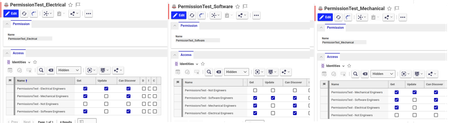
Has anyone successfully extended permissions to the item property level? I need to configure property‑level permissions in Aras Innovator so that modification and visibility of specific properties on an ItemType are controlled by user identity, beyond the standard item‑level permission and lifecycle security. This cannot be a purely UI/visual restriction (e.g., hiding fields via Forms or client‑side methods only). It must be enforced as a true permission/authorization control so that users cannot modify restricted properties using AML, REST, external integrations, or custom clients. Example Situation: Starting with 3 ‘Property Permission’ sets, one for Electrical, Software, and Mechanical Each Permission Set has 4 identities, one for Mechanical Engineers, Electrical Engineers, Software Engineers, and Non-Engineers. The permissions allow all of the engineers to Discover / get, but only one engineering group can update, and non-engineers have no access. Then modifying the 'Property' itemtype to have a lookup property to permissions And creating an ItemType called ‘PropertyPermissionItemType’ with 3 properties 'owned' by the different engineering groups, linked to the previously created permissions And the idea is that these property Level permissions would determine who could view and update these properties. It seems like theres a basic structure for it, but what would have to be done to actually implement the permissions at this level?218Views0likes7Comments