Office Connector - PowerPoint Issues
Hello, I am currently working on setting up a template for ARAS Office Connector for Microsoft PowerPoint. By writing a custom VBA script I am able to get the Custom Properties to display on a slide, but the issue I am having is how to have the field/text update when the Custom Property is changed? Has anyone else created a solution for a PowerPoint template that can solve this or approached this in a different way to solve setting up a PowerPoint template?82Views0likes1Comment"Change" property for Tracking Changes and Comments with Office Connector
In the "Aras Office Connector 31 - User Guide" documentation, section "9.7 Tracking Changes and Comments" mentions: "Aras Office Connector can control whether your documents contain change or comment tracking. This feature, if enabled by your administrator, works automatically and allows you to briefly see the status of changes and comments." I understand that if another user reviews the document and adds a comment or modifies the content, this should be reflected in the Changes property of the document. However, I have not found any additional information in the Aras guides about how to activate this functionality. Could someone clarify what settings or permissions need to be enabled by the admin so that the Changes property of the Documents item type correctly reflects the changes and comments made by other users? Thank you in advance for any further details or shared experience!77Views0likes1Comment
How do you import Excel BOM data into Aras Innovator open version?
Hello, I currently use the open, free version of Aras Innovator and am having difficulty figuring out how to store BOM data within the tool. I have seen from other posts that subscribers have access to a direct import functionality and also some kind of batch loader. For the latest free version of ARAS, what are the exact steps to import an excel file containing BOM data into Aras? Any help would be greatly appreciated.6.4KViews1like7Comments
How to set Default value thru office connector
Hi, I have to set default value for some of the properties thru office connector, I tried in "MSO_SaveDocument" this method, but value is not getting set on document. (I don't want to map this property with office connector). itemToSave.setProperty("name","Auto Generated"); itemToSave.setProperty("language","en"); itemToSave = itemToSave.apply(); Is there any other approach. Regards, Maddy.4.2KViews0likes3Comments
Batchloading multiple Document items - but some reference/link to others via template_file_container. Possible to batchload all documents and their dependent items in one go?
Hey all, I am developing a batchloading schema for uploading template files. Pretty straightforward, here is my AML for a simple document load: <AML> <Item type="Document" action="add"> <name>@1</name> <description>@2</description> <state>@3</state> <classification>@4</classification> <authoring_tool>@5</authoring_tool> <is_template>@9</is_template> <Relationships> <Item type="Document File" action="add"> <related_id> <Item type="File" action="add"> <actual_filename>@6</actual_filename> <filename>@7</filename> </Item> </related_id> </Item> </Relationships> </Item> </AML> However, I am trying to utilize template file containers for office connector templates. Template file container is a property on the document itemtype that lets a template document item to reference another template document item in order to reference and "use" its file. Useful if you want to have templates across multiple document classifications without adding the file individually to all those differently classified template doc items. I have about 10 templates and about 20 document classifications, so wanted to create around 200 document items (templates) but have only 10 hold the actual files, and 190 just reference the 10 via template_file_container property. A few questions: Am I able to accomplish this in one batchload procedure/one AML script? How do I write the AML for the latter document items to reference the file-holding document items? I imagine it is something like:<template_file_container></template_file_container>, but will the code require the actual item code (BFA3BE03444448F5916133D874712CF4 or something similar) or is there a way to use the name/item numbers? Or is there a way to easily find the item code of the created template-holding document items from earlier in the "batchloading process"? And if so, how would I go about writing that? What would be the most robust and simplest script I can write to accomplish my goals?166Views0likes5Comments
Instruction: Hiding the Open in Office Button
Hello everyone, Here is a short instruction on how to hide the Open in Office (Microsoft Office Connector) Button when viewing document items. This can be done without uninstalling / disabling MSO in case you want to prevent users from using the Toolbar Action button. Before: After: This can be achieved by taking these steps: Go to the root \Innovator installation directory of your Innovator instance Navigate to \Innovator\Client\styles Append common.min.css with the following CSS: [data-id="MSO_OpenInOfficeMenuButton"]{display: none!important;} I recommend also updating the regular common.css file with the same CSS but indented Save, clear browser cache and reload the Innovator webpage I hope this helps. All the best from Almelo. Daan1.8KViews0likes3CommentsOffice Connector with Document Sequencing Not Working
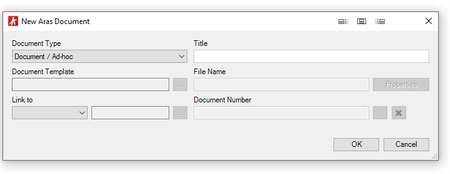
When attempting to create or open a document in Office Application and save to Aras we get the following error, and none of the Document Dialog files are editable expect the Document Type: "Document Type "Document" is not configured properly for use with Office Connector (Number is defined as Sequence). Please Contact your Administrator." The Office Connector is installed, and configured for Sequencing in the Office Connector Settings: Document Numbering = Sequence Document Numbing Sequence = Default Document The Document Item item_number is also setup to use the Default Document Sequence: What are we missing?2.4KViews0likes2Comments
Customization in Office Connector to restrict edit/save from MS office
After installing office connector, While opening the ARAS files from MS office using "Open from ARAS" menu, user can both edit and save the file back to ARAS. Is there any way to restrict the edit and also save access to the files that are opened using the menu. Only view option or access to be enabled to the user for the files opened using "Open from ARAS" menu of open office.1.1KViews0likes0Comments