Customizing BatchLoader in ARAS 31 to Add Users with Identities
Hi everyone, I recently migrated from ARAS version 11 to version 31. In ARAS 11, we used the BatchLoader tool to import user data from an Excel file, which included both user details and their associated identities. However, after migrating to ARAS 31, I noticed that the BatchLoader no longer supports adding users and identities together in a single operation. The AML mapping now restricts us to using only one ItemType at a time, which makes it difficult to replicate our previous process. Has anyone tried customizing the BatchLoader in ARAS 31 to overcome this limitation? I’d really appreciate any guidance or suggestions on how to achieve this. Thanks in advance for your help! — Salini54Views0likes0Comments
Any best practice tips to clean up orphaned files in the Global Files Container?
Hi community, on a regular basic I clean up orphaned files. Typically these are files that were used in a relationship or file property item. But we have another type of files -> images and thumbnails. If thumbnails are not referenced any more, they are not marked as orphaned. They stay in the Global Files Container. We cannot use the locator to check if the files are still used. What is the best way to get and overview of these files? I am already able to find orphaned thumbnails of Parts via SQL. But I noticed that it´s dangerous to only check the "Part" Item Type. The "Image" property is used more than 30 ItemTypes. Just because my orphaned image isn´t use in a Part, doesn´t mean it isn´t use in a mpp_Tool So I wonder if my current approach to get the files via SQL is really the best approach. Does anyone have a better idea? Angela316Views0likes4Comments
How to batch download and upload files?
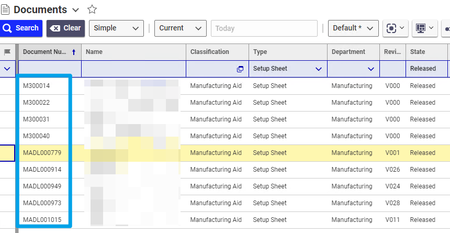
Under Documents, Type= Setup Sheet, State = Released, are documents that are in excel and they have to be converted to pdf I guess the first the step woudl be to get the meta data, Document name, ID, Related Files, and File ID. Then loop through this file to download them. But then what would the path be to download this. How do I go about this? Thanks!!Solved280Views0likes5Comments
Direct Link to Download File From Vault
I am wondering if there is a way to download a file directly via a link. In previous versions of Innovator there was a way to do this through the vault server: /vault/vaultserver.aspx?dbName={dbName}&fileId={fileId}&fileName={filename}&vaultId={vaultId} However it seems like in later versions of Innovator this no longer works. I am aware of an option of: /client/?StartItem=File:{fileId}, however this requires a user to authenticate and a popup window is displayed, it is not a direct download. Is there any way to achieve this?203Views0likes1CommentRemoving file from vault via server Event
Hai , I do have a requirement to delete unused files from vault , because it consumes memory . So I was trying to deleting files via server event which does not have any relationship . But I was not able to reach vault . Please help me to find a solution in this requirement. Thanks in advance !!105Views0likes2CommentsExtending FileType table with additional types for software files - what do I have to consider? @Aras: Could you provide an official extension?
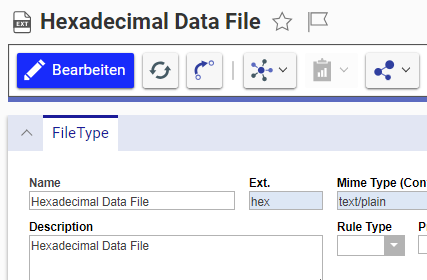
Hi community, does any one have experience with extending the FileType table with custom entries? Is there anything we need to know before adding own new entries? We use Innovator for more and more software related tasks, but the FileType table mostly contains general or CAD related file extensions. The missing file types are not really a big issue from a technical perspective. Innovator just ignores FileTypes it doesn´t know. It´s more a nice to have. But well, let´s say our PLM implementation is so advanced that stuff like this are now the BIG issues people complain about. [emoticon:6d505171faa4497c85c5ca27290c555d] Extending the FileType table is pretty easy. We can create own entries like this: But I wonder if it´s really smart when end users expand the FilesType table by themselves? In case Aras adds similar file types in the future, my own file types would conflict with the new ones. And I right now don´t know, if there are any cross references to other tables or even the codetree that we should consider (despite the Files table). Does anyone know if there are "official" extended Aras FileType entries for software files? @Aras: Could you provide some official FileType extension package? A official dataset would ensure that everyone works on the same items a minimize conflicts when people update!! These are the file types I miss so far related to typical software files: hex, ini, exe, app, bin, rom, dfu, dmg, iso, md5, msi, deb,... If we think even further, we could also add the file types for source code files like cpp, py, json, html, dll,.... Not sure if storing sources is somebody ever will do, but who know the future? Other file types that are missing are trivial common stuff like 7z, rar and ico. I assume there are more than enough file types that could be part of an "extension" package. Would be a great work for an intern :D Despite that, if any one from this forum community has experience with adding own FileTypes I would be happy to know! Best regards! Angela100Views0likes2Comments
Loading files using BeforeAMLPackagesImport script
Hello All, I am loading some custom help pages as items in Innovator as part of an AML package. These items have pictures attached to them so I know I need to load the pictures separately through a BeforeAMLPackagesImport script (or just before the help items on the import.manifest file?) I need these items (and the files that the items rely on) to load with a new build. The question is, how would I script to load those files into the database?136Views0likes3Comments
Prevent Popup on download of File
Hi community, Currently, when downloading a file from an innovator installation, like the viewable file property on CAD, a popup window occurs and the file is downloaded in chrome. Is there a way to get the file to download in the original window?966Views0likes2Comments
Get a direct link to a file
Hello, Is there a way to get a direct permanent link to a file content? I found a link like /InnovatorServer/Client/?StartItem=File%3A{fileId}, but if I click on this link, the file is downloaded in the new popup window. Popup window downloads file using link /InnovatorServer/vault/vaultserver.aspx?dbName={dbName}&fileId={fileId}&fileName={filename}&vaultId={vauldId}&token={token}. This is a direct link, but not permanent. I need a link that I can open in the browser and if I have opened a session, the file will be downloaded.3.8KViews0likes2Comments