"Change" property for Tracking Changes and Comments with Office Connector
In the "Aras Office Connector 31 - User Guide" documentation, section "9.7 Tracking Changes and Comments" mentions: "Aras Office Connector can control whether your documents contain change or comment tracking. This feature, if enabled by your administrator, works automatically and allows you to briefly see the status of changes and comments." I understand that if another user reviews the document and adds a comment or modifies the content, this should be reflected in the Changes property of the document. However, I have not found any additional information in the Aras guides about how to activate this functionality. Could someone clarify what settings or permissions need to be enabled by the admin so that the Changes property of the Documents item type correctly reflects the changes and comments made by other users? Thank you in advance for any further details or shared experience!77Views0likes1Comment
Trouble Exporting HTML Table to Excel in Aras Innovator Custom Button
Hello everyone, I've been working on a custom button within the search tab for parts in Aras Innovator. The goal is to export a list of specific parts and their properties through a query and display them in an HTML table. Here's a snippet of the code I'm using to convert the HTML table to Excel and download the Excel file: [embed:dc8ab71f-3b98-42d9-b0f6-e21e02a0f8e2:4ac1465e-c931-489c-a19e-bb242bc1c5f6:type=javascript&text=var%20htmlCode%20%3D%60%0A%3Chtml%3E%0A%3Chead%3E%0A%3Cmeta%20http-equiv%3D%27Content-Type%27%20content%3D%27text%2Fhtml%3B%20charset%3Dutf-8%27%20%2F%3E%0A%3Cscript%20src%3D%27https%3A%2F%2Fcdnjs.cloudflare.com%2Fajax%2Flibs%2Fxlsx%2F0.16.9%2Fxlsx.full.min.js%27%3E%3C%2Fscript%3E%0A%3Cscript%20src%3D%27https%3A%2F%2Fcdnjs.cloudflare.com%2Fajax%2Flibs%2FFileSaver.js%2F2.0.5%2FFileSaver.min.js%27%3E%3C%2Fscript%3E%0A%3Cscript%3E%0Afunction%20substituteTableToExcel%28%29%7B%0Avar%20table%20%3D%20document.getElementById%28%27all_Parts_AML%27%29%3B%0Avar%20sheet_name%20%3D%20%27ALL_Parts_AML%27%3B%0Avar%20workbook%20%3D%20XLSX.utils.table_to_book%28table%2C%20%7Bsheet%3A%20sheet_name%2C%20cellStyles%3A%20true%7D%29%3B%0Avar%20wbout%20%3D%20XLSX.write%28workbook%2C%20%7B%20bookType%3A%20%27xlsx%27%2C%20bookSST%3A%20true%2C%20type%3A%20%27array%27%2C%20cellStyles%3A%20true%20%7D%29%3B%0AsaveAs%28new%20Blob%28%5Bwbout%5D%2C%20%7B%20type%3A%20%27application%2Foctet-stream%27%20%7D%29%2C%20%27ALL_Parts_AML.xlsx%27%29%3B%0A%7D%0Adocument.addEventListener%28%27DOMContentLoaded%27%2C%20function%28%29%20%7B%0AsubstituteTableToExcel%28%29%3B%0A%7D%29%3B%0A%3C%2Fscript%3E%0A%3Clink%20rel%3D%27stylesheet%27%20type%3D%27text%2Fcss%27%20href%3D%27styles.css%27%3E%0A%3C%2Fhead%3E%0A%3Cbody%3E%0A%24%7BexcelTable%7D%0A%3C%2Fbody%3E%0A%3C%2Fhtml%3E%60%3B] return htmlCode; I'm encountering issues with the export functionality. When I click the custom button, the HTML table is generated correctly, but the Excel file download doesn't seem to work. Could someone kindly review the code snippet above and provide any insights or suggestions on how to troubleshoot and resolve this issue? I would greatly appreciate it. Thank you in advance! Version 12.0 SP8Solved138Views0likes2Comments
Merge pdfs and convert csv to pdf
Hi everyone, I want to add the data in a relationship in table form in a preexisting pdf.I am thinking making a csv from relationships than converting to pdf using some libraries and then merging both the pdfs.I tried itext7 but aras toolbar disappears when I use the dlls.I tried Spire too but the pdf generated is not looking good.Any have a suggestion or have done something like this,Please let me know.You will be of great help. Thank You. Rajat1KViews0likes1CommentHow to define export data for Excel, Word or PDF?
Hi everyone, We need to export some of out Process Plans for external use, but when we export to Word, PDF or Excel, only the name, description and process plan number are included in the document. How could we go about configuring this? ThanksSolved3.3KViews0likes3Comments
How do you import Excel BOM data into Aras Innovator open version?
Hello, I currently use the open, free version of Aras Innovator and am having difficulty figuring out how to store BOM data within the tool. I have seen from other posts that subscribers have access to a direct import functionality and also some kind of batch loader. For the latest free version of ARAS, what are the exact steps to import an excel file containing BOM data into Aras? Any help would be greatly appreciated.6.4KViews1like7Comments
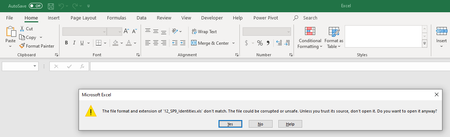
Warning while opening exported excel from Innovator
Hello, This might be a very basic question. I encounter a warning while opening the exported excel from Innovator. I am currently using Microsoft 365. Such warning makes me worried about security policy at organization level. Regards, Nagendra7.7KViews0likes4Comments
ArasModules.vault.saveBlob() JS Function.
Does anyone know where the JavaScript function ArasModules.vault.saveBlob() is defined? It is called out in the saveContentToFile function in the client/javascript/ExportToOfficeHelper.js file. The reason for the question is that the saveBlob() function is not preserving leading zeros from a table's outerHTML value when exporting the table to Excel.3.1KViews0likes1Comment
Read only fields in Excel Export
Hi, I am currently looking to customize my excel export functionality, is it possible to have some columns in excel sheet to be read only, when it is exported ? I am passing the treegrid to the method as an input, but i don't want some columns like "ID or Name" not to be modified. Method i am using is : aras.export2Office(exportXMLDOM.xml, 'export2Excel');1.7KViews0likes0Comments