Combine and selectively export PDFs in Innovator
Hello! I'm looking for something to add into Innovator that would allow my users to take multiple documents with attached PDFs and be able to selectively output them as a single PDF. For example, I could have 3 3-page PDFs. I want page 1 from PDF 1, page 2 from PDF 2, and page 3 from PDF 3 but not their other pages to be exported a single, new PDF (only 3 pages, not 9). Are there any tools or converters you're aware of which are compatible with Innovator? Preferably something that can be embedded into the Aras installation as our clients use secured, on-prem versions and thus can't make calls out to other websites. Thanks in advance for your help.116Views0likes4Comments
Aras documentation sources
Hi, I am looking for an authoritative source for Aras documentation. I assume that docs.aras.com is the main entry point. I have noticed, that some documents are duplicated, or have multiple was of accessing them. For example in the top menu, below Help Center, there is an entry Documentation, which leads back the same site, docs.aras.com. On the right side, there are links to "Knowledgebases" , which are gated behind an "Aras community/subscriber" login, but they also lead back to the same documents, that are already accessible from the main page. Are there any other documents, that are not available though this page, specifically regarding administration of the Aras platform? Thanks and best regards, ThomasSolved123Views0likes2CommentsHow is the Template field in the consultation Document used?
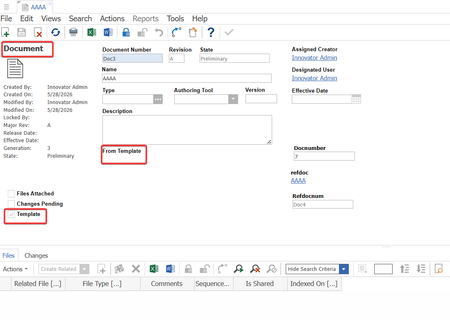
How is the Template field in the consultation Document used? How does the suggested business process for using the Template Document unfold? As a comparison, in Windchill, the administrator first creates a document template. When users create a document, they select the document template, and the system instantiates the template data onto the document.75Views0likes1CommentR37 docs: any bulk-access, single-page, or PDF option?
Hi all, Coming from R35 where PDFs were offered alongside the Online Docs, we noticed R37 dropped the PDFs and split each guide into many short pages reached only through the left-side tree. A few questions: - Is there a downloadable bundle (zip, EPUB, consolidated PDF) for R37 that we missed? - A "full guide on one page" / print-friendly view we can link our team to? - A sitemap or index endpoint for the documentation portal? Onboarding new admins and cross-referencing topics has gotten harder when each section is split across dozens of one-minute pages. Any pointer to a denser format would help a lot. Thanks!Solved216Views1like5Comments
"Change" property for Tracking Changes and Comments with Office Connector
In the "Aras Office Connector 31 - User Guide" documentation, section "9.7 Tracking Changes and Comments" mentions: "Aras Office Connector can control whether your documents contain change or comment tracking. This feature, if enabled by your administrator, works automatically and allows you to briefly see the status of changes and comments." I understand that if another user reviews the document and adds a comment or modifies the content, this should be reflected in the Changes property of the document. However, I have not found any additional information in the Aras guides about how to activate this functionality. Could someone clarify what settings or permissions need to be enabled by the admin so that the Changes property of the Documents item type correctly reflects the changes and comments made by other users? Thank you in advance for any further details or shared experience!83Views0likes1Comment
Can a Workflow Map be triggered from an OOTB Action in Aras Innovator 35?
Hello everyone, I'm David Sierra, PLM consultant and developer at T-Systems Iberia, with a background primarily in Teamcenter. I'm currently working on an Aras Innovator 35 implementation for a client, and I have a question I’d like to ask the community: - Is it possible to launch a Workflow Map directly from an OOTB Action? - Or is it necessary to configure something beyond what's provided out-of-the-box, such as a custom method or additional logic? I’d really appreciate any insights or experiences you can share. Thanks in advance for your support. — David Sierra PLM Consultant – T-Systems Iberia122Views0likes1Comment
Javascript method to set the default value in search grid?
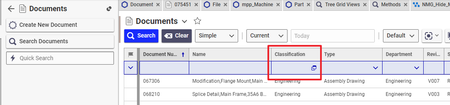
We need to limit the search results of "Document" item for certain identity. The default value of "Classification" should be prefilled to "General" and should be unchangeable by the user. I was thinking if I can get the current identity of the user and then call a function that would prefill the "Classification" to "General" and make it uneditable. I have a code for finding the identity of the user. I need to know how to target the "Classification" field of "Document" item type in the search grid view thanks!138Views0likes2CommentsModifying a Reverse View
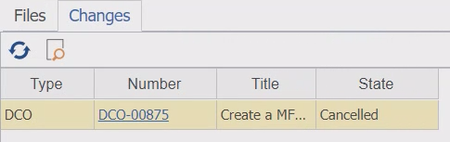
Hi all, On a document container, we have a tab with the view of all the DCOs that affect it: Because this isn't the standard view, the fields/properties that are/aren't shown here do not correlate to their visibility on the DCO item type. My question is, how do you add or remove fields/properties to this view? Please let me know if you need more information. We are using Aras Innovator Version 11 SP9.118Views0likes4CommentsDocument Revision List of Changed Document Files
Hi all, Is it possible, for a document, to provide a view of a list of document revisions where each revision on the list only describes changes to the attached document file(s)? On Version 11 SP 9, there is a "Revisions" selection under "Views" menu, but this shows all revisions including that of document container changes (changes to the title, description, etc). Looking for a list of changes to the attached file(s) only. According to someone that I used to work with, whom I can no longer contact, this feature used to exist in a legacy version of Innovator where there was an additional menu item "File Revisions" under "Views" menu. Thanks!101Views0likes1Comment