Comments after return in Client Method leads to 'event handler' error
Hi community, I discovered a strange behavior in Innovator 12. Let´s assume we have a regular Form with a button that uses the following onClick event: alert("This is just a test button event"); return; // Todo for later: add additional validation This Method will lead to the following error Message: 'Event handler' failed with the message: ReferenceError: func $ BD472BC271CA48E88DE6CB0C7E3CED75 $ _onclick2 is not defined I noticed that the Method works fine, as soon as I remove the comment behind the return. Of course in normal code we most of the time do not have any additional comments after the final return. But when creating new Methods, I often place later used code at the bottom so I can take care for it later. Comments after the return statement were never any problem in Innovator 11. It took me quite a few days until I finally discovered why certain parts of my new code never worked. Is there an explanation for this new behavior? Are there any other new design rules to consider when programming in Innovator 12? Would be happy about any hints to avoid similar effects! Thanks! AngelaSolved13KViews0likes10Comments
How to call a client method from another client method?
Hello everybody. I have several client methods which are sharing some common code. I would like to put that code in a method, and call that method from the other methods, everything is client side. How can I do that?Solved6KViews0likes4Comments
Enable Spinner on field event method
Hello, I have a javascript method that is triggered on change of a field value. This method takes 20 - 30 seconds to run and I want to be able to display the Aras spinner but nothing seems to be working. I have attempted multiple solutions from other posts but none have solved the issue. I noticed in the core function below my value for spinnerEl is always null. If anyone could provide any help it would be appreciated. BrowserHelper.prototype.toggleSpinner = function (context, state, spinnerId) { spinnerId = spinnerId || 'dimmer_spinner'; var spinnerEl = (context.ownerDocument || context).getElementById(spinnerId); if (!spinnerEl) { return false; } spinnerEl.classList.toggle('aras-hide', !state); return true; };1.8KViews0likes1CommentTrigger Client Method on Relationship Replace
I have a client method defined to be triggered on an OnInsertRow event for the Part BOM relationship type. This method is not triggered when the user performs a Part BOM replace. The most likely reason for this is, when handling the replace Innovator is just doing an update of the Part BOM item. The Part BOM itemtype definition only allows OnBeforeNew, OnAfterNew, OnNew and OnShowItem client events. But these events are not triggered when doing a Part BOM replace. Is there any way to trigger a client method when doing a Part BOM replace?1.6KViews0likes2Comments
CMF Property Coloring
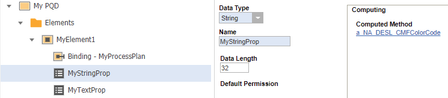
Hello, I'm working through the CMF guide, and attempting to implement the task in 4.1.9 (Set the text color for a given zone) for a real world use case. In my Innovator instance, I have a CMF Item Type called MyPQD, with two properties -- MyStringProp, and MyTextProp. (per an earlier example in the guide) I'm using the following code, but not having any luck getting the color to change. Any idea what I'm doing wrong here: var color = "#008000"; var innovator = aras.newIOMInnovator(); var myElement = innovator.newItem("MyPQD", "cmf_updateElement"); myElement.setProperty("Text", MyTextProp); // create cmf style object and set available styles var cmfStyle = innovator.newItem("cmf_Style"); cmfStyle.setProperty("text_color", color); myElement.setPropertyAttribute("MyStringProp", "style", cmfStyle.toString()); // you should set value of property directly, otherwise it will be updated to empty value // for this purpose we need to get existing element with property var existmyElement = innovator.newItem("MyPQD", "cmf_getElement"); existmyElement = existmyElement.apply(); myElement.setProperty("MyStringProp", existmyElement.getProperty("MyStringProp")); myElement.apply();1.6KViews0likes2Comments
How can I trigger the classification to update and change forms from a different property?
Hi Aras Community, I have a use case where my classification is technically controlling two things. What type of workflow they are on and what kind of form they see with the ability to switch the different kinds of forms. I'm trying to prevent mistakes from happening by providing 2 drop downs one that shows the workflow type and another that offers the form options. On selecting the form options, I need to update the classification and have the form change to the proper form. My current code updates the classification but does not execute whatever code causes the form to change on the classification update the way it does if you type it in or use the classification dialog box. Below is the code I'm starting with I don't know if there may be an API I can call that does this change or if there is a way to refresh the iframe that I'm not aware of. Any help is greatly appreciated. var inn = top.aras.newIOMInnovator(); var formtype = document.all("form_type").value; var worktype = document.all("workflow_purpose").value; var classification = ""; switch(worktype){ case "New Work": if(formtype = "form1"){ classification = "form1/Create New"; }else{ classification = formtype+"/"+worktype; } break; case "Other Work": if(formtype = "form2"){ classification = "form2/Other Work"; }else{ classification = formtype+"/"+worktype; } break; } window.handleItemChange("classification",classification); window.handleItemChange("form_type", formtype); return this;Solved400Views0likes2Comments
Logging & Progressbars Inside Innovator
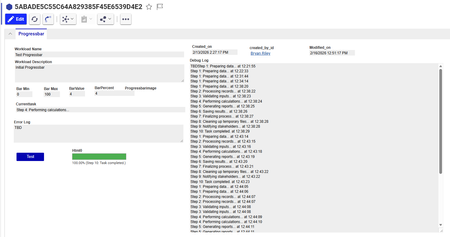
In Aras, we have a lot of different automations running at any given time, and there is no clean way (I know of) to see them all in one place. Further, I don't have access to the server, so I can't access the log files you might typically see so I'm looking for a way to write those directly into Aras. So I set out to address these issues, by creating an ItemType called Progressbar with fields for tracking progress and on the form I created a html object and a button to trigger a 'ProgressBarClient' Method, which repeatedly calls a 'ProgressBarServer' Method multiple times. This gets me an interface to see the status of the processing... So before I spend too much time on this, I thought I'd see if the community has any ideas on better ways to approach this or ideas for improvement. Some thoughts: Using the button on the item probably wasn't the best move, it stops processing if you close the item. It also gave me a lot of headaches getting the typing right I should probably set it up so the C# method doesn't require a return to update the progress I was hoping for a live progressbar in the search grid... but using the html on the form isn't going to work because its not a property // Javascript Client Method: ProgressBarClient console.group("---Action Trigger---"); // ProgressBar ItemType Values // barmin - int - minimum value of progressbar // barmax - int - maximum value of progressbar // barvalue - int - current value of progressbar // barpercent - decimal - % complete, barvalue / barmax // currenttask - string - text description of current action // debuglog - Text - log of all activity // errorlog - Text - log of error messages console.log("Name: ProgressBar Prototype"); console.log("Description: This will call a server side method and update a progressbar"); console.log(""); console.log("Setting up progressbar..."); // --- Instantiate Innovator object at the beginning --- var inn; try { inn = new Innovator(); console.log("Innovator object instantiated successfully."); } catch (e) { console.error("CRITICAL ERROR: Failed to instantiate Innovator. The global 'Innovator' might not be a constructor or is not available. Error: " + e.message); alert("An internal error occurred. Please contact support. (Innovator instantiation failed)"); console.groupEnd(); return; } // Basic check to ensure 'inn' is a valid object after instantiation if (!inn || typeof inn.getItemById !== 'function') { console.error("CRITICAL ERROR: The 'inn' object does not have the expected Aras API methods (e.g., getItemById) even after instantiation."); alert("An internal error occurred. Please contact support. (Invalid Innovator object)"); console.groupEnd(); return; } console.log("Innovator object retrieved and validated."); // Get the current Aras Item object (assuming parent.item is available and is an XML DOM node) var currentArasItemXml = parent.item; if (!currentArasItemXml) { console.error("CRITICAL ERROR: Aras Item XML object (parent.item) could not be retrieved."); alert("An internal error occurred. Please contact support. (Aras Item XML not found)"); console.groupEnd(); return; } console.log("Current Aras Item XML object retrieved."); var itemId = currentArasItemXml.getAttribute('id'); console.log("item ID:" + itemId); var itemTypeName = currentArasItemXml.getAttribute('type'); console.log("item Type:" + itemTypeName); if (!itemId || !itemTypeName) { console.error("CRITICAL ERROR: Item ID or ItemType name not found from parent.item."); alert("An internal error occurred. Please contact support. (Item ID/Type missing)"); console.groupEnd(); return; } var currentArasItem = inn.getItemById(itemTypeName, itemId); if (currentArasItem.isError()) { console.error("CRITICAL ERROR: Failed to fetch full Aras Item object: " + currentArasItem.getErrorString()); alert("An internal error occurred. Please contact support. (Failed to fetch item)"); console.groupEnd(); return; } console.log("Full Aras Item object fetched."); // Find the form field control for our property var propName = "html0"; // This is correct based on your HTML inspection var fieldContainerEl; // This will be the <div> with name="html0" var targetHtmlEl; // This will be the inner <div class="sys_f_value"> // --- MODIFIED: Robust way to find the field element without aras.uiFindField --- console.log("Attempting to find field for property: " + propName + " directly in the DOM..."); // Try to find the element in the current document (most likely the iframe document) fieldContainerEl = document.getElementsByName(propName)[0]; // If not found, try to find it in the top document (less likely for form fields, but a fallback) if (!fieldContainerEl) { try { fieldContainerEl = top.document.getElementsByName(propName)[0]; } catch (e) { console.warn("Could not access top.document directly to find field. Error: " + e.message); } } if (!fieldContainerEl) { console.error("CRITICAL ERROR: Progress bar field '" + propName + "' not found on form. Please ensure the field's HTML 'name' attribute is '" + propName + "' and the form is loaded."); alert("Progress bar field '" + propName + "' not found on form. Please ensure the field's HTML 'name' attribute is '" + propName + "' and the form is loaded."); console.groupEnd(); return; } console.log("Progress bar field container element found. Name attribute used: " + fieldContainerEl.name); // Find the inner div with class "sys_f_value" to inject the HTML targetHtmlEl = fieldContainerEl.querySelector('.sys_f_value'); if (!targetHtmlEl) { console.error("CRITICAL ERROR: Could not find the inner '.sys_f_value' div within the '" + propName + "' field container."); alert("An internal error occurred. Please contact support. (Target HTML element for injection not found)"); console.groupEnd(); return; } console.log("Target HTML element for injection found."); // --- END MODIFIED SECTION --- // Create basic progress bar HTML function renderBar(percent, currentTask) { percent = Math.max(0, Math.min(100, percent)); return '' + '<div style="border:1px solid #999;width:100%;height:18px;background:#f5f5f5;">' + ' <div style="height:100%;width:' + percent + '%;background:#4caf50;transition:width 0.2s;"></div>' + '</div>' + '<div style="font-size:10px;margin-top:2px;">' + percent.toFixed(2) + '% ' + (currentTask ? '(' + currentTask + ')' : '') + '</div>'; } // Helper to set the field value + UI function setProgress(barvalue, barmax, currenttask) { var percent = (barmax > 0) ? (barvalue / barmax) * 100 : 0; var renderedHtml = renderBar(percent, currenttask); // Update rendered field in current UI targetHtmlEl.innerHTML = renderedHtml; } // Initialize at 0% setProgress(0, 100, "Initializing..."); console.log("Progress bar initialized to 0%."); // --- START: Replaced simulated work with Server Method call --- // Variables to maintain state across server calls var progressItemId = null; // Stores the ID of the Progressbar item created/updated by the server var currentStep = 0; // Stores the current step to send to the server // Function to call the server method and update progress function callServerMethodForProgress(initialCall) { console.log("Calling the server-side method 'ProgressBarServer'..."); var serverMethod = inn.newItem("Method", "ProgressBarServer"); serverMethod.setProperty("itemId", itemId); // Pass the ID of the item that triggered this client method serverMethod.setProperty("itemTypeName", itemTypeName); // Pass the ItemType name serverMethod.setProperty("initialCall", initialCall ? "true" : "false"); serverMethod.setProperty("progressItemId", progressItemId || ""); // Pass the ID of the Progressbar item serverMethod.setProperty("currentStep", currentStep.toString()); // Pass the current step var result = serverMethod.apply(); if (result.isError()) { var errorMsg = result.getErrorString(); console.error("Server method 'ProgressBarServer' error: " + errorMsg); alert("Server method error: " + errorMsg); setProgress(0, 100, "Error: " + errorMsg); // Show error in progress bar console.groupEnd(); return; // Stop progress } // Parse the response from the server method var progressItem = result.getItemByIndex(0); if (!progressItem || progressItem.isError()) { console.error("Server method 'ProgressBarServer' returned an invalid or empty item."); alert("Server method returned invalid data."); setProgress(0, 100, "Error: Invalid server response"); console.groupEnd(); return; } // Extract properties from the server's response progressItemId = progressItem.getProperty("id", progressItemId); // Update progressItemId if it's the first call var barmin = parseInt(progressItem.getProperty("barmin", "0")); var barmax = parseInt(progressItem.getProperty("barmax", "100")); var barvalue = parseInt(progressItem.getProperty("barvalue", "0")); var barpercent = parseFloat(progressItem.getProperty("barpercent", "0")); var currenttask = progressItem.getProperty("currenttask", "Processing..."); var debuglog = progressItem.getProperty("debuglog", ""); var errorlog = progressItem.getProperty("errorlog", ""); var isComplete = progressItem.getProperty("is_complete", "false") === "true"; currentStep = parseInt(progressItem.getProperty("next_step", (currentStep + 1).toString())); // Get next step from server console.log("Server response - Value: " + barvalue + ", Max: " + barmax + ", Task: " + currenttask + ", Complete: " + isComplete + ", Progress Item ID: " + progressItemId); if (debuglog) console.log("Server Debug Log:\n" + debuglog); if (errorlog) console.error("Server Error Log:\n" + errorlog); // Update the client-side progress bar setProgress(barvalue, barmax, currenttask); // Persist the progress to the Progressbar ItemType (if it's the item being edited) // This assumes the form you are on *is* the Progressbar ItemType form. // If this client method is on a *different* ItemType's form, you would need to // load the Progressbar item by its ID and update its properties. if (itemTypeName === "Progressbar" && itemId === progressItemId) { currentArasItem.setProperty("barmin", barmin.toString()); currentArasItem.setProperty("barmax", barmax.toString()); currentArasItem.setProperty("barvalue", barvalue.toString()); currentArasItem.setProperty("barpercent", barpercent.toFixed(2)); currentArasItem.setProperty("currenttask", currenttask); currentArasItem.setProperty("debuglog", debuglog); currentArasItem.setProperty("errorlog", errorlog); // Note: This only updates the client-side item object. // To save to the database, the user would need to click 'Save' on the form, // or you would need to explicitly call currentArasItem.apply("update") here, // which might be too frequent and cause performance issues. // The server method already saves the Progressbar item. } else { // If the client method is on a different ItemType, we need to explicitly update the Progressbar item // This is an example of how to update the Progressbar item from a different context var updateProgressItem = inn.newItem("Progressbar", "edit"); updateProgressItem.setID(progressItemId); updateProgressItem.setProperty("barmin", barmin.toString()); updateProgressItem.setProperty("barmax", barmax.toString()); updateProgressItem.setProperty("barvalue", barvalue.toString()); updateProgressItem.setProperty("barpercent", barpercent.toFixed(2)); updateProgressItem.setProperty("currenttask", currenttask); updateProgressItem.setProperty("debuglog", debuglog); updateProgressItem.setProperty("errorlog", errorlog); // updateProgressItem.apply("update"); // Uncomment if you want to save from client, but server already does this. } if (!isComplete) { // If not complete, call the server method again after a short delay setTimeout(function () { callServerMethodForProgress(false); }, 500); // Adjust delay as needed } else { inn.showStatusMessage("Processing completed.", "info"); console.log("Processing completed."); console.groupEnd(); } } // Start the process by making the initial call to the server method callServerMethodForProgress(true); // --- END: Replaced simulated work --- console.log("Notify user of completion (handled by showStatusMessage)"); // C# Server Method: ProgressBarServer Innovator innovator = this.getInnovator(); // Get parameters from the client string progressItemId = this.getProperty("itemId"); string currentStepStr = this.getProperty("currentStep", "0"); int currentStep = int.Parse(currentStepStr); Item progressBarItem; int barmin = 0; int barmax = 10; // Define total steps for the simulated task // --- Step 1: Load the existing Progressbar Item --- if (string.IsNullOrEmpty(progressItemId)) { return innovator.newError("Error: 'progressItemId' is required but was not provided. The Progressbar item must exist."); } // Load the item first to get its current state progressBarItem = innovator.newItem("Progressbar", "get"); progressBarItem.setID(progressItemId); progressBarItem = progressBarItem.apply(); if (progressBarItem.isError()) { return innovator.newError("Failed to load Progressbar item (ID: " + progressItemId + "): " + progressBarItem.getErrorString()); } // Ensure barmax is consistent if it was set on creation barmax = int.Parse(progressBarItem.getProperty("barmax", barmax.ToString())); // --- Step 2: Attempt to lock the item for update --- // Use the loaded item to attempt the lock. // This is important: applying 'lock' on the loaded item ensures we're working with the same item instance. Item lockResult = progressBarItem.apply("lock"); if (lockResult.isError()) { string errorString = lockResult.getErrorString(); // Check for the specific Aras error message indicating it's already locked by *this* user. // The exact message for "already locked by current user" can vary slightly. // We'll use a broader check for "locked" and then check the user. if (errorString.Contains("Item is already locked") || errorString.Contains("Aras.Server.Core.ItemIsAlreadyLockedException")) { // Now, check *who* locked it. // Get the locked_by property from the item (if it exists and is populated) string lockedById = progressBarItem.getProperty("locked_by_id", ""); string currentUserId = innovator.getUserID(); if (lockedById == currentUserId) { // Item is already locked by the current user. This is expected in polling. // Proceed with the update. No error needed. System.Diagnostics.Trace.WriteLine("DEBUG: Progressbar item (ID: " + progressItemId + ") already locked by current user. Proceeding."); } else if (!string.IsNullOrEmpty(lockedById)) { // Item is locked by another user. This is a genuine conflict. Item lockedByUser = innovator.getItemById("User", lockedById); string lockedByUserName = lockedByUser.getProperty("keyed_name", "Unknown User"); return innovator.newError("Failed to lock Progressbar item (ID: " + progressItemId + "): Item is already locked by another user: " + lockedByUserName + "."); } else { // Item is locked, but locked_by_id is not set or couldn't be determined. // This might indicate a stale lock or an unexpected state. return innovator.newError("Failed to lock Progressbar item (ID: " + progressItemId + "): Item is already locked, but the locker could not be identified. Error: " + errorString); } } else { // Some other locking error occurred. return innovator.newError("Failed to lock Progressbar item (ID: " + progressItemId + "): " + errorString); } } // If lockResult is not an error, or if it was already locked by current user, // the progressBarItem is now locked by this session and ready for update. // --- Step 3: Simulate work and update progress --- string currentTaskDescription = ""; bool isComplete = false; // Simulate different steps switch (currentStep) { case 0: currentTaskDescription = "Step 1: Preparing data..."; System.Threading.Thread.Sleep(500); // Simulate work break; case 1: currentTaskDescription = "Step 2: Processing records..."; System.Threading.Thread.Sleep(700); // Simulate work break; case 2: currentTaskDescription = "Step 3: Validating inputs..."; System.Threading.Thread.Sleep(400); // Simulate work break; case 3: currentTaskDescription = "Step 4: Performing calculations..."; System.Threading.Thread.Sleep(800); // Simulate work break; case 4: currentTaskDescription = "Step 5: Generating reports..."; System.Threading.Thread.Sleep(600); // Simulate work break; case 5: currentTaskDescription = "Step 6: Saving results..."; System.Threading.Thread.Sleep(500); // Simulate work break; case 6: currentTaskDescription = "Step 7: Finalizing process..."; System.Threading.Thread.Sleep(300); // Simulate work break; case 7: currentTaskDescription = "Step 8: Cleaning up temporary files..."; System.Threading.Thread.Sleep(200); // Simulate work break; case 8: currentTaskDescription = "Step 9: Notifying stakeholders..."; System.Threading.Thread.Sleep(100); // Simulate work break; case 9: currentTaskDescription = "Step 10: Task completed."; isComplete = true; break; default: currentTaskDescription = "Unknown step or task completed."; isComplete = true; break; } // Update properties on the progressBarItem object int barvalue = currentStep + 1; // Increment value for the next step if (isComplete) barvalue = barmax; // Ensure it reaches max when complete double barpercent = (double)barvalue / barmax * 100; progressBarItem.setProperty("barvalue", barvalue.ToString()); progressBarItem.setProperty("barpercent", barpercent.ToString("F2")); // Format to 2 decimal places progressBarItem.setProperty("currenttask", currentTaskDescription); progressBarItem.setProperty("debuglog", progressBarItem.getProperty("debuglog", "") + currentTaskDescription + " at " + DateTime.Now.ToString("HH:mm:ss") + "\n"); // --- Step 4: Persist the updated Progressbar item --- // At this point, progressBarItem *must* be locked by this session. Item updateResult = progressBarItem.apply("update"); if (updateResult.isError()) { // If update fails here, it's a critical error. // This could still be a locking issue if the lock was somehow lost or not acquired correctly. return innovator.newError("Failed to update Progressbar item (ID: " + progressItemId + "): " + updateResult.getErrorString()); } // --- Step 5: Prepare the response for the client --- Item resultItem = innovator.newItem("Progressbar", "get"); // Return the updated Progressbar item resultItem.setProperty("id", progressItemId); // Ensure the ID is returned resultItem.setProperty("barmin", progressBarItem.getProperty("barmin")); resultItem.setProperty("barmax", progressBarItem.getProperty("barmax")); resultItem.setProperty("barvalue", progressBarItem.getProperty("barvalue")); resultItem.setProperty("barpercent", progressBarItem.getProperty("barpercent")); resultItem.setProperty("currenttask", progressBarItem.getProperty("currenttask")); resultItem.setProperty("debuglog", progressBarItem.getProperty("debuglog")); resultItem.setProperty("errorlog", progressBarItem.getProperty("errorlog")); resultItem.setProperty("is_complete", isComplete ? "true" : "false"); resultItem.setProperty("next_step", (currentStep + 1).ToString()); // Tell client the next step to send // --- Step 6: Unlock the item if the task is complete --- Item unlockResult = progressBarItem.apply("unlock"); // Unlock the item that was locked if (unlockResult.isError()) { // Log the unlock error, but don't fail the entire method as the task is complete. System.Diagnostics.Trace.WriteLine("ERROR: Failed to unlock Progressbar item (ID: " + progressItemId + "): " + unlockResult.getErrorString()); } return resultItem;300Views0likes4CommentsPrefill simple search criteria in the search grid
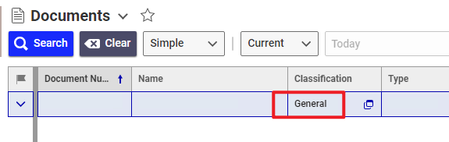
Hello, For Documents item type, in the search grid I need the "Classification" to be prefilled to "General" . I applied client side method to "classification" and "search_default" properties of Documents but it doesn't work. "search_default" property did not exist before so I just added it, I don't know if that makes a difference. method: return {classification:{filterValue:"General",isFilterFixed:false}};Solved199Views0likes8Comments
How to use Visual Studio Code 2022 for Coding Methods
I am new to Aras development, and I'd like to use Visual Studio Code 2022 ("VS Code") for coding Innovator methods. I found the ArasVSMethodPlugin project on GitHub, and its change log indicates that support for VS Code 2022 was added in version 1.21. However, when I attempt to load the plugin using the .vsix file from the Aras Innovator Method Plugin on Open VSIX (which was updated 3 months ago), I get a message telling me that Code can't find a package.json file that its expecting. Details about the package.json file for a VS Code extension can be found on this Publishing Extensions page. I was wondering if anyone else was using VS Code 2022 for coding methods and if they might have any additional information about how to get it working. Thanks in advance for any/all assistance.113Views1like1Comment
Trouble Exporting HTML Table to Excel in Aras Innovator Custom Button
Hello everyone, I've been working on a custom button within the search tab for parts in Aras Innovator. The goal is to export a list of specific parts and their properties through a query and display them in an HTML table. Here's a snippet of the code I'm using to convert the HTML table to Excel and download the Excel file: [embed:dc8ab71f-3b98-42d9-b0f6-e21e02a0f8e2:4ac1465e-c931-489c-a19e-bb242bc1c5f6:type=javascript&text=var%20htmlCode%20%3D%60%0A%3Chtml%3E%0A%3Chead%3E%0A%3Cmeta%20http-equiv%3D%27Content-Type%27%20content%3D%27text%2Fhtml%3B%20charset%3Dutf-8%27%20%2F%3E%0A%3Cscript%20src%3D%27https%3A%2F%2Fcdnjs.cloudflare.com%2Fajax%2Flibs%2Fxlsx%2F0.16.9%2Fxlsx.full.min.js%27%3E%3C%2Fscript%3E%0A%3Cscript%20src%3D%27https%3A%2F%2Fcdnjs.cloudflare.com%2Fajax%2Flibs%2FFileSaver.js%2F2.0.5%2FFileSaver.min.js%27%3E%3C%2Fscript%3E%0A%3Cscript%3E%0Afunction%20substituteTableToExcel%28%29%7B%0Avar%20table%20%3D%20document.getElementById%28%27all_Parts_AML%27%29%3B%0Avar%20sheet_name%20%3D%20%27ALL_Parts_AML%27%3B%0Avar%20workbook%20%3D%20XLSX.utils.table_to_book%28table%2C%20%7Bsheet%3A%20sheet_name%2C%20cellStyles%3A%20true%7D%29%3B%0Avar%20wbout%20%3D%20XLSX.write%28workbook%2C%20%7B%20bookType%3A%20%27xlsx%27%2C%20bookSST%3A%20true%2C%20type%3A%20%27array%27%2C%20cellStyles%3A%20true%20%7D%29%3B%0AsaveAs%28new%20Blob%28%5Bwbout%5D%2C%20%7B%20type%3A%20%27application%2Foctet-stream%27%20%7D%29%2C%20%27ALL_Parts_AML.xlsx%27%29%3B%0A%7D%0Adocument.addEventListener%28%27DOMContentLoaded%27%2C%20function%28%29%20%7B%0AsubstituteTableToExcel%28%29%3B%0A%7D%29%3B%0A%3C%2Fscript%3E%0A%3Clink%20rel%3D%27stylesheet%27%20type%3D%27text%2Fcss%27%20href%3D%27styles.css%27%3E%0A%3C%2Fhead%3E%0A%3Cbody%3E%0A%24%7BexcelTable%7D%0A%3C%2Fbody%3E%0A%3C%2Fhtml%3E%60%3B] return htmlCode; I'm encountering issues with the export functionality. When I click the custom button, the HTML table is generated correctly, but the Excel file download doesn't seem to work. Could someone kindly review the code snippet above and provide any insights or suggestions on how to troubleshoot and resolve this issue? I would greatly appreciate it. Thank you in advance! Version 12.0 SP8Solved101Views0likes2Comments