Failed to Fetch error
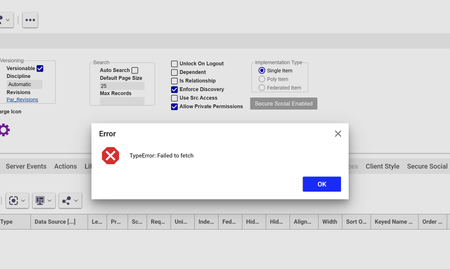
Hi all, I have been getting a 'failed to fetch' message over the past month when opening and searching across Aras. I get the message and the content usually won't load, but sometimes does. It's very intermittent (few times per week), and I've tried local troubleshooting but am not having any luck getting it to go away permanently. Has anyone seen this? I'm on version 22 (SaaS).248Views1like2CommentsReport Manager shows blank page on Aras Innovator 14.35 CE – Hotfix and Reporting 29 guidance needed
Hello Community, I am evaluating Aras Innovator 14.35 Community Edition and am currently facing an issue with Report Manager, where the result page is displayed as a blank screen. Before asking, I would like to clarify that I believe I understand the separation of concerns, and I am seeking confirmation on the correct and minimal path forward. Environment Aras Innovator: 14.35 Community Edition Build: 14.35.0.44037 MS Build Number: 000000.00 Browser: Chrome / Edge (same behavior) OS: Windows Server (IIS) Observed issue When executing a report (Type: General) from Report Manager, the result page is blank. From the browser network trace, I can see that blank.html is requested with an incorrect URL where an X-salt token is injected into the path, for example: .../InnovatorServer/Client/X-salt=std_14.35.0.44037-X/scripts/blank.html Instead of: .../InnovatorServer/Client/scripts/blank.html The AML itself executes successfully (InnovatorServer.aspx returns 200), so the issue seems to be on the client / UI side. What I understand so far Please correct me if anything below is wrong. 1. Hotfix / Patch Hotfixes apply to the Innovator core (Server / Client). MS Build Number = 000000.00 indicates that this environment is likely running a base build without Hotfixes applied. Therefore, this blank page issue may already be a known issue fixed by a Hotfix. 2. Reporting Aras Reporting is a separate product and installer. Reporting 29 requires a dedicated license (Aras.Reporting) and installation. Reporting 28 is not required if installing Reporting 29 as a new installation. My questions To proceed efficiently without rebuilding the environment, I would appreciate guidance on the following: 1. Is it correct that applying the appropriate Hotfix for Innovator 14.35 is a prerequisite, and that Reporting alone would not resolve the blank page issue? 2. Is the blank page / X-salt URL issue a known problem in the base 14.35 build that is addressed by a specific Hotfix? 3. For a Community Edition evaluation environment, is it realistic to: obtain the required Hotfix, and obtain the Aras Reporting 29 CD Image as part of the same guidance / recommendation? 4. If Reporting 29 is installed after the Hotfix, should Report Manager work as expected without additional undocumented steps? Goal / Constraints The goal is to evaluate Report Manager functionality. I would like to avoid rebuilding the existing test environment if possible. I am looking for the shortest correct path, even if it involves multiple steps, as long as the sequence is clear. Any advice, confirmation, or references would be greatly appreciated. Thank you in advance.191Views0likes2Comments
MAC Policy Issue in ARAS 31 – Need Help with Access Restrictions
Hi all, I’m working on implementing access restrictions for the a Itemtype in ARAS 31. There are around 46 records, and I want to group them into 5 categories. Each category will be assigned to specific identities, allowing controlled access based on the record's classification. To achieve this, I started configuring MAC policies. However, I’ve run into a few issues: The fields I need are disabled in the MAC Policy Condition Editor. User-defined properties are not accessible in the condition editor either. Has anyone faced similar challenges or found a workaround for this? Any help or guidance would be greatly appreciated! Thanks, Salini193Views0likes2Comments
Revisions/Item Versions appearing blank
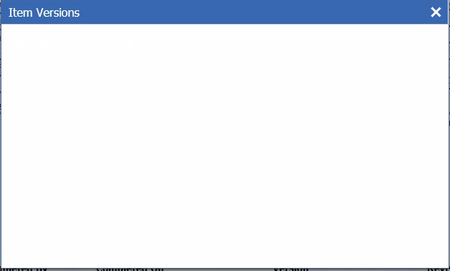
Hi all, Created a new ItemType. Initially, when viewing an instance, Views > Revisions displays the Item Versions. However, after creating a few items, it then appears blank, as illustrated here: I haven't changed anything (as far as I know), it just stops rendering after some time. Any input would be greatly appreciated. Aras Version 11 SP9. Thanks very much.101Views0likes5CommentsBug Report - CAD Document Comparison Rotation
Hi there, I've encountered a bug in Aras version 23. This was previously reported by my organization in version 12SP9 and was confirmed fixed, but appears to have been re-introduced. In brief: Create a CAD Document - ensuring versioning is enabled Add a viewable PDF - save Edit the CAD Document - change the viewable PDF - save Go into the PDF view and user the comparison function Both images get rotated 90 degrees clockwise and the bottom of the PDF gets chopped off. Has this been re-addressed in a later version of Aras? Thank you, Phil MacIntyre SSI61Views0likes2Comments
Warning: Versioning and tab pane very buggy in new Innovator versions!!! Are you affected?
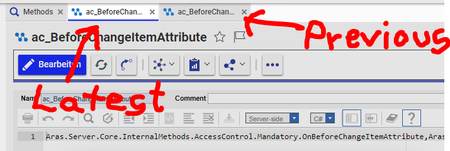
Hi community, I need your help to investigate an error that occurs in newer Innovator versions. In my case it occurred in Innovator 12SP17 and 12SP18 but NOT in Innovator 12SP7 / 9 / 10. I look for a bug fix for this one, cause unfortunately Aras rate this one as unimportant glitch and not as high risk behavior. From my POV the bug is a huge source for trouble (data loss!!), so I just can warn people to update to SP17 and SP18 without this bug fixed. I want to investigate, which service pack version is NOT affected by this bug. I am not able to test out all available service pack, so I would be happy if community could help: If you are a user of Innovator 12 SP11 / 12 / 14 / 15 / 16 / 17 I would be happy if you could test out at least the Error 1 scenario!! (2 minutes required!) Scope In 12SP17 and 12SP18 the tab pane can crash to easily when using item versions (like in Parts, Documents and Methods). In addition, old item revision can overwrite the latest item without the user noticing it! Both errors can occur easily, as soon users display previous revisions of an item. Comparing old and new revisions is a typical work during a Change Management process, so it´s an error that affects daily work of PLM users. Test Setup If possible perform this test in a test database. No data is edited during the test when you closely follow the instructions. But I don´t want to bring you in trouble in case of error! 1. Go to TOC -> Administration -> Open ItemType "Method" search grid 2. Search for Method with with "Ver 2" or higher, to ensure the Method has more than one revision. (If you need extra safety, create a temporary custom Method for this test that you can delete after test finished) 3. Open this Method (it doesn´t matter which one) 4. Open the 'Versions' dialog 5. Select a previous version (e.g Ver 1) of this Method 6. A Form with the previous version of your Method shall open. 7. Do not touch the new window with the previous version 8. Simply switch back to the tab with the newest version of the Method and close the "Versions" dialog We now have both versions in parallel in the tab pane. This is our basic setup. So far everything is fine. Reproduce Error 1 (Tab pane crash) 1. Start from setup above. We are in the tab with the latest revision 2. Click "Edit" (but do nothing else)! 3. Now just switch back to the tab with the previous revision of the Method and simply close this window 4. After closing the previous revision, we will automatically jump back to our latest revision tab 5. Click "Discard" as we never wanted to edit anything 6. Now the error should happen: In case of error a second tab reappears. We now have the two tabs for the item. They do not work and you cannot close them. Tab pane is crashed. Everything will be fine again after restarting Innovator in browser. If you don´t see this error, your Innovator version is not affected by this bug. You can skip all other tests. Please share which version you used! Reproduce Error 2 (glitch) 6. When you directly click "Search Method" in the TOC after above error occurred, a small additional glitch can appear 7. As our tab pane is crashed, the search grid will overlab with the Method Form. None of the tabs can be used reliable anymore Reproduce Error 3 (previous revision overwrites latest) Warning: Perform only in test database! Use a custom temporary Method for testing out this one, cause it can corrupt your data!!! 1. Start from setup above. We are in the tab with the latest revision. 2. First switch back to the tab with the previous revision. This time do not close the window, but simply take a look at the "Edit" button. It´s grayed out and you cannot use it. (This is correct behavior, as we never should be able to edit previous revisions) 3. Switch back to the latest revision and click "Edit" 4. Again switch back to the previous revision and take a look at the "Edit" button again. This time it´s not greyed out anymore!!! 5. It´s now theoretically possible to click the edit button inside the Form of the previous revision! 6. In case you click the 'Edit' button, you can create a high risk scenario: 7. After clicking the 'Edit' button, it´s seems to be possible to edit the previous revision. But what you see doesn´t represent the "truth" any more. a) The shown Method code still shows the content of the previous revision b) But the context item has switched to the latest revision. But this revision change is not visible to users as they still watch the previous code/properties. You can only see it in the 'Generation' value in the 'Properties' dialog. If you now save your "fake" previous item, the latest item will be overwritten with code and properties of the previous version. This is a high danger situation not only for Methods, but for all ItemTypes that use revision as it will lead to data loss and corrupted data. Conclusion I discovered the bug while merging a few upgrade patches and actually destroyed a few Methods cause of this bug. If I as admin fail to handle versioned items cause of this behavior, I expect that real users will face the same problem soon. I right would not recommend to use 12SP17/18 just because of this bug. Comparing and working with item versions is a daily task especially when using Change Management. But it´s important that users can trust the data they see. Right now working with revision in SP18 is very risky cause users can crash their tab (best case) or overwrite data without knowing (worst case). Please let me know if you are able to reproduce any of the above bugs in your Aras Innovator version! If you´re Innovator version doesn´t show the bugs, please also write a short post! When we can determine in which service pack the error appeared first, it´s maybe possible detect the bug more easily. Thanks for your help! Angela11KViews0likes15Comments
12sp05 packaging error on a simple item with ITPresentationConfiguration
Hi, I get a message I never saw while creating a package. I thougth it was due to a missing element but I reproduce it only by - 1 creating a simple object - add the TOC access (and permission/creation) - add it to a new package (1 form+ 1 item) - Then export it - and try to import it to a brand new db from the 12sp innovator backup db... I get that message : DELAYED RESOLUTION: applying AML <Item type='ItemType' id='D9D992E995EC41BB8B6B852510384D05' action='edit' doGetItem='0' version='0'><Relationships><Item type="ITPresentationConfiguration" id="9807CFE5BF3BD9466B77D6069BFA2DFF" action="add"><client>js</client><related_id keyed_name="tr_i001_project_TOC_Configuration" type="PresentationConfiguration">9807CFE5BF3BD94636326AA7318BB90D</related_id><sort_order>128</sort_order><source_id keyed_name="tr_i001_project" type="ItemType" name="tr_i001_project">D9D992E995EC41BB8B6B852510384D05</source_id></Item></Relationships></Item> In the exported package I have this lines I never saw before <Relationships> <Item type="ITPresentationConfiguration" id="7ACFCDADA1BD72956B77D6069BFA2DFF" action="add"> <client>js</client> <related_id keyed_name="tr_i001_projet_TOC_Configuration" type="PresentationConfiguration">7ACFCDADA1BD729536326AA7318BB90D</related_id> <sort_order>128</sort_order> <source_id keyed_name="tr_i001_project" type="ItemType" name="tr_i001_project">2E959A23C5D640B79FA45579D827BDEC</source_id> </Item> With 11spX I never get that issue. Thanks for your help, for the moment the support only tell me I might miss some element in the package... Since I reproduce the bug with only 1 items and the corresponding form I am a little bit confuse...5.2KViews0likes3Comments