Error 1720 during install
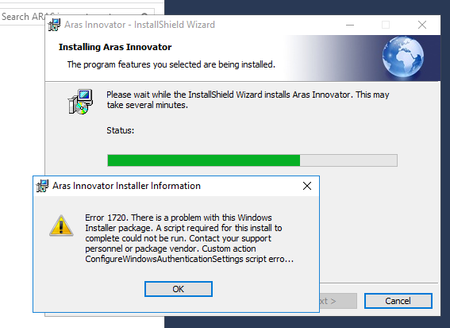


I've found some more details in the event viewer:
Product: Aras Innovator -- Error 1720. There is a problem with this Windows Installer package. A script required for this install to complete could not be run. Contact your support personnel or package vendor. Custom action ConfigureWindowsAuthenticationSettings script error -2146827864, Microsoft VBScript runtime error: Object required: 'WScript' Line 18, Column 3,

Same problem here. Did you sort it out?

Hi Duncan and Fabio,
I believe I have run into a similar issue. This is an issue with Windows installer, in my case I ended the installer task during installation and received a similar error. Have you tried re-registering the msi? You can try this by opening a command prompt as administrator and typing in the following command: msiexec /unregister, then press enter. Then to re-register type in the following command msiexec /regserver. After this try the installation again.
Hope this helps!
Nithin
Hi Nithin.
Sorry didn't fix my error. Ran the commands exactly as you have described then reran the installer and got the same error.

Hi Nithin,
I am facing the same problem and above answer did not help.
Hi Raghubudarp,
Unfortunately I am unable to recreate this issue, but I am unsure if this is related to a windows installer issue or something with the msi being corrupted. Are you able to install other programs? Have you tried re-downloading and running the same msi?
Best,
Nithin

