Solved
[Urgent]How to change the "State" in Preview property dialog
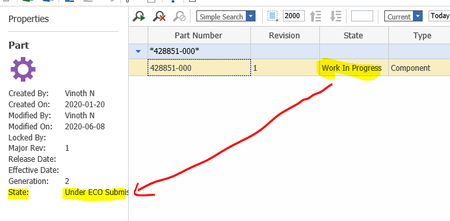

Thanks Gopi!! It worked after adding myself in Aras PLM role. I can able to promote the parts.

Hi Bala
State property should not be modified through SQL.
Follow below steps and let me know if it works
Update the previous value in SQL table for this part
Navigate to Administration --> Life Cycle --> Search and Open Part life cycle
Check for transition Work in Progress to Under ECO Submission (if not exist, you need to add this transition and give role (Super User)
Save and Unlock Part Life Cycle
Relogin to application as Super User
Navigate to the Part you want to change state
Right click and select promote and select the state you want to change
Thank You
Gopikrishnan R
Hi Gopi,
Thanks for the response.
I tried to promote the Part at "Under ECO submission state" that was already cancelled in a workflow process.
But i received the error as shown below,
No promotions available is shown.
I checked the part life cycle map and i can see the transition from "Under ECO Submission" state to "Work in Progress" state but the Role was "Aras PLM". I even changed that to super user and tried promoting but same error appeared.
And after cancelling the Workflow process still i can see the preview property window shows the first item in grid as Active only. rest all shows closed.
open the item and can see the state as closed. So confusing.
Note:- workflow process is cancelled using sql query only. Please is there any other ways to fix this?
Thanks,
Bala.
Update using SQL query will prevent all server events execution and it is not recommended.
Can you try adding your user account to ARAS PLM role and relogin to application and try promoting it
Thanks Gopi!! It worked after adding myself in Aras PLM role. I can able to promote the parts.
Glad to hear.. Stay safe [emoticon:c4563cd7d5574777a71c318021cbbcc8]



