Operations does not show up in the MPP ProcessPlan page. Thanks!



If you were to go into the mpp_processplanoperation relationship and make it visible, can you see the relationships in that tab on the process plan? I'm wondering if it's an issue when attempting to render the actual plan itself, or if the relationship isn't getting added for some reason.
Have you made any modifications to the standard MPP data model? How did you create the other process plans if you're unable to add operations?
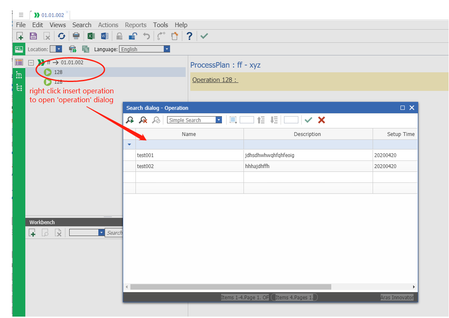
Hi AJ,I created the MPP_ProcessPlanOperation as relationship type of MPP_Operation which I added and modified for data model. Those mpp data I added before I made changes by using the standard version, Please see the screenshot, then I made change to open a search a dialog instead of manually inserting and find out the selected operation does not show up.
by the way, the mpp_processplanoperation has always been visible. Thanks.
Best,Jen
My recommendation was to unhide the mpp_operation relationship so you can view it in a relationship tab. You'll have to expose the relationsihps tab by unchecking the "select in all" button on the mpp_operation relationship.
Once you've done that, the MPP form should look like the following screenshot.
I wanted to see this view to see if the issue is saving the relationship, or if the render is unable to render the existing operations.
Hi AJ, I did review mpp_operation and the "Hide in All" is unchecked, and also the mpp_ProcessPlanOperation shows in the relationship Tab as you said . Please see the screenshot below.
The operations that selected from the search dialog has been save into the relationship tab,but are not showing in the next MPP page left/right side. So strange. Thanks very much for following up with me closely AJ! Hopefully we can make that work finally. Thanks again.
best,Jen



