I have in an itemtype a Foreign property and the referred property is a foreign property in another itemtype. In the form of the itemtype the data source results undefined. How can I resolve?
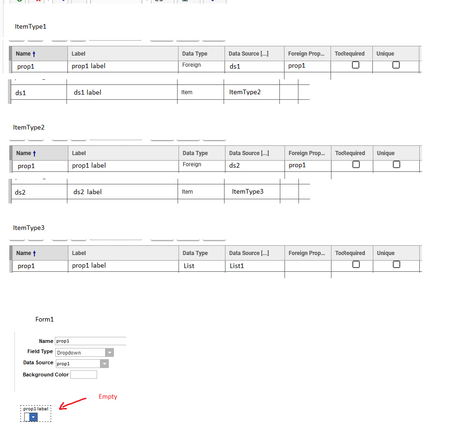


Is the property in Manufacturer a List Data Type?
If I use nash, I can retrieve the correct value of prop1, but in the form, it doesn't show the original List of ItemType "ItemType3" of the example

I changed it to a list property in Manufacturer and it worked too!
See here:
List property is linked from Manufacturer to Manufacturer Part to Part AML.
Do you use multilingual extension? Cause when you don´t have translation added sometimes Innovator doesn´t show the right value.
I don't use multilingual extension.
It is showed here
but not here
What is your version of Aras?
Ah I see! I can confirm that the dropdown is only shown in the grid, but not in the form.
And I think I know the reason. The datasource property used for the field links to the wrong ItemType. The detailed settings are unfortunately not visibly in the Form editor.
But "Field" contains a property "Propertytype_id" that links the field to the property. So in my case the property from "Part_AML" is linked, but not the one from "Manufacturer_Part".
I remember I once changed this one inside the SQL database to link the correct itemtype property. But I wouldn´t recommend the solution.
When you able to get the property data via AML, I would use an onLoad/onFormPopulate Method to fill the dropdown on form load.
It´s not hard to do and easier to maintain then manipulating the SQL database.
https://community.aras.com/f/development/3791/add-dropdown-values-programatticaly


