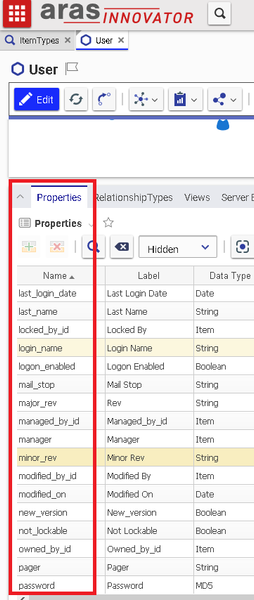
How do I find all of the property names associated with an object definition?


Hello,
I quickly generated some AML which does the following. I created and tested this using nash in a local instance. You'll need to modify your VB code to create the string, but the end result should look like this:
<AML>
<Item action="get" type="itemType" select="name">
<name>part</name>
<Relationships>
<Item type="property" action="get" select="value, label" />
</Relationships>
</Item>
</AML>
This AML will take the itemtype specified within the <name> tag and return some basic information about that ItemType, as well as all the value/label combinations for the related properties.
AJ

That didn't quite solve my problem, but it did get me working towards a solution which is partially successful. Now the issue is that I can get all property names, but not the labels... Newest working code below...
I guess part of the answer I was looking for was in the fact that the resultes are embedded into the XML nodes, not that I quite understand that structure yet....
Option Strict On
Option Explicit On
Option Infer Off
Imports Aras.IOM
Imports System.Text
Imports System.Xml
Public Class ArasInnovatorUsers
Public Connection As HttpServerConnection
Private Sub ArasInnovatorUsers_Load(sender As Object, e As EventArgs) Handles MyBase.Load
Dim sb1 As New StringBuilder
Dim dQ As String = Chr(34) ' Double Quotes
Dim inv As New Innovator(Connection)
Dim UserPropertyNames As New List(Of String)
sb1.AppendLine("<AML>")
sb1.AppendLine(" <Item action='get' type='User' select ='*'>")
sb1.AppendLine(" <Relationships>")
sb1.AppendLine(" <Item type='property' action='get' select='*'/>")
sb1.AppendLine(" </Relationships>")
sb1.AppendLine(" </Item>")
sb1.Append("</AML>")
Dim AML1 As String = sb1.ToString
Dim aml_1 As Item = inv.applyAML(AML1)
'Failed attempt to retrieve value, label
MsgBox(aml_1.getItemByIndex(0).getProperty("value"))
MsgBox(aml_1.getItemByIndex(0).getProperty("label"))
For i As Integer = 0 To aml_1.getItemByIndex(0).node.ChildNodes.Count - 1
'Gets all property names, but not the label...
UserPropertyNames.Add(aml_1.getItemByIndex(0).node.ChildNodes(i).Name)
Next
lstViewArasUsers.Items.Clear()
lstViewArasUsers.Columns.Clear()
For Each prop As String In UserPropertyNames
lstViewArasUsers.Columns.Add(prop)
Next
For i As Integer = 0 To aml_1.getItemCount - 1
Dim user As Item = aml_1.getItemByIndex(i)
Dim item As ListViewItem = Nothing
For i2 As Integer = 0 To UserPropertyNames.Count - 1
Dim prop As String = UserPropertyNames.Item(i2)
Dim propValue As String = user.getProperty(prop)
If i2 = 0 Then
item = New ListViewItem(propValue)
Else
item.SubItems.Add(propValue)
End If
Next
lstViewArasUsers.Items.Add(item)
Next
End Sub
End Class
Could you post an example of the XML which is returned? I recommend testing the AML through nash, and then that way you can know what you'll have to parse using your code.
Unfortunately due to security concerns, I cannot, but if you have a working example that simply iterates and displays the property names and values with a messagebox that would be tremendously helpful, I am looking to only access properties and labels of the default Aras Innovator User object....
If you look at the wrking code I posted above you will see what I am trying to do, which is mostly done, all I need to do is change the listview column header names to be that of the label instead of the property name



