Facing issue while logging into ARAS Innovator 12 - Ambiguous error protected
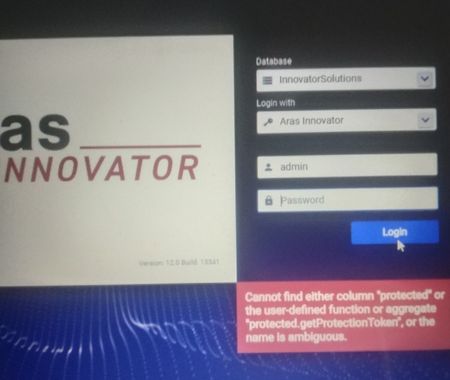


Hello,
Could you confirm that you have administrative privileges on this machine? The Aras Innovator installer should do all of the configuration for the innovator and innovator_regular users without you needing to manually change any settings. Very occasionally, if a user doesn't have administrative permissions, some of this configuration can not happen, but that's a rare circumstance.
Could you try restarting both IIS and SQL Server? This will help make sure you're not running into any caching issues.
Chris
Christopher Gillis
Aras Labs Software Engineer

Hi Christopher,
I have restarted IIS and SQL server, but it did not work.
Should I have to run Innovator setup.exe as Run as Administrator?
I just clicked on install.
I have deleted previously installed InnovatorSolutions Database in my SQL server when I was uninstalling ARAS Innovator. So with fresh install, installer created InnovatorSolutions Database. Is this something causing any issue?
Thanks
Hello,
You typically don't need to run the installer with the Run as Administrator option, but it wouldn't hurt to try in this case. I've seen some companies have stricter permissions on their employee's machines that can sometimes interfere with some of the configuration that the installer tries to do. That was my reasoning for checking that you had admin permissions on your machine.
I've run into issues in the past with restoring a database that has the same name as a database I previously deleted. As a quick test, could you try installing Innovator again but choose a different name for the database? This will confirm if the error you're seeing is indeed a caching issue.
Chris
Hi Christopher,
Tried to uninstall ARAS Innovator and reinstalled with new name to database InnovatorSolutions1.
I have admin access and it is my personal laptop.
But facing the same issue.
Is there any other way to fix this issue?
Thanks



